
Gmail is one the most widely used web mail service. Google has always been constantly updating its services to provide the best to its user. Gmail does offers you with some stunning feature which other web-mail might not provide but at the same time it does lack some essential features for example the ability to sort email by sender, date etc., Most of us use Gmail for both personally and official purpose. On many occasions official emails tend to have attachments that come along with it. At times we would like to search for emails by entering keywords inside the attached documents. But does Gmail support this feature?
Consider a Situation: You are urgently in search of an important document that came as an attachment in one of your email. But you neither remember the one who sent that email nor the subject or body of the email. All you remember is some sentences within the document. So how will you find the email?
Answer: Doing a search in Gmail will not give any results unless the attachment is a text (.txt) file. But sadly most of the time office related documents are in Microsoft Office format or in PDF format. The answer is to use Attachments.me, which lets you search within documents in Gmail attachments.
[Update- Oct 4, 2012]
Now Gmail officially supports this feature. Once your attachments are indexed you will able to search inside it.
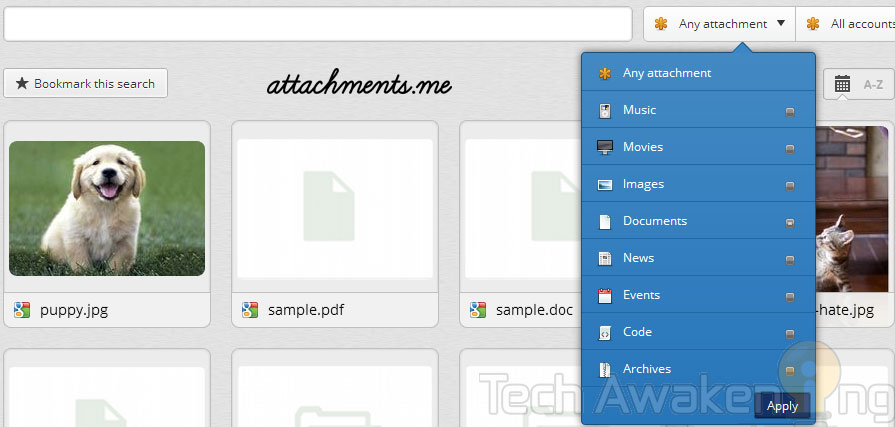
How to use Attachments.me to Search inside Gmail Attachments?
1. First install Attachments.me app.
–Attachments.me Chrome Extension
–Attachments.me Firefox Add-on
–Attachments.me iPhone app
2. Log-in to your Gmail account and authenticate the app by allowing access to your account.
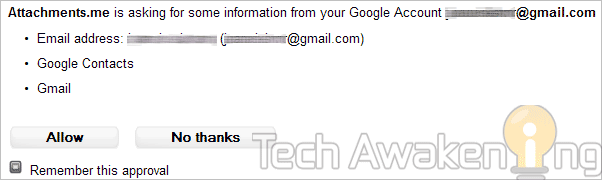
3. Now you will get a greeting email from Attachments.me. Allow few minutes for the service to index attachments in your account.
4. Start off by searching for cat. You will be able to see a new search results section just below the search bar.
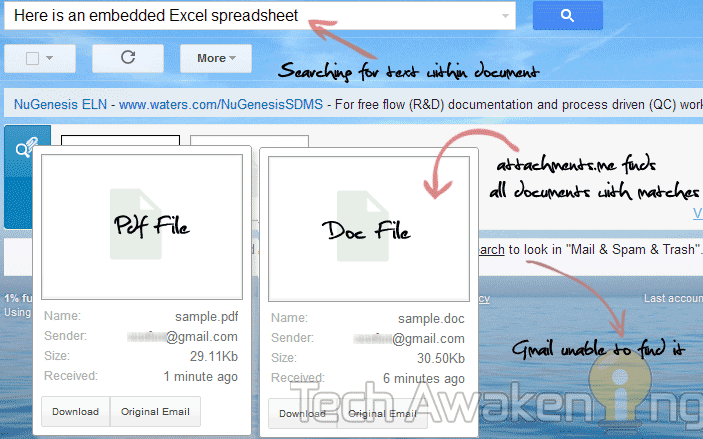
To find attachments containing any word or sentence just key in them and hit search, attachments.me will display all the documents with matches.
I tested by searching for a sentence within a DOC and PDF file, the service was able to find them correctly while Gmail was unable to find it.
Save Gmail Attachments to Cloud-Storage Based on Rules
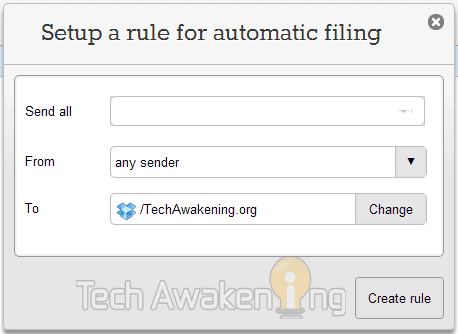
Another amazing feature of this service is it allows you to set rules, based on which your email attachments can be moved to cloud service like Dropbox and Box.
1. Click on the floating attachment icon on the top.
2. Click manage rules and then create rules.
3. Set the rules and destination location. For the first time you need to authorize your Dropbox and Box account.
4. Finally click create rule.
Take complete control of your Gmail attachments with this service! Found it useful? Do share it across
nice plugin…working great …thanks for sharing
Thanks! Welcome here ankit 🙂
I want to know the opposite. When I search for a word that I remember was in an email I get a list of emails that also have the word in an attachment. Is there a way to search just the email and not also the attachment?
Ideally you should be able to excluded attachments in Gmail search via the below type of query, try it and do share the article if it worked out 😉
Eg: Your Search Query -has:attachment
This is not helpful for me. A lot of my emails have some attachment or other and I certainly don’t want to exclude them from searches! I just don’t want to search the attachment. This “feature” really irritates me all the time and makes it very hard to find certain things in past emails.
As I mentioned if you don’t want to search attachments use the negation operator to exclude them.
I appreciate the reply, but you don’t seem to have understood my comment. To say it again: what if I know the email I am searching for HAS an attachment? This occurs often, and it would still be very useful to prevent the attachments being searched in order to reduce the number of false positives generated.
Ya, got what you meant. But currently there is no operator to achieve this. May will let you if I come across one!
Yep, using the ‘-‘ in front of has:attachment worked. Thanks and I guess I can use the ‘-‘ for other operations too.
Yes. That’s good to hear. Do share the article 🙂 If you found this blog a useful resource do feel free to like it.