
Cricket has always been one of the most favorite sport in many parts of the world. Craze of this awesome sport seems to have caught many with introduction of new formats like T20. This has made it more entertaining and exhilarating to watch.
If you are a crazy cricket fan I am sure you would never miss out on watching any matches especially when your favorite team is playing. In case your not able to watch it you might at least would love to keep yourself updated with latest scores. Some ways you might opt for could be checking out sport news website or install apps on your mobile to keep yourself informed with latest happenings. Other alternatives would be to subscribe to SMS notification services provided by your telecom operators which ofcourse they charge you.
But it’s not always that you have an active data connection on your mobile or have access to sports sites for example when you are behind corporate or school firewall. So, is there any way or service to get free cricket score alerts on your mobile? To be frank I couldn’t find one,if available I wouldn’t mind giving my mobile number to a third party service for privacy concerns. There is always a chance of you falling a victim to annoying marketing calls and spams. So I have come up with my own service that will send you live updates via SMS. Thanks to Google Docs. With ICC T20 World Cup 2012 super eight stage just beginning you should be finding this service useful 😉 Lets get started with instructions.
Get Free Cricket Score Updates on Mobile by SMS using Google Docs
1. Linking your Phone with Google Calendar
You can follow the instructions on how to link your phone with Google Calendar for SMS notification from our previous article.
2. Starting Cricket Score Alerts Service from Google Docs
- Login to Google Docs.
- Click here to make copy of the spreadsheet. Click Yes, make a copy.
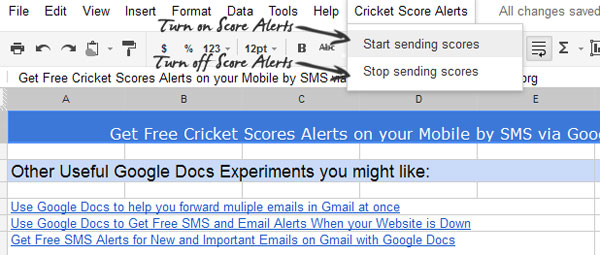
- Once the page has loaded, wait for few second for menu Cricket Score Alerts to appear just next to help menu.
- Now select start sending scores. Click OK then click Grant access in the big authorization notification that comes up. Finally press the close button.
- Once again select start sending scores from the menu and wait for a while.
- Now on you will be getting live updates on your mobile via SMS every 10 minutes.
3. Turning the service ON/OFF via an Email
You can turn off this service from the menu by selecting stop sending scores but to add more flexibility I have also added an option to control this service via email once you have started it from Google Docs as you might not always have access to Google Docs for example from your work place.
So you Turn ON this service by sending an email to your Gmail Id which you used to log into Google Docs with subject as
Similarly Turn OFF by sending
Note: Body of the Email can be left empty.
Get free SMS alerts on getting new emails on Gmail with Google Docs
Get Free SMS and Email Alerts When your Website is Down with Google Docs
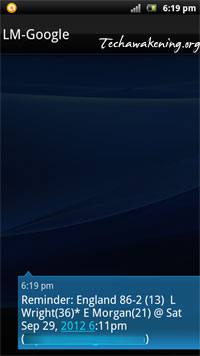
Here is a screenshot from my mobile:
So, liked it? Did it work for you? Have any suggestions, queries, clarifications or found any bug feel free to drop in. If you found it useful do share it on social networks. Spread the love. Stop subscribing to paid services instead use this service,ofcourse all for free 🙂
how can i stop this alerts….????
Above you mentioned but can’t understand the method..???
i have the same mail id for loging in into the google doc.!!
So i compose the mail in my own account and send it to also in my account..???? can’t understand please explain the step wise method..
And what can be written in the MAIL itself means in subject and body part…?????
Yes, you can do that too. Send the email to yourself or simply send an email from any other web mail account to your Gmail account.
okay thank you..!!!! 🙂
Please reply 2 my post…Mr.Shanmugha Sundaram…
Dear Shanmugha Sundaram….please can u tell me what is the scoreURL or which place that score come to script .
Hi Bro,
Thanks alot for ur valuable work, its just awesome to see your post.
I have been using email alerts on mobile phone as sms, that works absolutely fine.
I have some doubts in this post…
1. What should be in the body of email which we send to our-self to start and stop the service?
2. whats the url of the site from which we are getting this alerts?
Suggessions:
1. Could you please post “How to get birthday reminders on phone as sms from google calender every year”. I have tried alot but didn’t suceed.
2. And “How to get wrestling (WWE) updates from google”. But it should come twice/thrice in a week.
3. “How to get news from a particular site”.
Sorry If u get irritated with this lengthy comment..
Welcome. Feels happy to help out people 🙂 Do like and share this post if you loved it. Hope you won’t mind.
– Body can be left empty.
– Please look into the source code 😀
Thanks for your suggestions. I will try implementing it whenever I find time.
– For birthday reminders, if you have smartphone you can easily sync it will Google Calendar.
http://www.google.com/sync/index.html
bro, i didnt have smart phone, I guess we can schedule our birthday to get reminders every year. can you please text the procedure here…
@zmyest You can use google calander for bday reminder, and google let send you msg on your mobile.
Login to Google and then click on tab calander, like this https://www.google.com/calendar/render?tab=mc&pli=1&gsessionid=5kwdS5wCmpiVGdqSHpzjBQ , take a date and create event on that day at particular time. But to do all of these things you first have to register your mobile no to Google.
Thanks
Mukesh k
Mukesh,
Thanks for your inputs!
@zmyest
You can use this link to get better details from Google itself.
support.google.com/calendar/bin/answer.py?hl=en…37242
It explain many things like–
Google Calendar offers different options for receiving event reminders. You can choose to receive your event reminders via SMS messages, emails, or popups … In the calendar list on the left, click the down-arrow button next to the appropriate … The article didn’t address my issue. … Get the latest updates, tips & alerts & many more.
Regards
Mueksh k
thanks bro..
Could you please tell me how to sync my nokia e63 calender events to google calender, pls do helpful
Try googasync or emoze (http://store.ovi.com/content/31078)
HEY I DONT GET THIS ….
HOW TO STOP CRICKET SCORE MSG ….
I DID WHAT U WROTE ABOVE BT NTHING HAPPEND
WHAT I DO ???
Just delete the sheet itself it should stop it.
hey bro cricket trick does not work………….
and
whats the url yaar…………………..???????????
i want to stop alerts as soon as possible…
Anuj,
As mentioned in the article select Stop sending scores from Cricket Score Alerts Menu.
I Didn’t receive any score alerts,after following each step!
Cross check if score alerts are created in your Google Calendar.
No score alerts were created on my calender!
Then probably setup did not go as expected.
I repeated the steps but no alerts yet.
here is one error notification mail i got
Your script, Copy of Get Free Cricket Score Alerts on Mobile by SMS via Google Docs: Techawakening.org, has recently failed to finish successfully. A summary of the failure(s) is shown below. To configure the triggers for this script, or change your setting for receiving future failure notifications, click here.
The script is used by the document Copy of Get Free Cricket Scores Alerts on Mobile by SMS: Techawakening.org.
Summary:
Error Message Count
Cannot connect to Gmail (line 113, file “Code”) 2
Details:
Start Function Error Message Trigger End
8/29/13 9:22 AM getScore Cannot connect to Gmail (line 113, file “Code”) time-based 8/29/13 9:22 AM
8/29/13 9:27 AM getScore Cannot connect to Gmail (line 113, file “Code”) time-based 8/29/13 9:27 AM
Repeated the steps,but no alerts.
SMS notifications for emails works good.
Will investigate on it and get back to you.
hi bro,
i tried above procedure to get cricket alerts but i’m not getting cricket alerts.so pls help me ..
i tried above procedure but i’m not getting cricket alets yet.pls help me
Please make sure you follow the step correctly and check if score are being inserted in your Google calendar. I just cross checked now it’s working as expected.
i tried once again but i’m not getting….if you do this (get cricket alerts) for me i’ll give you mail id and password!!!
Please write to admin@techawakening.org. We will discuss offline 🙂