
 Facebook certainly has become an indispensable part of our day to day digital life. It helps us to stay connected with our friends and family. It’s undeniable that most of us are very much addicted to this awesome social network finding it difficult to keep ourselves away from it. Some make it a daily routine to visit Facebook at least once a day even in a busy schedule. But for others Facebook is everything they live and breathe it. 🙂 Their day might start and end with it. If you are one such fan this article is just for you.
You might find it difficult and annoying to type your username and password each and every time to log in. If you are using a multiple user PC it is certainly not a good option to enable keep me logged in feature. I was certainly finding it irritating so, came up with a small JavaScript Bookmarklet that lets you automatically log in to your Facebook account with one click. All you need to do is visit Facebook.com and click on the bookmark. You will be automatically logged in. I am sure this will save some time for you.
Let’s see how to install this, it just takes few seconds.
Bookmarklet: Auto-Login to Facebook with One Click
← 1. Drag and Drop this Facebook Auto Login bookmark to your browser’s bookmark bar or right click on it and copy the link address, then create a new bookmark and paste the copied link on to Location/URL field.
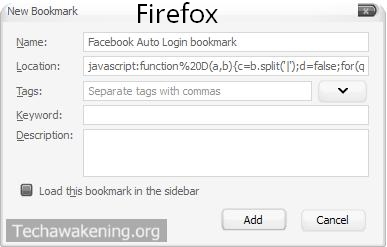
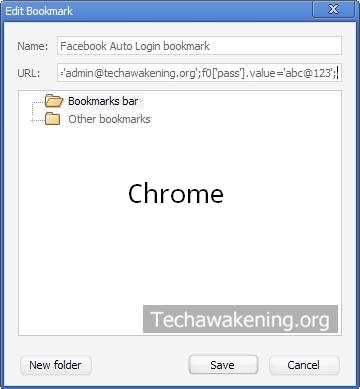
Note: Preferably give your Bookmark a misleading name for security reasons.
2. Now you need to edit the bookmarklet to change username and password. Change admin@techawakening.org to your email id and change abc@123 to your password. In chrome right click bookmark and select edit, in Firefox right click and select properties. Once modified save it.
Code:
document.getElementById(‘login_form’).submit();}login()
3. Test it by going to Facebook.com and click on the bookmark you made. You should be automatically logged in now.
Video Demo of Logging into Facebook Using Bookmarklet
So, free yourself from typing username and password each and every time. Try now. Found it useful? Do share it. Feel free to drop in your comments if it is not working for you.
I am a facebook addict. so your article makes my work for login in makes it more easier for me. Thanks for sharing this article with us…
You are most welcome 🙂
I guess this will be useful to everyone as we call log in to facebook 100 times a day 😛
But it can create probs if your parents use your computer.
Thanks for your comment Sahl Ahmed. Welcome here! Ha ha. Very true that’s why I mentioned that you must give Bookmark a misleading name for security reasons 😉
dear Shunmugha ,
Its a good JS, I have small Question here.
When I use this script from the bookmark(as you have said), it works. but when simply paste this script into the url bar it does not work. it takes me to the google search page.
Kindly help.
Shikhar Mehta
Welcome. That’s because off-late browser’s have stopped processing JavaScript directly from the address bar due to security concerns that might be the reason.
Do share this article if you liked it 🙂
how can I do this for other websites like social engine?
Yes, very much possible. You should look into the source code to understand how they handle log-in.
Thank you very much for this.
is there a way where you can incorporate the opening of Facebook site so I’ll only have one button to open FB and login automatically.
Still, great work!
Welcome. Thanks for the suggestion 🙂 Once I update the code will let you know. Me while do share this article on the web.
can I make login bookmark for this page?
http://ae.ikariam.com/
Hi Tiko,
Will email you the bookmarklet as I am unable to paste the code snippet in comment.
I actually found that this worked a lot better (in chrome). With your script I kept getting syntax errors. Still not sure what the problem was.
javascript:function login(){var email=document.getElementById(“email”);email.value=”EMAIL”;var pass=document.getElementById(“pass”);pass.value=”PASSWORD”;document.getElementById(“loginbutton”).click();}login();
You mean to say this code is working in Chrome but not in other browser’s?
No, I was meaning that I had only tested it in Chrome. I don’t see any reason it wouldn’t work in other browsers, but, seeing as it was initially a script I was intending to use only for myself, I didn’t test it in Firefox.
Excellent! Many thanks.
Rick,
Always good to see feedback’s on old articles 🙂 Do spread the word.
very good idea, save lots of time!! thanks~~
You’re Welcome! Do spread the word 🙂