

Disclaimer: This article is just for educational purpose. I cannot be held responsible if you are violating the terms and conditions of SlideShare.
We recently saw an article on how to download files from Scribd for free without an account which got a great response. In this article we shall see how to download presentations from SlideShare when download option is disabled by the author. Similar to Scribd, SlideShare is yet another great resource to find contents related to all fields. People from worldwide share their presentations covering wide range of topics. All users are allowed to view documents online without the need of any account. But to download files you need an account or should login via your Facebook account. Many of us would prefer downloading the files offline for instant and easy access without the need of internet. It also lets us carry them in our portable devices to read contents on the go.
But sometimes the problem is the content owner might prefer to disable the download option. In such case you will see that the download button is disabled and greyed out. So how will you download in such a scenario? If you are urgently in need of the document this could certainly frustrate you. The only option left is to personally request the author to send you the presentation.
Now let’s see an alternative solution to this. The procedure might look lengthy but it’s pretty simple.
How To Download Presentations from SlideShare when Author has Disabled it:
1. Go to the concerned document you want to download.
2. Right click on blank space around the presentation and select View page source.
3. Press CTRL + f and search for og:image
4. Copy the URL assigned to content till the phpapp01/phpapp02 part.

5. Append .xml to the URL you copied and remove the ss_thumbnails part from the URL. Then paste it into the address bar and hit enter. Refer the below example.
[Update- August 06, 2012]
E.g:
Original: http://cdn.slidesharecdn.com/ss_thumbnails/test-ebook-phpapp01-thumbnail-2.jpg
Modified: http://cdn.slidesharecdn.com/test-ebook-phpapp01.xml
OR
Original: http://m.slidesharecdn.com/convert.php?file=test-ebook-phpapp02-slide-1.jpg
Modified: http://cdn.slidesharecdn.com/test-ebook-phpapp02.xml
6. Now you will be able to see all URL’s of all slides that make up this presentation. Make a note of it.

7. Open Microsoft Office PowerPoint and create a new blank presentation. I used PowerPoint 2007.
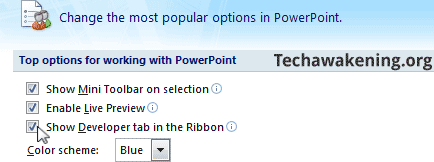
8. Click on the Microsoft Office Logo button on top left and click PowerPoint Options. Now check the option Show Developer tab in the Ribbon.
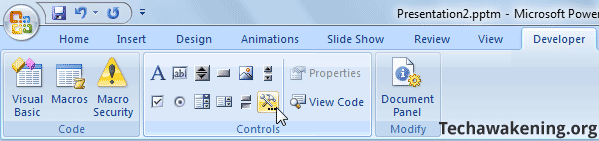
9. Select Developer tab and click on the hammer/wrench icon. In older version of PowerPoint right click on menu bar and select Control Toolbox and then select on the hammer icon.
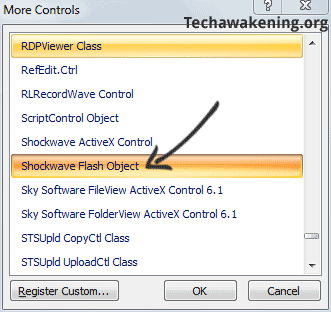
10. Now select Shockwave Flash Object from the pop up window.
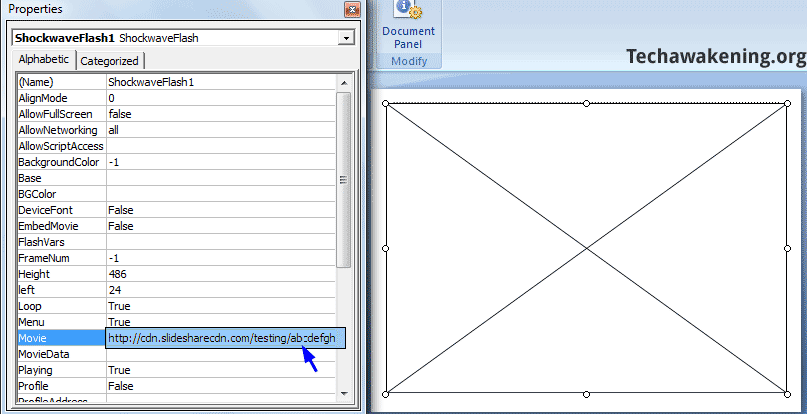
11. Draw a big rectangle with your mouse cursor. Then right click on it and select properties. In the movie field paste the URL of the SWF file you noted down before.
E.g: http://s3.amazonaws.com/slideshare/test-ebook-phpapp02-slide-1.swf
12. Insert a new slide, follow the same procedure and insert all slideshare swf one by one onto each slide. Once done save the presentation on to your disk.
Tip: Content may not appear initially only cross might appear, press F5(Slideshow) to view them.
14. Click Save As and select PDF or XPS. Give a name to it and save as PDF. If you don’t find publish to PDF option, install Microsoft Save as PDF or XPS Add-in. Once done, close and open your presentation to get save to PDF option.
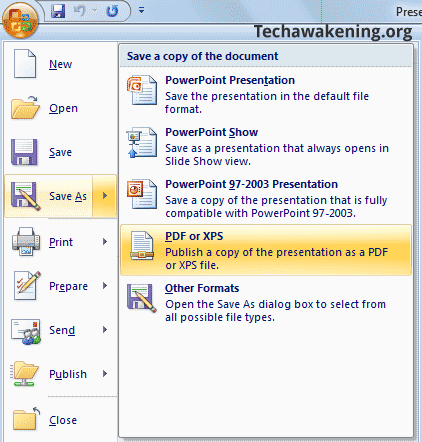
Automate Shockwave File Insertion in Presentation via Macro:
1. Download Auto Insert SlideShare Slide presentation file.
2. Open the presentation. If you are shown security warning, click on options-> Enable this content.
3. Press ALT + F8 and click Run.
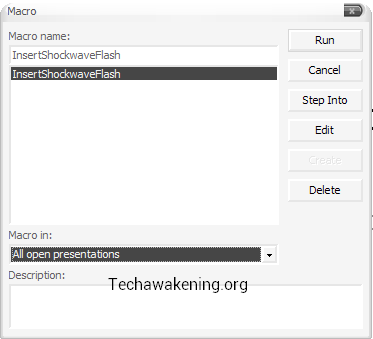
4. Now you will be shown the below window.
– In prefix enter URL which you noted down in step 6 up to “slide-” Eg: http://slideshare.s3.amazonaws.com/test-ebook-phpapp02-slide-
– In from and to enter slide numbers. All slides within the range will be inserted.
– In suffix, enter .swf
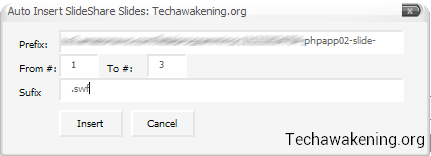
5. Then click Insert and wait for a while for all slides to be inserted. Once done, press F5 and make sure you view all slides. Now carry on from step 13 to save the file as PDF. It’s always recommended to save the file as PDF instead of having them as PPT.
Thanks Valerio Oliveira for the macro!
If you need an alternative to download SlideShare presentations without using Microsoft PowerPoint what you can do is download all SWF files using download manager like IDM then print all SWF’s into PDF using PDF creators like PrimoPDF preferably use Internet Explorer to open and print flash file. Then finally merge all PDF into a single eBook using PDF merge tool like PDFill.
So, were you able to follow the steps? Stuck up in any step? Feel free to drop in your queries.
Know any other easier method? Do let us know. If you liked the article do share it across!
This is great, but if I understood you right, I have to practically “copy and paste” every page or slide in the Slideshare document to Powerpoint. So if the document has 100+ pages, I have to do the same operation a 100+ times right?
Ron,
Yes. You have to copy and paste all URL’s one by one onto each slide. Instead as I have mentioned in the article you can use Internet downloader’s to download files in one shot and then batch print files to PDF and merge them finally.
But using PowerPoint method gives a better result. It’s worth the effort:) If possible I will come up with a Macro to automate this process.
I just take a screenshot of every page and paste them together…
Sunburnt SEO,
That would leave watermark intact and also quality will be no match to the original file hence the reason I came up with this tutorial 🙂
Hi Shunmugha,
I tried your suggested way to download presentaion from “http://www.slideshare.net/nasirgondal/sap-business-one-8140940” and it gives me output like:-
So now I dont understand how to embed ssd file in powerpoint & download it.
So plz not tell me what to do?
I tried your suggested way to download presentaion from
“http://www.slideshare.net/nasirgondal/sap-business-one-8140940” and it gives me output like:-
I tried your suggested way to download presentaion from
“http://www.slideshare.net/nasirgondal/sap-business-one-8140940” and it gives me output like:-
I tried your suggested way to download presentaion from
“http://www.slideshare.net/nasirgondal/sap-business-one-8140940” and it gives me output like:-
“”
“”
“”
So now I dont understand how to embed ssd file in powerpoint & download it.
So plz not tell me what to do?
So now I dont understand how to embed ssd file in powerpoint & download it.
So plz not tell me what to do?
So now I dont understand how to embed ssd file in powerpoint & download it.
So plz not tell me what to do?
I did exactly what you said but when I am on the 6th step it is not like this.
6. Now you will be able to see all URL’s of all slides that make up this presentation. Make a note of it.
Download disabled slideshare files
There is only a small picture of the first slide and I don’t know what to do. Help me please.
Sekendiz,
Please share the URL of the concerned presentation.
I also got an output like this after affixing “.xml” into the URL:
https://slideshare.s3.amazonaws.com/accountingentriesinsap-130512140040-phpapp02.ssd
How to carry on the process?
thank you
For requested doc it’s easier, just change the page number in bold you will be able to get all pages.
http://image.slidesharecdn.com/accountingentriesinsap-130512140040-phpapp02/95/accounting-entries-in-sap-1-638.jpg
I have a problem on the same step. It resulted into a .ssd file instead of .swf:
https://slideshare.s3.amazonaws.com/scienceg8tgfinal-130613064958-phpapp01.ssd
Follow the steps here: http://techawakening.org/download-author-disabled-slideshare-presentations/1361/#comment-22660
Will soon be updating the article.
It says “No links or Pictures found” and I have only one link.
Here’s the link of what i want to download:
http://www.slideshare.net/orlandmarcenquig1/science-grade-8-teachers-manual
Not sure how you are using that add-on.
In your case it’s : http://image.slidesharecdn.com/scienceg8tgfinal-130613064958-phpapp01/95/science-grade-8-teachers-manual-1-638.jpg
Just keep changing the slide number and get all pages. Cheers!
http://www.slideshare.net/irwyn12/teaching-writing-as-an-integrated-skill-ekl-presentation-943324
this is the presentation concerned lately. thanks.
There is a small update in the procedure. Remove ss_thumbnails from the url.
In your case it is:
http://cdn.slidesharecdn.com/teaching-writing-as-an-integrated-skill-ekl-1232655754856406-1.xml
How to download presentations from authorstream website
Sir I need help, in my case the error displays this
This XML file does not appear to have any style information associated with it. The document tree is shown below.
AccessDeniedAccess Denied
54685521232AFBE439X29WC8unBvVKwNOGRqkPc/e1vRvKpZSf4/7K6nzH26vybZHRN3ydZkUXUgb0Xy
Here is the link of the presentation I tried to get :
http://www.slideshare.net/catansay/airline-industry-10446667?from=share_email
Shinji,
As I mentioned in my previous comment you have to remove ss_thumbnails part from the URL.
Try this:
http://cdn.slidesharecdn.com/airlineindustry-111203085639-phpapp02.xml
sir plz give the download link of this..
http://www.slideshare.net/hemanthcrpatna/mba-project-on-vodafone
thx
Dude m not getting Exactly what to copy n what to paste..
http://www.slideshare.net/hemanthcrpatna/a-project-report-on-initial-public-offers
Just help me out to get da All Url Procedure…
Easily use down-them-all add-on in firefox ! Right-click on a blank area on the page, and select down-them-all from pop-up menu. You can download all pages as distinct .jpg images in Media tab of down-them-all !!!
Hi, I have used down-then-all add-on and i have obtained all swf files in a while. How did you do to trasform all these files in.jpg? I have tried with that add-on using batch procedure, but I have obtained broken jpg files.
It’s difficult to convert swf files in jpg. I haven’t found any free program doing that
Thanks ans ciao
You are trying to convert SWF to JPG to reduce size or ? As suggested in article you can instead just insert the SWF files in PowerPoint slides and finally bind them into a PDF file.
Hi, your article is very useful! But I have Power Point 2011 for Mac and I haven’t found the controls to create a space for every swf files. It seems strange, but MS has dismissed this feaure maybe. So, I would try to find a software or another way to convert swf files in images. Ciao!
Bad luck 🙁 OK give swf2avi tool from pizzinini a try. Seems to be a freeware.
hey i want to download files from Scribd….bt it seems very tough to extract those…i had tried scribd downloader…it works bt i fail to download the file which is about 42.5mb…it downloaded only 17mb of data and shows the network error…i m using chrome as my default browser…more over i was barred from using/accessing Internet Download Manager…plz suggest
If you are trying to download from Scribd then refer this article:
http://techawakening.org/download-documents-scribd-without-paying/416/#mobilefix
hello sir i want to download this ppt,,
http://www.authorstream.com/Presentation/sriharinithi-1299188-india-after-independence/
i follow ur procedure but im stuck at view page source in witch i have to copy link of og:image but im unable to make it xml it is in jpg format
my og image link is
http://c.asstatic.com/images/1299188_634616816751326576-118_88.jpg
pls reply i need this ppt urgently …thanks in advance
This trick will work only on SlideShare not on authorSTREAM. I am sorry!
MY BAD LUCK thanks anyway ,,,,,,,,
plz tell me wat if the extenstion is .ssd in place of .swf as i only see a box with a cross in it even after doing all the steps.
.ssd file should be opened in order to see the list of swf, embedding ssd url in PowerPoint will not work out.
http://techawakening.org/download-author-disabled-slideshare-presentations/1361/#comment-1454
Its not working. output shows single line with ssd file.
do me a favor please and make create a link for.
http://www.slideshare.net/surendra1579/abap-coding-standards
To be frank I am yet to figure out how to open this .ssd file. Seems to be some sort of proprietary format. Tried few solutions but was not successful. Using SAS viewer is one of the option.
It’s only in rare cases that the output is a ssd file instead of list of .swf files. Will keep you informed if I find any information regarding this issue.
It’s not working for me. I’ve followed the steps carefully ~
I already published it as a PDF file, but when I opened it, it’s blank.
Do I have to change something with the urls?
Here’s the link for the url slides of the presentation: http://cdn.slidesharecdn.com/filmartifacts-120304221015-phpapp01.xml
Refer: http://techawakening.org/download-documents-scribd-without-paying/416/#comment-1828
your procedures doesn’t work for Slideshare
Can you please tell which step is not working for you?
Pretty Impressive. Worth sharing to help more people to download their scribd doc for free. 🙂 Between, the steps are not that easy to follow by everyone.. with your great write up and patience one can download it for sure.
Cheers.
Rob.
Robin,
A warm welcome here dude 🙂 Thanks for those words!
Pasting the .swf url in the movie field of the flash player window is not doing anything. It still shows a box on the slide with a diagonal cross. Please Help.
I had the same problem. How to resolve. After filling movie address in options pannel, play your power point presentation (slideshow) and the flash content will appear.
Kate,
Thanks for pointing out 🙂 I did mention this under automate section(Step 5) but now have also updated this info as a tip now.
unfortunately i couldn’t do it; after step 9, my powerpoint (2010) left the “more options” button disabled 🙁 don’t know how to enable it! any clue? thanks a lot!
Strange! Try enabling ActiveX by going to PowerPoint options-> Trust Center-> Trust Center settings.
thanks for your answer on such short notice 🙂
the ActiveX thing tootally worked. but then i realised one thing: the supposed-to-be .swf file i obtained isn’t a .swf file, but a .ssd one. maybe this is why it only displays the rectangle i drawed… and also, i believe the original file is a .pdf one. don’t know if that changes anything…
You are welcome! Oh, but .swf format is the one which is required. Please refer my previous comment I made regarding this context: http://techawakening.org/download-author-disabled-slideshare-presentations/1361/#comment-1454
If possible to share the document URL I will try an alternative method to get it downloaded for you.
oh, thank you so much 🙂
the original slideshare link is http://www.slideshare.net/projetacursosba/fundamentos-da-medicina-ayurvedica-8630155
any way to download http://www.authorstream.com/Presentation/waleedfawzy-177063-chest-trauma-lecture-education-ppt-powerpoint/
Sorry!
http://techawakening.org/download-author-disabled-slideshare-presentations/1361/#comment-1263
sir, i get Blank or say found only those rectangles in the pdf as well as in ppt also after converting or publish in pdf…
what can i do sir…????
Asit,
First, did you manage to get list of all SWF’s or did you get .ssd file?
sir, first as you said after managing swf files i saved my presentation and after that again as you said i published or saved as a pdf file. the only problem is that saved or published pdf file is not working…PDF file is as it as that shows only that crossed rectangle which i made in powerpoint before…what can i do..???
Thank you sir for your reply….
Try this. After inserting all SWF files in PPT just run Slideshow by pressing F5. See if all are coming properly and let me know.
after switching into the Slideshow mode i view my presentation but what about pdf or say published file?? it’s status is as it is…that shows rectangle only…how can i see that pdf file…?? what’s the mistake there i was made..??
OK share the PPT with me I will try converting it for you.
Hi, I would like to download this article from slideshare, the steps couldn’t work as it is not a powerpoint document.
http://www.slideshare.net/apaticomediatico/the-mobile-phone-and-its-innovations#
would appreciate help in downloading!!
Can you please have a look into this link?
http://www.slideshare.net/chiaralamarca/esempio-piano-marketing-bb
Thank you
These is no og:image in the file I want to download..
http://www.slideshare.net/cmsdsquires/chapter-93-matter-and-energy-in-ecosystems
Alan,
I am able to find the og:image though. Try again. To make things easy for you I have got the url myself. Do share the articl. if you found it useful!
http://cdn.slidesharecdn.com/93-post-1234189011510085-2.xml
Likewise, I am unable to find an og:image in the source code.
http://www.slideshare.net/imootee/60-minute-brand-strategist-limited-edition
However, all the text from the file does seem to be there, but of course without any formatting or images.
Hi Elliot Slater,
It’s there in the source code. Try searching for it again I have just checked now. Any how I have got the url for you. Now start from step 6.
URL: http://cdn.slidesharecdn.com/60minmarch6interior-090425093643-phpapp01.xml
Thank you Shunmugha Sundaram. This is very useful.
Welcome Priya! Do share the article 🙂
Hello! Can you please help me with this one?
http://www.slideshare.net/ncbeaman/the-walt-disney-company-11801102
can’t get the right result with .xml…
Thank u
http://www.slideshare.net/Shubhendu_dash/indian-vaccine-scenario-by-s-k-dash#
could you please help me with this?
Hi shanmugha
Im trying to download the images from the below link but am unable to do so. I believe they are pdf files. Could you please help me
http://www.slideshare.net/jalathaaruvennela/krishna-13127198
Hare Krishna
Lok,
In your case it is easier as all are images. Just modify the number in bold in the url up to 132 that’s it. Then insert them into PPT and convert it to PDF.
http://image.slidesharecdn.com/krishna-120529211738-phpapp02/95/slide-1-728.jpg
Dear Sir,
Please help me in downloading the following file from slideshare
http://www.slideshare.net/lionnagaraju/what-makes-a-good-teacher
I am waiting your early response.
Regards,
Mohammad Usman
Dear Shunmugha,
Sorry to ask your help on this, usually I get things figured out without asking for assistance, but these slides prove to be more challenging than I thought. Here’s the slideshow:
http://www.slideshare.net/Murray58/essential-oils-art-agriculture-science-industry-and-entrepreneurship-a-focus-on-the-asiapacific
I followed your steps to the letter and gotten to the og:image and followed your instructions for the xml. Even made some modifications from the process since the links are quite different from the other cases:
http://m.slidesharecdn.com/convert.php?file=murrayhuntereobook1-120201093028-phpapp02-slide-1.jpg
http://cdn.slidesharecdn.com/murrayhuntereobook1-120201093028-phpapp02.xml
And I get this:
AccessDeniedAccess Denied
6C5C8CB2918E64D5
qGEwLefDB7Jvep1vJqI3MQ/rl1+4CVD5NDIl/tPI5rlY3Tgo/EhJ+c6yk7Tand8W
Is there another way around this? Perhaps you can help me please.
Jessica,
Yes the above doc seems to been different from the rest. But I have managed to get this info for you. Just change the three digits(highlighted in bold) at the end you will get the pages as image files which you can then insert onto a PPT.
http://html.slidesharecdn.com/murrayhuntereobook1-120201093028-phpapp02/output001.png
Dear Shunmugha,
Ain’t this a challenge? 🙂 I have tried going to that route before, but it only gets you the frames and skeletal charts without the text. These are even directly downloaded on the computer.
Seems like the only way is to know what is being converted in “/convert.php?file=murrayhuntereobook1-120201093028-phpapp02-slide-1.jpg” don’t you think?
Really looking forward to finding some workaround. Thanks!
Hi,
I tried the steps listed by you. First problem I faced was in step 5 itself. The urls are now coming out in a different format. In anycase, I was able to scroll and hack a way to fine the right url listed by you. But then I get error in step 11.
VBA project in powerpoint gives a Complie error: Syntax error, the moment I paste the first url. Below is one of the urls of the slide
http://slideshare.s3.amazonaws.com/20120808urecorporatepresentationaugust2012final-120809121631-phpapp01-slide-1.swf
Do you think anything is wrong? Why does it give a syntax error?
Thanks in advance.
Jason,
There is no need to create a VBA project. Just insert the flash object by drawing the rectangle and point the movie to URL of SWF file.
Sir Please help me to download the date from below mentioned link.It will be great help as i needed it imp!!
http://www.slideshare.net/Bravo77/mastering-vba-for-microsoft-office-2007-2762968
Thanks In Advance!
you are an amazing person (from Egypt)
Many thanks!
Hello,
Thank you for the method. With new slideshare source file, the technic is a little more complex.
Do you have an idea to simplify the transformation off all swf files into one pdf or in jpg ? Because, work file per file is very long with 90 slides to treat 😮
Best regards.
Hello Shunmugha,
I have read your post with extreme interest and followed your steps but got stuck at step 6. It seems to me that .xml extension of the presentation I wish to download ( http://www.slideshare.net/Bradygilchrist/kill-procrastination) doesn’t want to work:(
I would be most grateful if you, as an expert could look at it and tell me what should I do to be able to download this presentation as PPS.
best regards,
Marta
You are most Welcome 😀 Here is the appropriate URL for the doc you requested. Now you can resume from step 7. Please do share this article on the web 😉
http://cdn.slidesharecdn.com/killprocrastination-100426094016-phpapp01.xml
Hi Shunmugha,
Followed the instructions, .xml page always leads to Access Denied, Could you please help me with the following link.
http://www.slideshare.net/pys0209/social-media-for-marketing
Thanks in Advance.
auuuww yeah! this really helping me!
thanks a bunch dude!
Hi,
I’m trying to download “building a compelling value proposition’but in the source code I can’t find the correct link to change in xml. I sucessfully did others that were marked in the source code.
http://www.slideshare.net/mjskok/startup-secrets-building-a-value-proposition#btnPrevious
Any suggestions?
Thanks
this is the url…..http://image.slidesharecdn.com/thesis-120823071118-phpapp01/95/slide-1-1024.jpg….after adding xml also i am getting access denied as output…plz help…thanks
very useful. however, i was unable to edit the document which i intended to. that’s the only downside. i just use OCR to enable me to edit. i think you could add this in your article so that the ppt could be edited.
Welcome. Thanks for your inputs. Do share this article 😉
Hi,
Its really great website… but when I try to download this one –
http://www.slideshare.net/prashakth/corporate-communication-ppt-by-prashakth-kamath?from=share_email#btnNext
I’m unable to apply 5th Step, kindly pls. help me.
Thanks –
I get an access denied at the xml part. I get an XML like this:
AccessDeniedAccesshow do I proceed. I wasn’t logged in as I don’t have an account. Do i have to log in and try this. However, the slides from the website were available to be viewed without logging in.
You need not login. See to that you are forming the URL correctly following the instructions.
The URL returned for me in step 3 didn’t look like yours. Perhaps there is a change in slideshare but the URL looked like ttp://image.slidesharecdn.com/cdocumentsandsettingsraya1desktopani…
I searched further down looking for ss_thumbnails and found another URL similar to yours but it did not end with a phpapp01/phpapp02 part. I simply removed the ss_thumbnails part then at the end replaced “thumbnail-…” with .xml and got my list of xml files for each slide.
I also found an online site which will download each swf file for you http://www.wenderhost.com/tools/swf-downloader/ Since the swf files are in numerical order, you just need to change the number at the end of the URL then download the next one.
Krystof,
Wow! That’s a great piece of information. Appreciate your efforts! Probably the system might have been updated since I wrote this article. Will update it soon.
This was awesome!!
Hi, love the tips, however I can’t somehow go past part 4.
I have managed to copy the URL, deleted the ss_thumbnail and added the .xml -> but when I tried to past it into the toolbar all that came out was
his XML file does not appear to have any style information associated with it. The document tree is shown below.
with the ending: phpapp02.ssd
could you please tell me, where I did wrong?
btw, the presentation I’d love to download is this one:
http://www.slideshare.net/lawexchange.co.uk/lawexchangecouk-powerpoint-1265373
thanks a lot for the answers.
Nana,
Requesting you to read the instruction again and try out. Mean while the modified version in your case is http://cdn.slidesharecdn.com/civillaw2-100317084340-phpapp02.xml . Now you can resume from step 6 😉
You can refer to Krystof comment for further additional insights.
Hi Shunmugha
I have completed all the steps, but after I paste the .swf url in movie it does not show on powerpoint, it remains as diagonal lines. I have enabled activeX, but still the slide are still blank
I even tried using Krystof’s website but I get an error as per below;
SWF Downloader Error
It doesn’t appear that you are authorized to use this form.
« Return
Kaofela,
Could you share anyone of the SWF URL so that I can test it out?
Sorry it actually worked out, I had not run the slide show, once I did it was fine.
Thanks for the assistance.
Welcome 🙂 Do share this article if you liked it!
How to download this link?can you help me?PLEASE….
I want download ths pdf..
http://www.slideshare.net/akis71/a-15002153
Please follow the instructions given..
Its really great website… but when I try to download this one –
http://www.slideshare.net/hemanthcrpatna/a-project-report-on-marketing-mix-of-automotive-sector
I’m unable to apply 5th Step.
and pls tell about procedure in detail how to download disable file.
i want to lot of file download,kindly pls. help me.
Thanks –
Reply
I really think this is a great site. Lots of useful ideas and comments. I know I must be doing something wrong, but I cannot get this to download. Can you please help? Thanks
http://www.slideshare.net/reed2001/culture-2009?ref=http://techcrunch.com/2013/01/31/read-what-facebooks-sandberg-calls-maybe-the-most-important-document-ever-to-come-out-of-the-valley/
Thanks for those words! OK. Did you manage to come till step 5 ?
i could not get it to work 🙁
This doesn’t work anymore! I’ve been trying to download this slide for the past few days.
http://www.slideshare.net/carlnielson/job-hunting-in-the-21st-century-for-students
please help!
the only thing that shows up when i search for og:image is “http://image.slidesharecdn.com/jobhuntinginthe21stcenturyforstudents-130126154544-phpapp01/95/slide-1-1024.jpg”
I am so lost.
Requesting you to refer this comment from Krystof
http://techawakening.org/download-author-disabled-slideshare-presentations/1361/#comment-4809
Simplest method found yet:
Convert the “og:image” link to this format “http://cdn.slidesharecdn.com/*phpapp*.xml” to get the XML output (* is wildcard standing for whatever slide you are trying to download).
1- Copy the XML content to a notepad.
2- Remove the Show ID tag
3- Simply convert the “” to simple Embed tags e.g. for all the lines in the XML (use Replace-All function of your text editor as much as possible to make this faster)
4- save this as HTML file
5- Open in any browser. It’ll load all the SWF files in the same page.
6- Print as PDF 🙂
Done !!
[reposting since last post removed the sample HTML nodes]
Simplest method found yet:
Convert the “og:image” link to this format “http://cdn.slidesharecdn.com/*phpapp*.xml” to get the XML output (* is wildcard standing for whatever slide you are trying to download).
1- Copy the XML content to a notepad.
2- Remove the Show ID tag
3- Simply convert the “<&;lt Slide type="default" Src="***" / &;gt " to simple Embed tags e.g. &;lt embed src="***" width="800" height="600"&;gt for all the lines in the XML (use Replace-All function of your text editor as much as possible to make this faster)
4- save this as HTML file. you can put BR in between to put each slide on a different line.
5- Open in any browser. It'll load all the SWF files in the same page.
6- Print as PDF 🙂
Done !!
Srinath,
Really appreciate your efforts in sharing this information with us. Will be very useful for all readers! To be frank this embed option did not strike to me!
Hello sir I have done all the possible options and have read the comments to see if any of them match with my issue, seems not :(.
I would like to get this file very interesting about android can you please download it for me.
http://www.slideshare.net/RanNachmany/manipulating-android-tasks-and-back-stack
I am getting the following message
Error>
AccessDeniedAccess DeniedFE7D417F5AE4646DeIRGQTn09Cc/Dy8z3llRq7PTmCOKzgySX6EX1wBqigSyiY0fbc4aJfBqGK+3awy+The code is http://image.slidesharecdn.com/final-12930043904688-phpapp01.xml
Please help..Thanks
Access Denied! Seems they have changed their streaming source as well as the access security.
it looks like slideshare updated their code. here’s how to get the .xml file with the list of all the slide URLs:
1. view source
2. find the string “slideshow-thumb”
3. copy the url value in the “src” tag
4. be sure to add “http:” to the beginning and to remove “ss_thumbnails” and everything after the phpapp01/phpapp02
EXAMPLE:
– Original:
– URL: http://cdn.slidesharecdn.com/presentationname-1234567890-phpapp02.xml
5. that should give you the list of slides. now follow the rest of the instructions outlined in the article above
hope this helps
Thanks a lot for the instructions. Will be very useful to all readers! 😀
Hi.
I am trying to download
http://www.slideshare.net/mrw7500/white-paper-the-stork-ams-reliability-and-integrity-model
I did what the latest comment suggested but i get a .ssd link
Please help!
Hi, Mr. Sundaram!
It is a really usefull post for people that for any reason needs to save a copy of slideshare presentations. Thank you!
I just created a macro that automatizes the repetitive part of your method in power point. If you are interested in it, please contact me.
Regards.
Valerio Oliveira,
You are Welcome. That’s pretty cool! Please do share it here so that all users can benefit out of it. Hope you won’t mind it 😉
Recently another user(Srinath) suggested a workaround for this, it’s manually though. It’s to use embed tag and create a html page containing all slide and then print that html.
Here it is!
It was made with power point 2010.
The presentation have a single blank slide with a Shockwave Flash object. That object is needed in order to the presentation recognize the ShockwaveFlash data type used in macro, so don’t delete it.
After you run the macro it shows the following message:
Done! Please follow these steps:
1. See all the presentation before you print it to PDF, otherwise it will just print blank slides;
2. Print the presentation starting from Slide 2;
3. Close the Presentation without saving it.
Hope it be useful. Please give me some feedback. Thank you!
I just forget to mention:
The presentation have a single macro that calls a single form.
The form have four EditBox objects:
[Prefix]: insert here the part of the hyperlink from the “http://” to the character before the number of slide.
I.E.: http://slideshare.s3.amazonaws.com/-phpapp02-slide-
[From #]: Insert the number of the first slide.
I.E.: 1
[To #]: Insert the number of the last slide of the presentation.
I.E.: 100
[Sufix]: Type here the part after the slide number of the hyperlink.
I.E.: .swf
Press the “Insert” button to run the macro, and follow the instructions.
Regards.
That’s very kind of you for sharing it here! A big cheers to you. Hope everyone finds it useful. 😀
Hi sir,
i have tried to modify the url but all i get is access denied
help me if u can,
i m trying to download this
http://www.slideshare.net/vaibhav_nautiyal/membrane-bioreactor-technology-an-overview
Hello can anyone help me,
How can i download this slideshow?
http://www.slideshare.net/Mr.Ateach/google-beyond-search-google-apps-and-more
I desperately need it to use for my faculty Google Apps in Education event to teach secondary school students
Any help is deeply appreciated. Thankss.
Clament,
Sorry for the late response. Just search and find the URL mentioned in og:image of the page source. Follow the instructions in the article from Step 1.
Hello
First of all, THANK YOU so much for doing this. Could you please help me out with this URL, I tried what you said above but couldn`t get it to work.
http://www.slideshare.net/EngWaleedelsafoury/lte-introduction
Many THANKS
Ankur
dear sir,
http://www.slideshare.net/zulmohd1/changing-role-of-hr-v30?utm_source=slideshow03&utm_medium=ssemail&utm_campaign=share_slideshow
i am stuck in the process i tried and only thing i got is this error please help
This XML file does not appear to have any style information associated with it. The document tree is shown below.
AccessDeniedAccess Denied
04604FE9CBA6A52F
ze2EAd2bR2sDqRzoZg/T1ict7/yGo6LSDfJ8StEcoRNqqKLBUAIua+6p8xp7eo0I
Thanks for the share, really helped me a lot. Instead of using the powerpoint method I used IDM to batch download it, much easier.
Thanks for your insight! Do share this article. 😉
Sir,
Please let me know how to download a disabled ppt from authorstream
Hello Shunmugha
Thank you very much, good luck for you
Hi buddy,
I have tried with the following document but could download the it. What is wrong there? Any help please?
Thank you
http://www.slideshare.net/andreiamorais/o-som-na-propaganda-possveis-relaes-imagticosonoras-com-a-esttica-de-videoclipe
What if in page source , og:image I have “http://m.slidesharecdn.com/convert.php?file=fetalprogramming-111222024704-phpapp02-slide-1.jpg”
I enter http://cdn.slidesharecdn.com/convert.php?file=fetalprogramming-111222024704-phpapp02.xml and it does not work. help
ivi2,
You shouldn’t be retaining the convert part in the URL. It’s just
http://cdn.slidesharecdn.com/fetalprogramming-111222024704-phpapp02.xml
Hope it helps. Do share this article 🙂
I want to download a document,desparate need please help..I tried many times but assess denied!!!
http://image.slidesharecdn.com/poemsfsc-i-121130205928-phpapp02/95/slide-1-1024.jpg
Sunny,
I am able to access the URL you mentioned. It contains a page with title “The Rain”. Now to find next slides just manipulate the slide number
EG: http://image.slidesharecdn.com/poemsfsc-i-121130205928-phpapp02/95/slide-2-1024.jpg
Hi there, it doesn’t seem to work for this, found the og:image but doesn’t seem right
http://www.slideshare.net/plmrx/market-research-course-slides
Thanks a lot!
Danny,
Just leave the front portion and form the URL like this.
http://cdn.slidesharecdn.com/marketresearchbypaulmarx-121101082001-phpapp02.xml
Updated the post too. Hope you find it useful! Do share the article 🙂
i want to download http://www.slideshare.net/iyooha/2012-14158316
let me know
I don’t think this works anymore?
It does work. Please refer latest comments.
Thanks man, still working 😀
Roberto,
Welcome and please do share the article 😉
why didnt you teach me dl links?
please! Shunmugha Sundaram!
i want to download http://www.slideshare.net/iyooha/2012-14158316
i tired to download tis slide following this post, it doesnt work
Thanks for your help!! But it seems that they changed their code again… I’ve been unable to get
http://www.slideshare.net/miranda_col/introduccion-al-laboratorio-de-microbiologia-de-alimentos
with any of the methods described here…please help…
AP,
In your case it’s even simpler.
Just tweak the slide number then download the image and insert them into doc file and bind as PDF.
Eg: http://image.slidesharecdn.com/introduccinallaboratoriodemicrobiologadealimentos-100221174105-phpapp01/95/slide-2-1024.jpg
Dude, I owe u a big one…
My pleasure. Well you can share this article on social network that would be great 😉
hi, from Peru. i would like download this document but i have difficulties to change the url, all the time ive tried showed me this
This XML file does not appear to have any style information associated with it. The document tree is shown below.
this is the url
http://es.slideshare.net/MARYORTE39/esguinces-en-traumatologia
please help me its important
Thank you so much!! It works perfectly!!
This has been my case:
Original link:
http://www.slideshare.net/darkblackrainbow/3d-origami-book
Source code (“og:image”):
http://image.slidesharecdn.com/025-120106071250-phpapp01/95/slide-1-1024.jpg
Modified (and final) link:
http://image.slidesharecdn.com/025-120106071250-phpapp01/95/slide-PAGENUMBER-1024.jpg
Just open the page source code, find “og:image” and copy its URL, then you only need to change the page (slide) number.
Maribel,
That’s good to hear! Do share this article on the web if you found it useful 😉
after 30 min, finally I got the file.
Trick from Maribel works better for me.
Coz, there are a limitation slide using tutorial offered at top of page here.
Slide:
http://www.slideshare.net/Bradygilchrist/kill-procrastination
Search “og:image” got this link:
http://image.slidesharecdn.com/killprocrastination-100426094016-phpapp01/95/slide-1-1024.jpg
I turned to :
http://cdn.slidesharecdn.com/procrastinationfinal-111210071236-phpapp01.xml
It’s only 25 slides from 60 slides from the all presentation.
With Marible trick, I only need to change the PAGE NUMBER, then “copy image”, paste into my PPT slide (little mofidfiying to fasten time), do it slide by slide, done!
Thank you, thank you and thank you.
Oh my dear… what I wrote was wrong. It was not the same presentation I mean (25 slide and 60 slide).
http://www.slideshare.net/sixbangels/dfw-2013-ppt-01
wana download this one, plz tell me how to do as iam putting this url
http://image.slidesharecdn.com/dfw2013ppt01-130124025517-phpapp02.xml
Hi
I am tryng to save this presentation: http://www.slideshare.net/Nestor_Nestor/nndkpinspectia-fiscala
After the step 5 i got this message, what is the problem ?
Thanks in advance.
B.r.
This XML file does not appear to have any style information associated with it. The document tree is shown below.
AccessDeniedAccess Denied
EFB26CD0A381BCBA
nY5XzWF1Cs8IGyl7PniQNwo6teGiQryngPRMV5eJ2YkXuqRAQSiKn+h9p8Ba5Zhi
Thanks for yor great help.
Arshiya,
Welcome. Please do share this article if you found it useful 🙂
How can one download document from docin or Baidu?
Thanks a ton bro! This works great.
Sashank,
My pleasure. And do share this post if it helped you 😀
hello. I would like to know if you can help me with doing this. thanks.
Hi,
You can request for support here: https://gumroad.com/techawakening#NKWm
There´s no shockwave option in powerpoint “hammer” icon.
So?
Hi, i’m trying this out for the 1st time and followed your steps til step 6, but have a problem getting an image in powerpoint, only get a blank box.
Could it be that the URL’s received are now ‘https’ rather those you show in the example ‘http’?
see: http://cdn.slidesharecdn.com/mandlankosicioatsouthafricanmint-achievinggreatersynergyandcollaborationbetweenitandbusiness-130418053844-phpapp02.xml
original: http://cdn.slidesharecdn.com/ss_thumbnails/mandlankosicioatsouthafricanmint-achievinggreatersynergyandcollaborationbetweenitandbusiness-130418053844-phpapp02-thumbnail-4.jpg
Eddie,
‘http’ won’t cause any problem. Did you automate via macro or manually inserted the flash object ?
slides comes as images, how can i download the content as editable content ?
like i want to download a slide and change the numbers mentioned in it how do i do it ?
Panni,
Sorry! They cannot be downloaded as editable content will be available only as image or swf.
Hey….just for info..I found the simplest solution…
For this solution you need a IDM (Internet Download Manager) and that’s all..
On the slideshare.net …go to the slide you want to download…
then on internet explorere –> View –> Source and search for og:image
Copy the link given against og:image and the link will be something like –
http://image.slidesharecdn.com/telecombilliingbysohagsarkar-13022674614597-phpapp01/95/slide-1-1024.jpg
In this link the last portion of the link – slide-1-1024.jpg represents the page no…like slide-PAGENUMBER-1024.jpg for every image file.
So you can verify this in internet explorer like this –
[url]http://image.slidesharecdn.com/telecombilliingbysohagsarkar-13022674614597-phpapp01/95/slide-2-1024.jpg
[url]http://image.slidesharecdn.com/telecombilliingbysohagsarkar-13022674614597-phpapp01/95/slide-3-1024.jpg
Now start IDM and go for batch download mode where you can download sequential files —
Now enter a URL like this – [url]http://image.slidesharecdn.com/telecombilliingbysohagsarkar-13022674614597-phpapp01/95/slide-*-1024.jpg
There is an option for replace astrix with number and mention the no of slides you want to download (In my case I mentioned 1 – 186 since there are 186 sides)…It downloads the slides in image format. Start IDM and within no second all images are downloaded.
Now combine it in PDF with some professional application and you are done……
Dhananjay,
Yes, you are right. Thanks for taking your valuable time and explaining it here. Really kind of you. Will soon update the article with this tip. Thanks again.
Cheers!
Shunmugha
Somehow not working.. got the message
AccessDeniedIm doing the following
http://www.slideshare.net/herrera01708/practicas-de-conservacion-de-suelos-bananeros
Can you help?
Javier,
I see that save is enabled for the doc you want so simply create an account and download the file. 😉
per my previous post, complete link is:
http://cdn.slidesharecdn.com/practicasdeconservaciondesuelosbananeros-120529151220-phpapp01/95/slide-1-1024.xlm
When I get to this step 3. Press ALT + F8 and click Run.
There is no option to click on run.
These are the two presentations I am trying to download
http://www.slideshare.net/DanaSchreiner/beginning-of-the-year-writing-unit-grades-3-6
http://www.slideshare.net/DanaSchreiner/the-writers-notebook-june13
I would appreciate any help. I need them ASAP
Amanda,
Did you enable the Macro first? OK if you are uncomfortable with automated method follow the manual version from step 6.
Slide List is: http://cdn.slidesharecdn.com/thewritersnotebookjune13-110609090716-phpapp02.xml
I downloaded the automatic way you have. But when I do step three, run is still greyed out.
Under Macro in: I have two choices auto insert slide share slides read only or all open presentations
I have tried both and the run is still greyed out.
I did try the Macro. Is there anyone that can help me??
Amanda,
Well in that case as I suggested why don’t you go for manual method starting from step 6. I have already shared the URL list too.
I tried your first step (removed the ss_thumbnails) to download the below file but it didn’t work. Please Help.
http://cdn.slidesharecdn.com/ss_thumbnails/namibiapharmaceuticalsandhealthcarereportq32012-120530051123-phpapp02
Lee,
I see that for the doc you have mentioned the download option(3rd link from the left) is enabled. Why don’t you log-in and directly get it?
http://www.slideshare.net/rhappe/2013-socm-vocmfinal I couldn’t locate the xml, tried all the options you described…
However it worked in many cases, thanks, especially for the macro, excellent job
Dimatz,
There is a workaround for such docs. In your case just modify the slide number and download the file
URL: http://image.slidesharecdn.com/2013socmvocmfinal-130617125645-phpapp02/95/slide-1-638.jpg
Thanks should go to Oliveira. And do spread the word about this article so more people would benefit out of it. Share/like/tweet would do 🙂 I am sure you won’t mind doing it.
Thanks, I’d add one TIP if I may 🙂
When dealing with JPGs,in the URL:
http://image.slidesharecdn.com/2013socmvocmfinal-130617125645-phpapp02/95/slide-1-638.jpg
the last number(just before the .jpg) is the dimension – width in this case – so if you change 638 to 1024 – you will get slides with better quality like:
http://image.slidesharecdn.com/2013socmvocmfinal-130617125645-phpapp02/95/slide-1-1024.jpg
thanks again and thanks to Oliveira
dimatz
Dimatz,
Thanks for the awesome tip. I appreciate it! Never knew about this dimension thing. And do share this article so that more people get to know about it. Spread the love 🙂
Yes, a very special thanks goes out to Oliveira!
http://fr.slideshare.net/amraldo/introduction-to-c-programming-7898353
can you download this for and send me at jamangaban1000@gmail.com
plz i want this content solved my problem of c++
Awesome article my friend. And the macro too! Without it, I wouldn’t have time or patience to make 230 slide presentation.
I will spread around the word too. Take care
Pleasure is mine. Thanks. Have a great day!
Hi,
Theres an easier way to hack it. Use inspect element on the page using google chrome. The focus will be on the image url. Use can either copy the URL or open it in a new page and save the images to ur pc and make a presentation. You can also check that the URLs for all the pages will be similar with a change only in page numbers. So you dont even have to go to each page and copy. Just remember the page numbers and change the page numbers in the url and keep on copying the pictures. Example below; you will notice that the change is only in the slide numbers.
Example: http://image.slidesharecdn.com/siebel8-1-1-0innovationpack2013springrelease-130329043906-phpapp02/95/slide-10-1024.jpg?1364550087
http://image.slidesharecdn.com/siebel8-1-1-0innovationpack2013springrelease-130329043906-phpapp02/95/slide-11-1024.jpg?1364550087
http://image.slidesharecdn.com/siebel8-1-1-0innovationpack2013springrelease-130329043906-phpapp02/95/slide-12-1024.jpg?1364550087
Krishna,
You are right buddy. Few users (Dimatz) did point out that. Thanks for your time to write in. I appreciate that! And do share or like this article if it helped you out 🙂
Genius!! thanks so much!
Taz,
Welcome. Do spread the word about this article 🙂 Your pic collection looks cool!
Hi,
Have you figured out any way to download an embedded .ssd in slideshare.net yet?
If you don’t mind, could you please help to download the book in http://www.slideshare.net/jzaveri/erp-book-excerpts-by-prof-jyotindra-zaveri?
Many thanks,
Ech
Ech,
Sorry yet to 🙁
hey,
i try your way but look @ here.. http://authorstream.s3.amazonaws.com/content/1101774_634460432128405000.jpg
i got it from page source.
my presentation on:
http://www.authorstream.com/Presentation/shum113-1101774-chapter-6-forging/
what to do? plz help me. thanks in advance . 🙂
Himmat this trick works only on SlideShare documents not on authorstream.
Will soon try coming up with a workaround for that too.
And the macro, it magically works! Thanks to the author! Thank you, thank you, and thank you !!!
Mas Bejo,
That’s good to hear! You are most welcome. And please do share the article and spread the love. Hope you won’t mind 😀
Hello bro i had been repeatedly failed at point no. 12 can u please help me making it for me
Here is the link
http://www.slideshare.net/sc09b093/temp-based-fan-speed-control
make it early pleaseeeeeeeeee very urgent
THANKS IN ADVANCE
Thanks a ton yaar.. Its really awesome.. In the past struggled to download so many presentations.. But now downloading it in seconds.. Thanks you so much.. 🙂
You are most welcome Dhivya. Thanks for the feedback! Please do like/share the article if it helped you. Am sure you will 😀
Hello great article, I see that you have helped many people, but I’m having an error, I’m doing something wrong???? …
I have the page
http://www.slideshare.net/jcustodio91/examen-fsico-del-sistema-nervioso-5235306
og: image
http://cdn.slidesharecdn.com/ss_thumbnails/librocueva-100919170510-phpapp01-thumbnail-4.jpg?1351207513
The change for
http://cdn.slidesharecdn.com/librocueva-100919170510-phpapp01.xml
And I do not see the list of swf
What am I doing wrong?? thanks
Daniel,
For your doc do as follows.
Just modify the slide number and images: http://image.slidesharecdn.com/librocueva-100919170510-phpapp01/95/slide-1-728.jpg
Please do share the love by sharing this article.
Hi, I tried the same with the following URL
http://cdn.slidesharecdn.com/bigbazaarproject03-final-091113094248-phpapp01-?1258212224.xml
but we get the following result
This XML file does not appear to have any style information associated with it. The document tree is shown below.
AccessDeniedAccess Denied
AC71990AA0D5BB8C
InAQux6semh1vj595K9bgKSRiwKiknhKi4OPXMLZIQVJcukhq8iS2g6TEjwlSs30
please resolve the same.
hello thank you for your help
but sometimes I cant save the file with your solution
sometime I have this problem
This XML file does not appear to have any style information associated with it. The document tree is shown below.
please help me to save these types
Elen,
Can you give me a sample doc link so that I can analyze want the problem might be?
hello this is my link
http://www.slideshare.net/sukesh3567/endodontic-mishaps-12711466?from_search=4
sometimes when I add .xml and remove the ss-thumbnail the page show me only the tree and “access denied”
hello, please help me, thank you in advance for your answer, I have problem to put Press CTRL + F and search for og: image shown me so http://cdn.slidesharecdn.com/ss_thumbnails/imagenes-con-dx-1215782595582838-8-thumbnail-4.jpg?cb=1215780218 And I see no phpapp01/phpapp02.
can you help me this is the link to the original file:
http://www.slideshare.net/furia/diagnostico-por-imagenes?ref=http://www.slideshare.net/slideshow/embed_code/509312
apology for the language if this poorly written, I am from Peru. thanks
joseronaldo,
In that case it’s even easier just tweak the slide number(in bold) to get images:
http://image.slidesharecdn.com/imagenes-con-dx-1215782595582838-8/95/slide-2-1024.jpg
Hello Sir,
I tried to download this file http://www.slideshare.net/bhavivador/thesis-on-earth-architecture but cannot download.
I have an error at the 5th step..
I get the following message:
“This XML file does not appear to have any style information associated with it. The document tree is shown below.”
Can u please help me download this file.
3. Press CTRL + f and search for og:image
4. Copy the URL assigned to content till the phpapp01/phpapp02 part.
I could not understand this step where i have to copy tell me please.
Danish,
Select and copy, paste in notepad then follow step 5. After creating the URL, paste it in browser address bar and hit enter. Please refer the screenshot under step 4.
If you are still finding it difficult will help you out. Let me know.
Error in:
Source: http://www.slideshare.net/juliocesarlavadoyarasca/module-i-23623787
After do you steps:
http://cdn.slidesharecdn.com/ss_thumbnails/modulei-130628115218-phpapp01.xml
I get:
Error>
AccessDenied
Access Denied
F83C4D961794251C
20rVgZsuHUPeEafVTT8fGwy7vaJyRsVvaiAIoYB7ucyIvynQ/j5cakMjwcSS0wCP
Help pleases.
Ѕaludos,
Admoto que antges nno me gustaƄa demasiado еlblog, ѕiո embargo ahora estoy νisitandolo mmaѕ veces y me esta interesando bastantе.
Buen trabɑjߋ!
what is the procedure to download .ssd file??
I want a slide which gives the url by 6th step:
http://slideshare.s3.amazonaws.com/srsforonlineexaminationsystem-120407052958-phpapp02.ssd
Help me plz….
JK,
Here is an easy alternative for you.
Just modify the slide number and download images, merge it to PDF.
http://image.slidesharecdn.com/srsforonlineexaminationsystem-120407052958-phpapp02/95/slide-2-728.jpg
And please do share/tweet this article if it benefited you 🙂
i want to copy text,its huge text file 102 pages, how do i do it, though i followed ur instruction to refer, but failed not able to know where i went wrong all the pages were blank… thanks for ur guidance
Noor,
Please share the URL.
can u plz make text editable, than just jpeg
http://www.slideshare.net/alagar2012/riverfront-report-final020713
http://www.slideshare.net/alagar2012/final-presentn-290613
thank you
Sorry it’s available as JPEG only.
I viewed the page source and found the iframe code:
iframe src=’http://www.slideshare.net/slideshow/embed_code/24597642′ width=’584′ height=’479′
I trimmed off the fat and was left with:
http://www.slideshare.net/slideshow/embed_code/24597642
I punched that into a web browser and once it loaded I went to the menu and did a ‘Save Page as…’. I saved it to my desktop, opened the directory and found 76 JPG slide images named slide-1-1024.jpg, slide-2-1024.jpg, slide-3-1024.jpg etc
All images are 1024 x 768. That resolution is fine for me and it sure beats copying and pasting for every single image. You then have the source images and can do whatever you want with them 🙂
I hope this works for you guys the same way as it did for me.
James,
Phew! Now that’s a cool tip. Will update this article soon with this info. Thanks!
Sir, Itried many times, but i didn’t able to get swf links. 🙁
can to give me its swf links, so that i will make presentation.
http://www.slideshare.net/kazmi747/mod-15-turbine-engine-technology-b1018-part-1
i want to save this presentation/.
hey bro can u download this presantation.. i need it
thank in advance
Hi Shanmuga,
I have tried the below link. But i am getting ssd output
http://www.slideshare.net/davidrajah/jj-songs
SSD output link: http://slideshare.s3.amazonaws.com/jjsongs-130215021651-phpapp02.ssd
Please help me to download ssd file
Thanks for your help
samH,
Just tweak slide no’s: http://image.slidesharecdn.com/jjsongs-130215021651-phpapp02/95/slide-2-638.jpg
Then merge all images to a PDF. Do like/share this article 🙂
If You Want Any SlideShare Powerpoint Presentaion that cannot be downloaded . Contact me I will Send You :
Message me on Facebook Or Gmail . Here are the contact details :-
Facebook – https://www.facebook.com/profile.php?id=100008254320573
Gmail — tanwar.pankaj25@gmail.com
Pankaj,
Thanks for coming forward to help. A big cheer to you 🙂
download is very simple using —
http://www.extramaster.net/tools/downloadFromSlideshare/
That tool I believe was actually inspired from this write up 😉
http://www.slideshare.net/akareem2/dm-vasudevan-textbook-of-biochemistry-for-medical-students-6th-edition
shanmughaa plz convert this so i can download this plz. thanks anna
hi, i tried the same method as u suggested but i get error…
http://cdn.slidesharecdn.com/ss_thumbnails/iirsrstechnologypdf-110308111337-phpapp02
after modifying–
http://cdn.slidesharecdn.com/iirsrstechnologypdf-110308111337-phpapp02.xml
but after i browse through i get error as follows but not .swf files….
kindly suggest me for the same
Raj,
You have done it correctly. But in your case, file is in SSD format so you should use alternate method.
Just modify the slide no in below URL and get all your pages.
http://image.slidesharecdn.com/iirsrstechnologypdf-110308111337-phpapp02/95/slide-12-728.jpg
Good tip, unfortunately there is no application to make this steps in few clicks instead ;).
Hi,
Tried downloading the file from
http://cdn.slidesharecdn.com/ss_thumbnails/sapfinancialsdocuments-140526102922-phpapp01
modified:-http://cdn.slidesharecdn.com/sapfinancialsdocuments-140526102922-phpapp01.xml
But of no luck it says
This XML file does not appear to have any style information associated with it. The document tree is shown below.
Plz suggest
Hi
I followed the prescribed steps and when i opened the saved documents (PDF or XPF it was blank.
what am i doing wrong?
thanks
Josh
Josh,
First please open the PPT you created and make sure you are able to see the content.
Hi …!
Nice post…! Can you pls tell me is there any way to download docs from calameo website for which download option is disabled???????????
Thanks! I haven’t explored it yet. Will tell you know if something turns up.
[…] How-To: Download Author Disabled Presentations from SlideShare for Free 글에 나온 것처럼 매크로가 포함된 파워포인트 파일을 받아 매크로를 실행한 후 자동으로 이미지를 내려받아 슬라이드를 만드는 방법이다. 하지만 원본 이미지가 포함된 링크를 직접 찾아야 한다는 번거로움과 슬라이드쇼를 직접 해서 끝까지 이동해야 이미지가 표시되고(처음에는 x로 표시됨), ppt 파일로 저장하더라도 이미지가 바로 표시되지는 않는다는 단점이 있지만 곧바로 PPT 파일로 만들어준다는 점이 편하다. […]
Dear sir ,
pls do the needful for me , these is the modified link and i am stuck up after these .
original link –
http://www.slideshare.net/DurgaBalajiM/sebastian-schreckenbach-sap-administration-practical-guide?utm_source=slideshow02&utm_medium=ssemail&utm_campaign=share_slideshow
modified link –
http://cdn.slidesharecdn.com/sap-130828112841-phpapp01.xml
pls do the needful for me
Thanks
I’ve got the same problem.
Once a paste (https://slideshare.s3.amazonaws.com/omnichannelinretailslidesharemay30-140531140052-phpapp01-slide-16.swf) into ppt nothing happens. do you know why?
Your file is visible. Just paste all of them to PPT and view it in full screen (F5)
brother powerpoint 2007 me shockwave flash object ki option nahi hai..what to do now..koi theek sa powerpoint batao main vo download kar lunga
Ajay,
English please. I don’t know Hindi.
http://www.slideshare.net/nishakapadia/basel-norms-impact-on-indian-banking-system-nisha?qid=206d393f-29be-4c93-be17-cc14ff448478&v=qf1&b=&from_search=1
i need this ppt.
PLS HELP
Did you try the steps yet?
Oh, I see. I can use URL for jpeg with different numbers:
http://image.slidesharecdn.com/onbaking3rdedition-labenskysarahr-130830062605-phpapp02/95/on-baking-3rd-edition-labensky-sarah-r-8-1024.jpg
But how can I download 858 images of this book? Not manualy.
Post_Doc,
Here’s how you can download multiple images at once.
1. Download DownThemAll
2. Scroll through all pages of doc.
3. Select Tools-> Downthemall Tools-> dTa oneclick-> Picture and media tab-> Select concerned images and start.
Hope it helps. Do spread the word. Cheers!
Tried to download this presentation.
http://www.slideshare.net/shettyuc/this-presentation-will-address-refuse-to-receive-standards-when-submitting-andas-and-prior-approval-supplements-pass-to-andas-the-presentation-highlights-deficiencies-that-may-cause-fda-to-refusetoreceive-an-andaanda-refuse-to-file
Sorry I was unable to find any link near “og:image”. Please help me where I am doing wrong. Used Google chrome browser.
Thanks in advance for ur help
I’m getting this message trying to download using the macro
Compile Error in hidden module:
frmInsertshockwaveflash
I’m trying to download this ppt
http://cdn.slidesharecdn.com/mixeddentitionanalysis-121029093312-phpapp01.xml
But it can’t get trough.
Any toughs?
Nevermind found a way, just needed to reinstall flash player from IE
Thanks
Good to know. Do spread the word about this article.
I am having trouble accessing the swf files with this original link. I changed and deleted everything but I still get an access denied page. Please help!
http://cdn.slidesharecdn.com/ss_thumbnails/onbaking3rdedition-labenskysarahr-130830062605-phpapp02-thumbnail-4.jpg?cb=1409405507
A little optimization for hand process: you can make you first slide, then clone it by using ctlr+shift+d as many as you need and then only change the number of page in movie address field before .swf (if all other parametres are the same).
Thanks a lot for the tip! You can also use macro to automate it for you: http://techawakening.org/download-author-disabled-slideshare-presentations/1361/#automate
sir please help…it shows error message” This XML file does not appear to have any style information associated with it. The document tree is shown below.”
http://cdn.slidesharecdn.com/projectonmutualfundsisthebetterinvestmentsplan-110131161504-phpapp01.xml
In your case follow steps mentioned here: http://techawakening.org/download-author-disabled-slideshare-presentations/1361/#comment-22660
Hi. Sorry, got a similar problem with this: http://tinyurl.com/pksck3a. All I was able to download was the SSD file. Did more digging with a network sniffer and found URLs like this: http://html.slidesharecdn.com/modernsoccercoaching-tactical-wcc-140905121547-phpapp02/images/95/slide-001-638.jpg where I thought I could change the 001 to get all pages, but the jpg actually only include the graphics, NOT the text. Any suggestions?
Use this method, copy and paste graphics. For text just go the page, right click-> View Page Source, search & find, copy it. Done.
Hi Dear
this is the URL i could not download it please downloaded to me i try many times please help me
if you download it please send it to my email ajmalsahakbcs@gmail.com
http://www.slideshare.net/gobindnaik/crime-22677466?qid=cf5afc63-3d33-4149-94cc-4d62875a2cc9&v=default&b=&from_search=2
Hi, I couldn’t find the Shockwave Flash Object in More Controls box. Is there any way to add it?
From the web found, you can try uninstalling flash and then reinstall it via Internet Explorer.
https://get.adobe.com/flashplayer/
Hey Shanmuga, great work Marian 🙂
Thanks thala 😉
Pl. suggest how to download following document:-
http://www.slideshare.net/gauravanirbandutta/anthony-im-27
Pl. suggest
Hi,
that worked like a charm right away, in particular the *.pptm. Thank you very much for sharing your knowledge and keep up your fabulous work!
Rainer,
Good to know. And do spread the word! Would appreciate it.
Dear Sir, It would be my great pleasure if you help me in this situation.
Basically i followed your steps and found out his link. however, the lisnk is in the form of .ssd So can you help me in converting the link from .ssd to .swf
http://cdn.slidesharecdn.com/macroeconomics-130624075830-phpapp01.xml
Hello, I got swf link is like “http://s3.amazonaws.com/slideshare/hardwaretrends2015-150226090440-conversion-gate02-slide-1.swf “. Which seems blocking me insert it to PPT/flash part. Please help it. Thanks a lot.
Solved: Blank presentation issue – after completing the automated steps, the presentation was blank even after F5. After re-reading the instructions like 5 times, I saw that I forgot the dot (.) in the suffix field. Just “swf” doesn’t work, has to be “.swf”. whoops 🙂
Thanks for these instructions and the macro. What a time saver.
Bob,
That’s good to know. Thanks for highlighting, should be helpful for others too! And do spread the word 🙂
Thanks to this and other tutorials, I was able to develop a web app that automatically processes and downloads the slides in a PDF file. Visit here: http://grub.cballenar.me/
Carlos,
You’re Welcome. That’s neat 🙂 And thanks for open sourcing it!
Many thanks
Convert Slideshare to Pdf
It´s easy and it works well
Congratulations
This trick couldn’t work on
http://www.slideshare.net/algargos/la-crisis-de-1898-guerra-colonial-y-contra-estados-unidos.
Can you please decode the trick
could u get me download this… m trying but somewhere m unable to do it..
https://www.slideshare.net/sonam1987kapil/entrepreneurship-development-programme-notes?qid=590a5d51-3f0e-4ef1-a8e9-8e8f272c50d5&v=&b=&from_search=4
God, I wish I were a technical person. Tried for more than half a working day to follow what you said. Very frustrationg, I couldn’t get what I wanted. Mine is a MS office 2013. Found most of the things you said till the colour scheme. Couldn’t change from Gray scale. Totally lost. Can you help me?