
Consider a situation you are away from your computer and in travel waiting for an important email which you need to reply in a timely manner and all you have with you is your mobile-phone. Instead of constantly checking your inbox you can setup SMS alerts which notify you on receiving emails. Recently we saw how to use Google Docs to monitor multiple sites and send free alerts when they are down. In this article we are going to see how to turn Google Docs into Email Notifier to send you free SMS alerts for important and new incoming emails on Gmail.
There are already some ways to achieve this using third-party services or using free SMS gateway by setting up email forwarding. But they do have restrictions and limitations. E.g.: Country based limitations. Sometimes they don’t work at all. Of course privacy is another important concern. I am sure many of us are in need of this SMS alert feature, number of queries raised in various Google forums are a proof for this. So, let’s create our own email notifier service with Google Docs.
Below trick is pretty simple it just takes at the max of 5 minutes to setup. It only uses services provided by Google, no third-party services are involved. Importantly it works in almost all countries, free of cost.
How does it work?
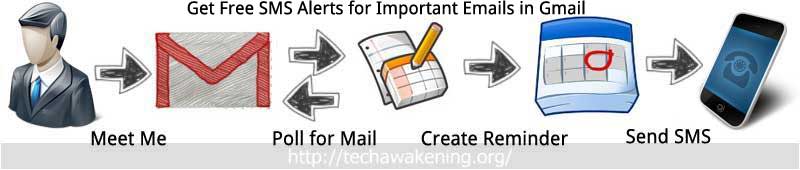
1. Creating a filter condition and linking it to a label in Gmail.
2. Google Docs periodically monitors the label thread for new incoming emails and creates a Google Calendar SMS reminder on receiving it.
3. Google Calendar sends you a SMS alert containing the subject of your message.
So lets see how to set it up. Might look lengthy but it’s very easy.
Get Free SMS Alerts for New and Important Emails on Gmail with Google Docs
1. Setting up Google Calendar to make SMS as default reminder channel
You can follow the instructions on how to configure for Google Calendar for phone notification from our previous article.
2. Creating filter condition and linking to Label in Gmail
- Login to Gmail.
- Click on the Gears icon on the top right and select Settings.
- Go to Labels tab.
- Scroll down and click Create new label.
- Give label name as sendsms and click create. Now label creation is done.
- Now click on filter tab.
- Click Create a new filter.
- Click Create filter with this search.
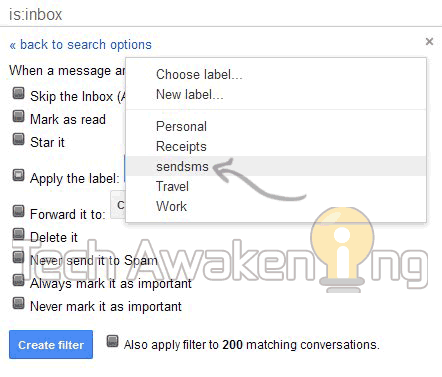
- Now check Apply the label and select sendsms from the drop down. Finally click create filter.
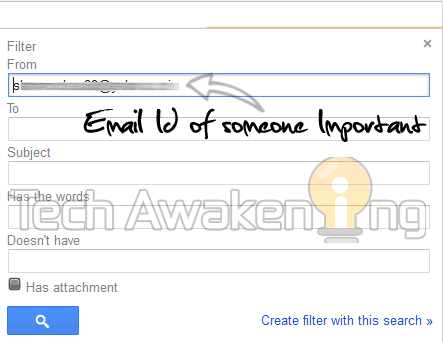
If you want SMS alerts only for emails from some important person such as your boss. Set the filter condition using ‘from’ field.
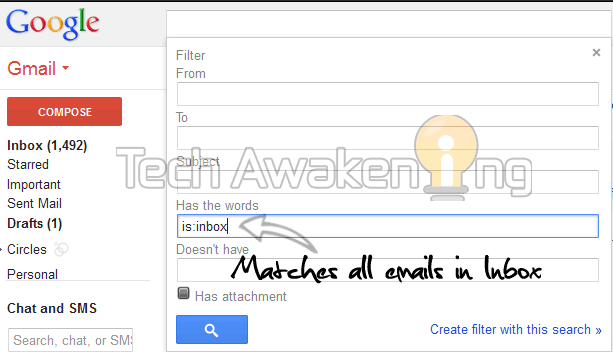
If you want SMS alerts for all incoming emails. Set the ‘Has the words’ field with is:inbox
3. Configuring Google Docs To Poll for New Incoming Emails
1. Login to Google Docs.
2. Click here to make copy of the spreadsheet. Click Yes, make a copy.
3. Now select Tools-> Script Editor. Then Resources-> Current script’s triggers.
4. Select click here to add one. Under events select Time-Driven then minutes timer and every minute and save it.
5. Click Authorize and then grant access. Now click close and save the trigger again. That’s it.
So, now on Google Docs will be polling your Gmail Account every minute for new incoming messages through the label you have created and will send a free SMS alerts as and when they arrive.
Thanks Romain Vialard for the original script.
Never miss any important emails be informed as and when they come to your inbox. Have trouble in setting this up? Do feel free do drop in your queries and problems.
[Update: 03-Mar-2014]
Disclaimer:
– Google has limits on number of sms reminders one can receive per day. Once it’s reached you will not be receiving alerts.
– Preferably set the timer interval to higher value (at-least 30 min or more) because frequent event creation might break calendar functionality.
This is a great tip. I don’t use google docs but this could a good service for my emails. Will be looking into this real soon. Thank you for sharing your tips and advice on this.
Welcome here mam 🙂
Thanks. This is one of the best way to get notifications for free. Especially will be very useful when you are waiting for some important mail.
WHER WOULD WE GIVE OUR MOBILE NO. ?
Well, I was able to set it all up. But there was no question about my mobile number. Have tested it with one of my other email addresses and – no suprise – it doesn’t work.
Which step or information did I miss?
Claudia,
Did you complete the Google Calendar setup (http://techawakening.org/website-downtime-free-sms-alerts-google-docs/988/#smssetup) mentioned in step 1? There you will be mentioning the number.
Why not skip the whole google docs thing and simply forward all filtered emails directly to your phone’s email address? “yourtendigitnumber@yourserviceprovidersemail.com”
It does not work most of the time hence the reason I came up with this trick.
Just set it up and tested; it seems to work. Thanks for the tips!
Some wording on Google Docs and Gmail has changed a bit since you created this how-to.
Wouter,
Thanks! Will soon update the article. Please spread the word if this article helped you out 🙂
hi… MR. Sundaram…
first of all thanks.. for this trick.. well i tried it… for the first time it work but when there is a second mail come from the same sender its not sending me sms… while its creating a calender event… everytime…
then i delete all the event from the calender for the same day.. then also i tried.. but still the result is same… im not receiving any sms alert…
is there any limitation like… they will send 1 sms per day.. or something.. else..?
watiting for your reply…
Thanks..
hey i hav gone throuh all d above procedure bt still its not working.
i havnt receive any sms from gmail.
and plz tell me one more thing how cn i saw ma mobile no.
Wonderful tip, i will be using google docs to upload my files and docs so it would be great if i get sms alerts of my documents.
Welcome Sameer 🙂
Hi Shunmugha
This is a great tip. I rarely use Google Doc. But this is very good service . thanks for sharing this with us.
Bryan
Welcome here Bryan. Good to see you 😀
Hi Shunmugha
I didn’t use Google docs functionality but it’s seems good now I try to post my docs on Google cloud.
Wow! Helpful tips for me. As I use frequently Google Docs, this tip can help me a lot.
Welcome here Satyakam. Happy that you found it useful!
Outstanding info once again. Thank you:)
Here is the code that sends an SMS to all new inbox messages
function SendSMS() {
var sheet = SpreadsheetApp.getActiveSheet();
var idemail = sheet.getRange(“A1”).getValue();
var message = GmailApp.getInboxThreads(0,1)[0].getMessages()[0]
var MesI = message.getThread().getMessageCount()
message = message.getThread().getMessages()[MesI-1]
var lastDate = message.getThread().getLastMessageDate()
if (message.isUnread()){
if (idemail<lastDate){
sheet.getRange("A1").setValue(lastDate)
var cal = CalendarApp.getDefaultCalendar();
var d = new Date(); d.setMinutes(d.getMinutes() + 1)
cal.createEvent(message.getSubject(), d, d, {location: message.getFrom()}).addSmsReminder(0);
}
}
}
OlegT,
Thanks for the code 🙂
When I put this code: appears out this warning: Illegal character. (line 3)
var idemail = sheet.getRange(“A1″).getValue();
Please wait. I am looking into your issue. With regards to illegal character error refer this:
http://techawakening.org/free-sms-alerts-new-email-on-gmail-with-google-docs/1130/#comment-1233
OK, I’m waiting!
Thanks a lot.
Just copy below give code (Modified)
function SendSMS() {
var sheet = SpreadsheetApp.getActiveSheet();
var idemail = sheet.getRange(“A1”).getValue();
var message = GmailApp.getInboxThreads(0,1)[0].getMessages()[0]
var MesI = message.getThread().getMessageCount()
message = message.getThread().getMessages()[MesI-1]
var lastDate = message.getThread().getLastMessageDate()
if (message.isUnread()){
if (idemail<lastDate){
sheet.getRange("A1").setValue(lastDate)
var cal = CalendarApp.getDefaultCalendar();
var d = new Date(); d.setMinutes(d.getMinutes() + 1)
cal.createEvent(message.getSubject(), d, d, {location: message.getFrom()}).addSmsReminder(0);
}
}
}
Sorry my above post contains error
function SendSMS() {
var sheet = SpreadsheetApp.getActiveSheet();
var idemail = sheet.getRange(“A1”).getValue();
var message = GmailApp.getInboxThreads(0,1)[0].getMessages()[0]
var MesI = message.getThread().getMessageCount()
message = message.getThread().getMessages()[MesI-1]
var lastDate = message.getThread().getLastMessageDate()
if (message.isUnread()){
if (idemail<lastDate){
sheet.getRange("A1").setValue(lastDate)
var cal = CalendarApp.getDefaultCalendar();
var d = new Date(); d.setMinutes(d.getMinutes() + 1)
cal.createEvent(message.getSubject(), d, d, {location: message.getFrom()}).addSmsReminder(0);
}
}
}
Can you make an video of it and upload it on YouTube.com.
You’ve explain everything clearly but it’ll be really helpful if you make an video of it.
Thanks
zmyest,
Sure would do it soon. Thanks for the suggestion 🙂
1. Can’t we make that spreadsheet by ourselves? what’s the need to copy?
2. Is it safe?
that code which we have written and moreover copying that spreadsheet?
Don’t mind, But I just don’t know anything about google docs,calendar that’s why I’m asking.
1. Yes, you can make the spreadsheet yourself. Just copy, paste the code onto script editor and setup the triggers. Copying the sheet eases the work of manually copying the code.
2. Yes, it’s absolutely safe. But it’s advisable that we investigate the code. For example sending a copy of the email you receive to another email is possible.
P.S: Code I have written is clean 🙂
Is it necessary that our mobile phone should remains open at the time when we get an email in our inbox? or can we get email alert even after a day if the mobile phone is switched off?
To receive email alert it’s not necessary that your mobile remains switched on, it will be delivered to your inbox. You can access it anytime. Whereas to get SMS alerts your mobile should be switched on.
Thanks a lot brother for your reply, I’m using it now. Its just fantastic.
I have got an reminder in my mobile phone as
Reminder: Subject
date time
my email id
Is there any way to get the email address from which we are receiving the email.
It will be really helpful if we get the email address of the sender also..
thanks again.
Welcome 🙂 OK. Change the line
CalendarApp.createEvent(threads[0].getFirstMessageSubject(),new Date(now+60000),new Date(now+60000)).addSmsReminder(0);
to
CalendarApp.createEvent(threads[0].getFirstMessageSubject() + threads[0].getFrom(),new Date(now+60000),new Date(now+60000)).addSmsReminder(0);
Do share the post with your friends!
bro, I’m sorry i have no idea how to edit that, I don’t know anything about google docs… would you tell step by step procedure please?
Go to Data->Script Editor. Change the line I have mentioned then save it. That’s all.
Great post..!!
While changing to this:
“CalendarApp.createEvent(threads[0].getFirstMessageSubject() + threads[0].getFrom(),new Date(now+60000),new Date(now+60000)).addSmsReminder(0);”
I am getting an error of:
“TypeError: Cannot find function getFrom in object GmailThread. (line 7)”
Please clarify.
And also if possible, please include some line of removing previous events in Google Calendar (the events which were created by this script only) as when I opened my Google calendar, my browser hanged and I could not update any settings (This would also help me in keeping Calendar clean in case I need it later someday). It would be perfect.. Thanks again for wonderful post… 🙂
hey, sorry but my first comment was not published. The suggestion you gave for ‘zmyest’ to include senders email Id didn’t work for me. I was getting an error of ‘TypeError: Cannot find function getFrom in object GmailThread.’.. any solution for this?
Optimus,
Here is the updated version. Change the line
CalendarApp.createEvent(threads[0].getFirstMessageSubject(),new Date(now+60000),new Date(now+60000)).addSmsReminder(0);
to
var message = threads[0].getMessages()[0];
var sender= message.getFrom();
CalendarApp.createEvent(threads[0].getFirstMessageSubject() + sender,new Date(now+60000),new Date(now+60000)).addSmsReminder(0);
var message = threads[0].getMessages()[0];
var sender= message.getFrom();
CalendarApp.createEvent(threads[0].getFirstMessageSubject() + sender,new Date(now+60000),new Date(now+60000)).addSmsReminder(0);
var sender= message.getFrom();
the 2nd line of code should be actually
var sender= message[0].getFrom();
I believe it isn’t necessary because message variable is already a primitive type not an array.
Shunmugha Sundaram FYI
A primitive type is predefined by the language and is named by a reserved keyword.
Primitive values do not share state with other primitive values.
here message is an object; clearly
Class.functionName() OR newObject.methodName()
and getFrom() expects and array not a primitive type as you said!
Cheers!
rtuniki
Agreed but it’s just object not an array of object hence message[0] is not required.
My Dear Friend,
YOU Said: I believe it isn’t necessary because message variable is already a primitive type not an array.
RULE #1
And the answer is:
PRIMITIVE DATA TYPES are not OBJECTS;
A primitive type is predefined by the language and is named by a reserved keyword.
Primitive values do not share state with other primitive values.
Secondly YOU Said: Agreed but it’s just object not an array of object hence message[0] is not required.
And the answer is:
An array is a container object that holds a fixed number of values of a single type.
The length of an array is established when the array is created. After creation, its length is fixed.
message[index].getFrom();
HERE:
message is a container object that holds a fixed number of values of a single type;
And here the values are: The SENDER;
Pls don’t confuse yourself or others, by confusing yourself;
Cheers
Rakesh,
Thanks for the insight! 🙂
Brother, I did replaced the lines but then also I’m not getting email address of the sender, now what to do?
Sorry. Try the updated version:
http://techawakening.org/free-sms-alerts-new-email-on-gmail-with-google-docs/1130/#comment-639
After replacing, save the script.
great bro, its working perfectly.
thanks a lot once again for this remarkable post…
I think with this we can get email alerts throughout the world?
right?
Yes. Google does support SMS delivery to almost all countries.
Although it is more then enough to get email address + subject. but as you have able to write the code for getting senders email id, I’m just curious that is it possible to even get the text message which they’ll send us.
bro, i’m getting this message. can you tell wat it is…
Reminder: Summary of failure for Google Apps Script:
Copy of Send…@
date month year
time
myemail id.
I guess if you have over used the resources, Google will send failure notifications.
When adding a trigger you needed to disable error notifications
Tools / Script editor / Resources / All your triggers… / notification
Hi,
Have used this technique for the last 20 days and was getting alert of all mails. But for the last two days, it almost stopped. Getting alerts for only few mails.
Please let me know what to do.
Nice article! But sometimes the subject and the name gets messed up. Can you tell how to add ” From:” before a senders name or email?
Siddharth,
Welcome!
var message = threads[0].getMessages()[0];var sender= message.getFrom();
CalendarApp.createEvent(threads[0].getFirstMessageSubject() + "From: "+sender,new Date(now+60000),new Date(now+60000)).addSmsReminder(0);
Hi,
Thankyou for your post.
When I use this section of code and save it, it says “illegal character line 15”, and doesn’t work.
what could I use instead for intended effect?
many thanks.
Benjamin
Benjamin,
Please remove all the double quotes and manually type it. Change all “ to
"I have also updated above chunk of code to remove all illegal characters, try using it now.
Thanks so much for replying so quickly!
It now works. The other thing I had to do was go to the “triggers” window, save and “Authorize” again before it worked.
Is there somewhere you can recommend to learn the basic scripting language used here?
Kind regards.
You are most Welcome Benjamin. If you liked this article do share it on social networks. Would you ? 😉
Here are few references to help you learn basics:
http://googleappsdeveloper.blogspot.in/
http://www.google.com/script/start/
Greetings,
I tried the above mentioned codes and I still receive ONLY what is sent the in subject line, I do not receive the Sender’s E-mail address, Sender’s Name a E-mail body Text.
Thanks & best regards
Hi Shunmugh,
1- I inserted the following codes:-
/* Get Free International SMS alerts for new incoming Emails on Gmail*/
/*Instructions at http://techawakening.org/?p=1130 */
/*Original Script by Romain Vialard
Modified by Shunmugha Sudararm for Techawakening.org*/
function sendsms() {
var label = GmailApp.getUserLabelByName(‘sendsms’);
var threads = label.getThreads();
var now = new Date().getTime();
for(i in threads){
CalendarApp.createEvent(threads[0].getFirstMessageSubject(),new Date(now+60000),
new Date(now+60000)).addSmsReminder(0);
}
label.removeFromThreads(threads);
}
And I receive the sms notifications without the sender’s name and e-mail address.
Also when I put directly a Reminder on the Calender, I receive it regularly.
2- I inserted the following codes:-
/* Get Free International SMS alerts for new incoming Emails on Gmail*/
/*Instructions at http://techawakening.org/?p=1130 */
/*Original Script by Romain Vialard
Modified by Shunmugha Sudararm for Techawakening.org*/
function sendsms() {
var label = GmailApp.getUserLabelByName(‘sendsms’);
var threads = label.getThreads();
var now = new Date().getTime();
for(i in threads){
var message = threads[0].getMessages()[0];
var sender= message.getFrom();
CalendarApp.createEvent(threads[0].getFirstMessageSubject() + “From: “+sender,new Date(now+60000),new Date(now+60000)).addSmsReminder(0);
}
label.removeFromThreads(threads);
}
I did not receive the sms notifications But the sent e-mail goes to the calender as a Reminder named “Subject line From: Sender Name ”
So the function exports the sent e-mail to the calender with the subject line and Sender’s name and e-mail address but I do not receive the sms notification.
Another strange thing: when I put directly a Reminder on the Calender, I do not receive it when the second codes are inserted.
So the second code blocks both the sms notifications of the imported E-mail from Gmail and for the direct reminders.
Waiting to hear from you!
Thanks and best regards,
Shunmugh,
Since you are in loop(for loop) you can use the index instead.
/*
//modified by rtuniki;
//rtuniki@gmail.com
//http://facebook.com/rtuniki
function sendsms()
{
var label= GmailApp.getUserLabelByName(‘Sendsms’);
var threads= label.getThreads();
var now= new Date().getTime();
for(i in threads)
{
var message= threads[i].getMessages();
var from= message[i].getFrom();
CalendarApp.createEvent(threads[i].getFirstMessageSubject() + “From: “+from,new Date(now+60000),new Date(now+60000)).addSmsReminder(i);
}
label.removeFromThreads(threads);
}
*/
Thanks!
Also the text limit is 119 per SMS. Is there any other way to increase the text limit?
Siddharth,
I guess no!
hi, if you help us to remove the remainders created by your event script after the SMS got fired will, be helpful to manage our google calender efficiently. but this script is doing great.
many thanks!!!
Hey,
I followed the instructions which are given here and also the script by Romain Vialard. However, when I checked the script by sending a mail from my other account, I got the SMS but then I got it continuously for 20-30 times for the same email.
Any idea how to correct this?
Prime,
Did you manually run the script? Just modify this SpreadSheet and start using it.
Shunmugha Sundaram:
Bro, I’ am getting this error for 4 times daily which says
Reminder: Summary of failure for Google Apps Script:
Copy of Send…@
date month year
time
myemail id.
please tell me how to stop receiving this error messages.
Disable the notifications as suggested by OlegT.
http://techawakening.org/free-sms-alerts-new-email-on-gmail-with-google-docs/1130/#comment-684
bro, date and time is taking too many characters and its taking subjects and senders emails space in it.
how to remove date and time?
Shunmugha Sundaram: Bro how not to get date and time in the message which we get..?
its taking too many characters in the reminder message..
zmyest,
Google is appending the time stamp in the message by itself. I am not inserting the time in the code.
Many thanks!!! Very useful, just checked it and it works! Great job…
Welcome George!
Don’t forget to share the article 😉
Hello there,
Thank you very much for this great article It’s really very useful for me. I have some questions please :
1-Why does it show MY email address in the SMS message? It doesn’t show the sender’s or the editor’s address.
2-Is it possible to shorten the date format a bit? So that I can see more of the actual content in the message?
3-Regarding the chart limit of 119 I think I have WAY Less limit, can this be caused by arabic letters in the message?
Thanks very much!!
Thanks!
– You can refer my previous comment on how to include sender’s email id in the message.
http://techawakening.org/free-sms-alerts-new-email-on-gmail-with-google-docs/1130/#comment-676
– Date is appended automatically by Google. I guess we could not do anything about that.
– Ya that might be the reason behind it.
If you liked the article do share it on Social networks 🙂
To ensure that SMS does not contain your email, you need to rename the calendar. Go into the settings of google calendar / Calendars / Calendar Name.
OlegT,
Thanks again for the Tip!
Thank you very much, everything works perfectly.
Hi. Thanks for the script. Is it possible to get text from the body of the email message, to be sent in the SMS alert (as much as would fit)? What do I add to the script to enable that? Thanks.
I didn’t receive all sms alerts.
I wonder why?
worked like a charm(although getting atleast 3 sms 4 same mail.p.s-i have not manually ran the script).three cheers 2 u 🙂
Kris,
You are most welcome. Ideally you should get only one SMS per email not sure why that many are coming 🙂 Just cross check by going to Google Calendar and see if only one reminder is created per email if that’s the case nothing to worry.
If you liked the article do share it. Give it a like and share 🙂
Hi.
I do not get all sms alerts !.
I also get the copy of failed sms with details in my email. Iam not worried about these email notifications rather it helps me know whether the circuit is intact or not.
What shud i do to get all sms alerts without missing any ?.
rgds
Hi.
I do not get all sms alerts !.
email notification says – “Cannot connect to Gmail (line 9)”
I also get the copy of failed sms with details in my email. Iam not worried about these email notifications rather it helps me know whether the circuit is intact or not.
What shud i do to get all sms alerts without missing any ?.
rgds
I also get the copy of failed sms with details in my email. Iam not worried about these email notifications rather it helps me know whether the circuit is intact or not.
What shud i do to get all sms alerts without missing any ?.
rgds
Not sure why it has failed. Could be a network issue. Try again following the instructions exactly as mentioned.
Cheers!
Hi
Nice, I Work with elance, freelancer and i get remainders to log on and work , Great tip sir
You are most welcome! Do share the article 🙂
Is the same facility available for Yahoo and other mails?
No Sandeep it’s not available for other providers. Sorry. This demo uses Gmail API’s.
But alternatively you can create a Gmail account then set an auto forwarding rule in other providers like Yahoo, Hotmail to send a copy of all incoming emails to Gmail account. After which you can follow the above trick.
Hello Shunmugha Sundaram,
I followed all the steps in this page and I have received sms notifications.
But when I receive the sms, I receive ONLY which is written in the Subject Line of the E-mail sent to my inbox, I do not receive the Sender’s name, Sender’s E-mail Address and E-mail Body Text!!
Is there a way to receive also, in the sms notification, the Sender’s E-mail address and the E-mail Body Text??
Looking forward to receive your prompt reply.
Please accept my best regards,
Hi,
Thanks for dropping in your query. If you want sender email id too do the code modification mentioned here:
http://techawakening.org/free-sms-alerts-new-email-on-gmail-with-google-docs/1130/#comment-639
But you will not be able to receive body because Google imposes limit on the length of the SMS so email body text will not fit into the SMS that’s the problem. Hope I have clarified your doubts now.
If you liked this article, do like and share on Facebook and other social networks 🙂
Hi Shunmugha Sundaram,
Look, this is the original script:
/* Get Free International SMS alerts for new incoming Emails on Gmail*/
/*Instructions at http://techawakening.org/?p=1130 */
/*Original Script by Romain Vialard
Modified by Shunmugha Sudararm for Techawakening.org*/
function sendsms() {
var label = GmailApp.getUserLabelByName(‘sendsms’);
var threads = label.getThreads();
var now = new Date().getTime();
for(i in threads){
CalendarApp.createEvent(threads[0].getFirstMessageSubject(),new Date(now+60000),
new Date(now+60000)).addSmsReminder(0);
}
label.removeFromThreads(threads);
}
And this is the updated version to be able to receive also the sender’s E-mail address:
/* Get Free International SMS alerts for new incoming Emails on Gmail*/
/*Instructions at http://techawakening.org/?p=1130 */
/*Original Script by Romain Vialard
Modified by Shunmugha Sudararm for Techawakening.org*/
function sendsms() {
var label = GmailApp.getUserLabelByName(‘sendsms’);
var threads = label.getThreads();
var now = new Date().getTime();
for(i in threads){
var message = threads[0].getMessages()[0];
var sender= message.getFrom();
CalendarApp.createEvent(threads[0].getFirstMessageSubject() + sender,new Date(now+60000),new Date(now+60000)).addSmsReminder(0);
}
label.removeFromThreads(threads);
}
Am I right???
Waiting for your reply
Best regards,
I have updated the sheet now. Make copy of this new version and try now.
You will be getting sender email id along with the subject now.
https://docs.google.com/spreadsheet/ccc?key=0Aqy7rBwoHlSvdHo3QkNCem1YNHY1YmtfOGl0RzZaVEE&newcopy=true
Do share this article if you found it useful.
Cheers!
Hi Shunmugha Sundaram,
The function exports the sent E-mail to the Calendar with both the sender email id along with the subject, BUT I do not receive the sms notification!!
Thanks!!!
This code tracks only incoming emails not sent mails. Delete the old sheet and start over again. Create the label correctly and map it to the filter. Then copy the updated sheet and set up the triggers. I have tested it and it’s working.
Also see if you have turn on SMS as your default notification channel on Google Calender.
Dear Shunmugha,
Yes, I know that this code tracks only incoming emails, which are SENT to me.
Brother, if the code exports the incoming emails to the calender that means that the label is created correctly, and it’s mapped to the filter, right??
My default notification channel on Google Calender is SMS!!
Try to send me an e-mail, as a test!!
Thanks
Yes. If it appears in calendar it means that the code is doing it’s job correctly. OK can you tell me what is your filter condition? Have you created it for all incoming emails or ?
If you won’t mind share your screen with me. Do it via https://join.me/
This is my filter condition:
Matches: is:inbox
Do this: Apply label “sendsms”
Hmm.. That could be the problem. It might be causing excessive resource usage. Just try creating filter using some condition instead of is:inbox. Try from tomorrow. As of now delete and keep all reminders created by this script in your calendar.
Then let me know what happened.
Let me understand better:
I will delete the current condition and I will create a filter to receive sms notifications for e-mails sent to my inbox from sender@hotmail.com
And for the current reminders in my calender, will I delete them all??
Yes you are rite, create filter constraining it to only selected persons (Eg: Boss). Delete all reminders create by this script alone. Then stop the trigger by deleting it. Tomorrow again create a new trigger and see how things go about.
Now there is no reminders in my Google Calendar.
Now There is no files in my Google Drive.
I created a new filter in my Google Mail.
Tomorrow I will create a new trigger, and I will surly inform you about the new situation.
Thanks a lot bro Shunmugha!
Way to go 🙂 Welcome buddy.
Hi Shunmugha,
Few minutes ago, I copied the sheet you have updated: (https://docs.google.com/spreadsheet/ccc?key=0Aqy7rBwoHlSvdHo3QkNCem1YNHY1YmtfOGl0RzZaVEE&newcopy=true).
I waited more than 24 hours since I deleted yesterday the old trigger.
I will inform you if I will or not receive the sms notifications with the sender e-mail address.
Thanks and best regards,
Hi Shunmugha,
Look there is new situation:
The code exports correctly to the Calendar the e-mail I received with subject line and sender name and sender e-mail address.
This is the exported text to the calendar:
Subject line: sender name
but I did NOT receive the sms notification!!!
I put directly a reminder on the calender using the same text but without the two like this:
Subject line: sender name sender@domain.com
and I RECEIVED the sms notification!!!!
What do you think??
Hi,
I think that when the e-mail address is put between less-than sign & greater-than sign, the sms notification can not be received!
I put a reminder directly on the calendar with only the two less-than sign & greater-than sign without any another characters, and I received the sms notification.
ALSO I put a reminder directly on the calendar with the text: e-mailaddress@domain.com between the two less-than sign & greater-than sign and I did NOT receive the sms notification.
ALSO I put a reminder directly on the calendar with the text: e-mailaddress@domain.com without the two less-than sign & greater-than sign and I received the sms notification.
ALSO I put a reminder directly on the calendar with the text: world between the two less-than sign & greater-than sign and I did not receive the sms notification.
SO WHEN THERE IS A WORLD OR AND E-MAIL ADDRESS PUT BETWEEN THE TWO LESS-THAN SIGN & GREATER-THAN SIGN, THE SMS CAN NOT BE RECEIVED!!!!
Is there a way to receive the sms notification with the subject line and the sender name WITHOUT his e-mail address as the e-mail address must be put between the two less-than sign & greater-than sign???!!!
Or a way to receive the subject line and the sender name and the sender e-mail address but WITHOUT the two less-than sign & greater-than sign which block the sms notification even if the reminder is put directly??
Thanks!
Strange. I believe that isn’t causing the problem because I am getting it properly see this screenshot:
http://i47.tinypic.com/349axb5.png
But if you still think that is causing the problem, for your satisfaction try what I have said in the email 🙂
Can I receive also in the sms notification the e-mail body??
I know that I will not be able to receive it because Google imposes limit on the length of the SMS, but if the e-mail body contains only one word, so can I receive it???
Thanks!
YESSSSSSSSSSSSSSSSSSSSSS YOU ARE GREAT!!!!!
FINALLY I RECEIVED THE SMS WITH THE SUBJECT LINE, WITH THE SENDER NAME AND WITH THE SENDER E-MAIL ADDRESS!!!
Thanks a lot!!!
You are most welcome 😀
It works wonderfully. Is there any way to limit the number of characters of message subject? (let say to 5 characters)
I also use google voice (and forward text messages to my gmail) and all I want to know is if it is a text or an email message, so the first 4 or 5 characters of the subject will suffice.
Thanks in advance
Azucena,
Welcome 🙂 In that case you need to modify the code as follows. Change the line
CalendarApp.createEvent(threads[0].getFirstMessageSubject(),new Date(now+60000),new Date(now+60000)).addSmsReminder(0);to
CalendarApp.createEvent(threads[0].getFirstMessageSubject().substring(0,5),new Date(now+60000),new Date(now+60000)).addSmsReminder(0);Try and tell me if it worked for you. Also don’t forget to like and share the article 🙂 Do spread the word.
Cheers!
Not sure if my post was actually delivered. I was looking to limit the subject to 5 characters.
Thanks again
A
Hi,
thanks for this awesome post!
Is it possible to specify a certain calendar to be used for the SMS alerts (in addition to the modification above to have the sender included in the sms), as I would prefer to not have them in my default calendar?
Thanks in Advance.
Phil
Phil,
Thanks! That’s an awesome suggestion. I guess it’s possible. Will soon implement it and update the doc. Will let you know once done. It will be useful for other users too 🙂 Cheers to you!
Mean while if you found this article useful do share it on social networks. Spread the love.
Shunmugha,
Thanks a lot. And please keep me posted if you find a solution for the above problem.
Another thing that I (and others maybe too) would value very much would be, if you have an idea to make this work for new mails marked as important by GMail (as in the Priority Inbox). Unfortunately the standard gmail filter do not work as the search term ‘is:important’ “will never match incoming mail”.
Thanks again.
Phil
I’d love this feature, too!!
Because now I get sms alerts about all events in my main calendar, which is so annoying that I stopped using it.
Hmm. My bad 🙁 Will make sure that this feature is available by this weekend 😉 Do share this article.
Hi Shanmugha
I get an error message :
sendsms TypeError: Cannot call method “getThreads” of null. (line 10)
In the filter , In FROM section my 2 sender’s email id is written separated by “OR ” eg: first@eu OR second@gmail.com.
Iam not getting the sms alerts from one sender(second@gmail.com) and iam getting the sms alerts from the other sender (first@eu).
Until day before , things worked fine but from yesterday this problem has started ,… Can U help me out ?.
much regards
See if you have given the correct label name. It should be sendsms
iam not getting thru the problem… the line 10 error written before persists. is there any way i can clean any cache etc of the google doc.. i dont know. i guessed !.
regrads
Hi Shunmugha
thanks for ur quick replies as always.I was sent this message from google app failure notification.
Summary:
Error Message Count
Cannot connect to Gmail (line 9) 2
TypeError: Cannot call method “getThreads” of null. (line 10) 863
We’re sorry, a server error occurred. Please wait a bit and try again 1
It seems I had all the problems due to server failure? google. Is it so ?.Can i cancel notifications so that resources are not over used !. I dont know.
Secondly, today I have started getting all the smss properly.
Is there any other provider like google who provides email to sms conversion ( yahoo,rediff have limitations )?.( Becoz server failure wud affect my entire busi affair).
thanx in advance.
It’s probably because you have overused the system resources. Google Apps free version does imposes limits to avoid misuses. If is going to effect your business suggest you to go for Google Apps for Business which is the paid version.
Yes, there are some third party service which promise these kind of services but most of them are not dependable.
Or alternatively reduce the triggers time from minutes to hourly to avoid exceeding quota limits.
Hope it helps. Would appreciate if you can like and share this article if you found it useful.
//modified by rtuniki//rtuniki@gmail.com
//http://facebook.com/rtuniki
/*
function sendsms()
{
var label = GmailApp.getUserLabelByName(‘Sendsms’);
var threads = label.getThreads();
var now = new Date().getTime();
for(i in threads)
{
var message = threads[i].getMessages();
var sender= message[i].getFrom();
CalendarApp.createEvent(threads[i].getFirstMessageSubject() + “From: “+sender,new Date(now+60000),new Date(now+60000)).addSmsReminder(i);
}
label.removeFromThreads(threads);
}
*/
thanks,
rtuniki
Hi,
Thankx for your code.
But when i run it, i m getting error like “Illegal character at line 4”.
i.e, on line “var label = GmailApp.getUserLabelByName(‘Send SMS’);” of the code.
Please help.
Replace quotes by manually typing it.
Hi Shunmugha
Thnx for all help.
1. For Google Apps for Business (paid) service, how to use your application to get the smss?.
2. Wont be using other third party services.
3. Every minute I get important mails for sms purpose. hence cant switch to hour driven mode.
4. I have kept not to notify me but still i get app script failure notifi immediately. !
I seek ur advice on above.
thanx
The procedures are same only difference is you will have higher quote limits. To turn off script failure notification refer this :
http://techawakening.org/free-sms-alerts-new-email-on-gmail-with-google-docs/1130/#comment-684
Its heartwarming to see ur prompt replies for all queries raised. i will do likewise and info u if i face further problems .
thankx big !.
Hi Shunmugha
Why do I get same sms messages many times.
iam using the follwoing code:
/* Get Free International SMS alerts for new incoming Emails on Gmail*/
/*Instructions at http://techawakening.org/?p=1130 */
/*Original Script by Romain Vialard
Modified by Shunmugha Sudararm for Techawakening.org*/
function sendsms() {
var label = GmailApp.getUserLabelByName(‘sendsms’);
var threads = label.getThreads();
var now = new Date().getTime();
for(i in threads){
CalendarApp.createEvent(threads[0].getFirstMessageSubject(),new Date(now+60000),
new Date(now+60000)).addSmsReminder(0);
}
label.removeFromThreads(threads);
}
I do not want senders email address and this code does not send senders email also.
I installed .. installed the speradsheets manytimes. but always multiple times same message got !!.
help reqd…
Ajit,
If you want sender’s email too use the updated sheet instead. Refer to previous comments.
Hi
I do not want senders email id and the above code does not send the same.
repeated messages: for eg: at 7.30 pm my inbox got 4 emails as alerts. google calender showed only 1 alert polled and sent it to me three times and missed to send me the other 3 emails which i shud have had got…. how to go about this..?.
rgds
If you don’t want sender id to be sent remove the sender variable.
i.e.,
CalendarApp.createEvent(threads[0].getFirstMessageSubject(),new Date(now+60000),new Date(now+60000)).addSmsReminder(0);
If it is a threaded/nested emails only first message from it will be sent not the others.
Hi
1. I removed the sender variable from the code and no more I get the sender details.
2. i created the label “send sms” as a main head and is not nested(as u adviced) . I have not created any other label or nested label also.
Still the repeated same messages persists.
!@$#… dont know what to do.
thanks in adv
Thanks so much for such a great Script..! 🙂
Do spread the word 🙂
Sure..! 🙂
Thank you very much Shunmugha Sundaram. Its very helpful for me. Keep this good work up. Thanks again man. 🙂
Thanks Subhadeep! Stay in touch by signing up for newsletter. There is more articles coming up in future featuring Google Docs to do useful stuffs. Do share this post on social networks 😀
gud jann
I got repeated sms for one email, almost 20 sms before i disbale the feature. What went wrong?
Happened only for one email or all emails? What is the filter condition you have chosen?
I just sent one email. the filter condition is is:inbox
Did you manually run or via triggers?
hi Shunmugha Sundaram
I need to get all the mail alerts through sms. so i choosed second option.
I have done everythin as u mentioned in your steps…..
but stil i coundnt get the alerts…
any idea of this issue??
Could you please elaborate on what you mean by second option I could not get you. For it to work you need to follow all the steps starting from setting up Google Calendar.
Yeah I did all the steps ma… i am getting only few mails only not all the mails which are coming to my gmail…
It depends on the filter condition you have sent. Also if you have exceeded the allocated limit you will not be receiving it.
how could i know whether my mail are exceeded than he allocation??
It is an useful tip indeed.. I was searching to get email alerts as SMS and got it here.. Thank you..
Thanks. Welcome here buddy!
This worked perfectly and was exactly what I was looking for. I wish Google would offer this natively instead of forcing people to forward the email to an SMS address. Thank you very much for taking the time to post these steps. Your instructions were great!
You are most welcome! Happy that you found it useful. Yes, if it was natively available it would have been awesome. Hope you won’t mind sharing and giving a like to the article 😉
Sorry, but I don’t use Facebook due to privacy concerns, so I posted here to say thanks. If I run into anyone else looking to solve the email-sms alert dilemma, I will of course refer them to this page. 🙂
Hmm. Thanks! But do share in Twitter or Google Plus or in any social network in-case you are in any 😉
Hi shanmugha
days togther I struggled to get nested/threaded emails as sms. tried multiple steps… all failed. later…. I thought if i keep every minute polling of my spreadsheet plus if i separate ( or fool the system…) the incoming nested/threaded emails (all from same sender)… by adding another condition to my filter so that the mail is picked by goo doc as an event and also is polled by google drive within seconds ( usually so) and simultaneously (soon after in milliesecs) get disposed of from my inbox ( either get deleted or archived). that the nested emails get polled separately.. I might be succeeding… hence i added other criterias to my filter labelled”sendsms”, as….
1. never send to spam
2.always mark important
3.skip the inbox…. and created the filter.
although i did it and succeeded , i still dont know… how the mail can be polled if it has escaped or removed from inbox upon arrival…. or the polling is more frequent than the published every ” 1 minute….. given lowest choice”.
somehow the problem has got solved….for nested mails.
all problems have atleast one solution…
keep up the good work..
That’s really awesome to hear that you somehow got it to work! Cool.
is it possible to send sms of email content,
any body share the script…
Hi Shanmugha
Iam having a peculiar problem…. a ghost work like!!
I deleted (my email example ajit@gmail.com)my google calender events, stopped notifications ie no sms, no popups,no email…(mobile no still is registered)… kept my calender name as “hi”(without quotes)…. in short no further event registration shud happen… then i deleted the google spreadsheet that was created from your link for “sendsms”….. so polling of my calender named “hi “…. also shud stop…
I deleted all labels ,filter, no forwarding of my email(ajit@gmail.com)..
still a particular senders email reaches me as SMS with the calender name “hi” also in sms….I was shocked….. Any ghost memory is there for the previously created google drive and calender utilities..
i dont know… can u suggest how to solve this…. how can i delete my calender entrirely.. is it possible…. i cannot change or delete my email account…?..
regards
Hii Shanmugha, i have been trying to follow what you have typed above, but i don’t understand why is this not working properly for me. So, can you please help me with a video(the entire process) and share it, so that not only me, any one can easily follow it and get benefited from this.
Waiting for ur reply.
Thank you
Thanks for the suggestion will try coming up with the video demo soon.
Hii shunmugha, i have tried the code given by you above, i don’t know what’s wrong with my spreadsheet i am getting a weird email everyday morning stating that:
“Your script, Copy of Send SMS – Techawakening.org, has recently failed to finish successfully. A summary of the failure(s) is shown below. To configure the triggers for this script, or change your setting for receiving future failure notifications, click here.
The script is used by the document Copy of Get Free SMS alerts for New Incoming Emails on Gmail – Techawakening.org.
Summary:
Error Message Count
Authorization is required to perform that action. 341
etc………..”
although i have granted it full access, but still i am getting it and even the mails are not going into the spreadsheet or the calendar. So could you please just give me the exact and proper code so that i don’t face any problem from now onwards(sender name, mail subject, receiving time should come to my mobile)… my email id is: venkataharish13@gmail.com. So, please send me even the correct instructions. I hope its not a burden for you.
Thanks a lot. Waiting for ur reply..
Hareesh,
There is nothing wrong in the code because it is working for everyone. Delete all the existing sheet. Make a new copy. Authorize and create the triggers properly, keep the polling time for say about once per 5 minutes. Then for the first time alone run the function manually from Run menu.
I had this error message several times, too. And I did as you said: delete all the sheets, make new copy and authorize and create the triggers. And, about 2:30 AM (CET) I usually receive messages from google that there were errors while executing script. And usually the error messages are like Hareesh’s. But, I yesterday received different message:
Error Message: We’re sorry, a server error occurred. Please wait a bit and try again. Count: 3
Details:
Start Function Error Message Trigger End
10/12/12 4:08 PM sendsms We’re sorry, a server error occurred. Please wait a bit and try again. time-based 10/12/12 4:08 PM
10/12/12 4:27 PM sendsms We’re sorry, a server error occurred. Please wait a bit and try again. time-based 10/12/12 4:27 PM
10/12/12 4:49 PM sendsms We’re sorry, a server error occurred. Please wait a bit and try again. time-based 10/12/12 4:49 PM
Can you understand from these messages what’s going on. Thank you… Nikola
Finally its working.. Thanks a lot shunmugha. Is there any way where i can also get the first few lines of the mail that i receive??
I change have pop3 checked by gmail so I change the:
var label = GmailApp.getUserLabelByName(‘sendsms’);
to:
var label = GmailApp.getUserLabelByName(‘2nd.Mail’);
Also, create label in Gmail is 2nd.Mail, accordingly. All the step I follow instruction, strictly, but it’s not work. It’s send the error to mail as following:
“Exceeded maximum execution time”.
Any suggestion?
Thanks
You might have exceed the allocated quota. Wait for sometime and re-try.
May be my situation like R in this thread “http://techawakening.org/free-sms-alerts-new-email-on-gmail-with-google-docs/1130/#comment-1622”.
So, could you email me what you sent to R, in order I try if it working?
Thanks and best regards,
Chung
But for R it was a different kind of issue. He was able to get notification on creating manual reminder but not when created programmatic-ally. I guess he did not receive any kind of error message like the one you are getting.
Thanks for your reply.
My trouble seem be from the filter. If I mark it to the label without “Skip Inbox” (Mark to the label only, leave it to Inbox), I can receive the SMS. Now, checking more.
Regarding to “Exceeded maximum execution time”.
It’s happen when the script take long time to execute (likely, when I click the “Run” button it’s take long time to “Running function sendsms…”).
Specially, when I change the code then run to test, then it happen. Anyway to solve it?
Thanks.
Shunmugha Sundaram, thanks for your reply.
But what is allocated quota for? And it’s not working (I has not received any SMS, until now)?
How do I add my phone number havn’t found anything to put it in…
Thank you for your help
It must me configured in Google Calendar. I have mentioned the link to the tutorial in step 1.
I like your article.
i use it.
can you add subject , sender and full massage ?
please add it and give it
Hi,
thanks for your app, can it be possible to send emails depending on some value to be send to an assigned mobile number (different mobile numbers linked to different variables.)
I believe you can only link one mobile number in Google Calendar so it is not possible.
Hi,
am seeing there are lots of modifications in comments list.
So, its a request to Mr.Shunmugha Sundaram to please update the fine working script in the setup instruction.
thanks.
Hi Shunmugha,
I am facing some issue while configuring sms alerts.
Have completed successfully till point 4 of step 3 “Configuring Google Docs To Poll for New Incoming Emails”.
After saving the trigger in point 4 of this step, am not able to find authorize tab so that can move forward.
Please help.
one thing…. is the notification instant.. when a new mail has arrived in my inbox.. after how much time will i be notified….??
Most of the time it’s instant but every much subjected to network traffic at the given time.
Hi,
I have been using this script for several months now and I think it is excellent.
Just one minor question, is it possible to:
Automatically delete the calender events?
OR
Put all the events in a secondary calendar?
I use my calendar a lot, and sync with my phone and outlook at work so I keep getting reminders in addition to the SMS. Using a secondary calendar or deleting them before they sync will minimise this issue.
Thanks,
Joe
Thanks for your suggestion. Yes I have already come up with a fix for it by using a secondary calendar. Will soon update the code 🙂 Do spread the love by sharing this article on social network if you liked it.
Hi Agartine,
I have released a new version.
– To fix duplicate SMS issue.
– To create reminders in separate calendar and not in default.
Start over again with new one. Test it out and let me know the results please.
By the way.. one thing I learned recently…
I have 25,000 e-mails in Gmail. Of which only 330 DO NOT contain the word unsubscribe. I have therefore set my sms filter to pick up all e-mails that do not contain the word unsubscribe.
This ensures I mostly get only personal e-mails, with a fairly small number of exceptions.
i have done set up acccording to the instructions provided stil not getting any notifications . has any1 faced the problem erlier …. wat can be the possible problem or mistake??
It’s not working please reply
Great stuff!
But i get over 4 SMS and reminders to gmail.
Hi Shunmugha Sundaram, Thank you so much for this tip. It really helps. i have only one problem. The SMS do not stop, even after I delete the email.
The SMS messages keep comming every 3 min or so.
How can I limit the test messages to just one or two when the email hits my Gmail account filter? Thank You.
John,
Welcome 🙂 Do share this article. No of SMS you get is determined by number of reminders created in Google Calendar. If you are getting more SMS for a single reminder it might by due to network latency. But code does not pick up the same email twice because once it has read the email it deletes the label associated to it so it does not pick the same message the next time.
Any how I will try looking into code again 🙂
Ok Thank You
Hi Agartine,
I have released a new version.
– To fix duplicate SMS reminder issue.
Delete the old project and start over again with new one. Test it out and let me know the results please.
Hello Brother Shunmugha Sundaram,
I am receiving sms notifications only for some mails. For instance, if I get 15 mails a day, I receive sms notifications only for 3 or 4 mails. Kindly help.
Regards,
Jayaprakash.
hi..i followed ur steps n i m receiving sms alerts .then i wanted to receive sms alerts wiht sender id ..so i used the updated spread sheet ( i copied it ).i didnt recive sms alert wiht sender id..do i hv to deactivate the previous trigger (the trigger used in the previuos spread sheet ) ?
i m not receiving sms alerts 🙁
Cross check in Google Calendar if reminders are being created. Preferably deactivate trigger in old sheet since you are not using it now.
thanks fr the reply ..i checked calender.reminders are created as events.yesterday i clicked run in the script editor .from then sms alerts are coming 🙂
one doubt : how do i identify the old sheet ?in the drive,i can see 3 titles named as “copy of get free sms alerts fr new incoming mails in gmail-techawakening.org ” with 3 diff updated timings .
what does indicate ?
Hey Shunmugha Sundaram
The script works fine. Can u alter it so that it displays only the subject of the email. i.e without the senders email or sent time….
Dear Frnd,
Thanks for tip..
But I can’t get the alert..
Plz guide me…
with reg,
E. Thiagarajan
Could you provide more information?
Dear Frnd,
Thanks for your response..
I followed your instructions but the mail alert is not comes to me..
Shall I give my user id and password to you? (I trust you) can you do it for me that alert activation to me?
Friendly your’s
E. Thiagarajan
9894838267
This won’t be necessary as you seem to have got it working yourself. Way to go!
Dear Frnd,
HAPPY DIWALI TO YOU AND YOUR FAMILY MEMBERS.
with reg,
E. Thiagarajan
9894838267
My best wishes to you and your family. Have a safe and happy Diwali! 🙂
Dear Frnd..
I got it..
Thanks for your tip…
Once again I thank you..
with reg,
E. Thiagarajan.
Dear Frnd,
Now I got this type of msg…
Plz guide..
Your script, Copy of Send SMS – Techawakening.org, has recently failed to finish successfully. A summary of the failure(s) is shown below. To configure the triggers for this script, or change your setting for receiving future failure notifications, click here.
The script is used by the document Copy of Get Free SMS alerts for New Incoming Emails on Gmail – Techawakening.org.
Details:
Start Function Error Message Trigger End
11/12/12 6:43 AM sendsms Service using too much computer time for one day time-based 11/12/12 6:43 AM
Sincerely,
Google Apps Script
Need help? Visit the Google Apps Script documentation. Please do not reply to this message. (c) 2012 Google
Increase the trigger time to say about every 5 minutes. Because if triggers time is set to low it will consume lot of resource that is the cause of this problem.
I am following all the process properly, but keep getting this error
Our systems have detected unusual traffic from your computer network. Please try your request again later.
Any Idea, what can be wrong?
Thanks for this, it’s really great!
You are most Welcome Mark! Do share this article 🙂
Shunmugha Sundaram: I have been using this for a while now.everything works fine so far.
but, from the last 4,5 days i am not getting reminders.
I didnt understand wat could b the problem?
btw, I just rename the google calenders name as mention in the comment.
Hi Shunmugha Sundaram,
Thanks a lot for this code but issue i am facing is although its sending sms alerts it gives alert for 1st mail although its old. can it be made in way that if alert for that mail is given before it should not repeat
Hi.
Is there any way, how to automatically stop sending sms during night please ?
Thank you !
As of now it is not possible but will consider this as a feature request 😉
Dear Frnd..
Hope you fine there…
Plz clear my doubt..
Can I get mail alert for YAHOO mails like the same..?
Waiting for your reply..
No. It’s not possible as of now.
Keep going.
Great! It works. : – )
You are most welcome. Do share the post!
Can I receive also in the sms notification partof e-mail body??
I know that I will not be able to receive whole body because Google imposes limit on the length of the SMS.. but short part of body would be not possible? it will very helpfull..
Thanks!
Hai Mr. Shunmugha Sundaram! Who are you man? Just awesome! Thank you for this great work!
Arun,
You are most welcome buddy. Don’t forget to share the article on social networks. Me? Just another guy in the web 😉
Hi,
I tried this on my google documents. but its creating a new event for each one minute for the same old mail. I hope you wil guide me in finding the upadated script. But really this is very great script
yours faithfully
Chaavadi
This works for me except I have the same problem as others here have. I get 2 or 3 SMS alerts for each email received. Is there any way to ensure only one SMS message is sent for each incoming email?
function sendSmsAlerts() {
var label = GmailApp.getUserLabelByName(‘text forward’);
var threads = label.getThreads();
var now = new Date().getTime();
for(i in threads){
CalendarApp.createEvent(‘IMP- ‘+threads[0].getFirstMessageSubject(),
new Date(now+60000),
new Date(now+60000)).addSmsReminder(0);
}
label.removeFromThreads(threads);
}
this script is enough to get that done
Hi,
I did as per your guidelines.
I am not getting alerts.
How come ?
Please help.
Regards
[…] gmail from android? Hiya JohnsonGamingTV This may help > Get Free SMS Alerts for New & Important Emails on Gmail with Google Docs __________________ i7, Asus Rampage, Radeon HD 6670, Corsair 8GB, OCZ SSD`s, Saitek & […]
Hi Shunmugha,
I am getting a truncated sender email id.
Any fix for that
Regards
sid
It might be due to character limits imposed by Google. Longer the subject there is a chance of email being truncated.
Hi Shunmugha
Thanks for the post. It did work !
However, this only gives the notification that an email from XYZ has come. Is it also possible to give the body of the email (the text in the email in sms)?
That won’t be possible because of constraints imposed by Google on message length.
Hii shunmugha, you promised that you will be making a video of the entire procedure so that people can easily understand this. I am waiting for this. By when are you going to do so??
Thank you
Sorry about that. I didn’t find time to do it. Will try doing it ASAP.
Thanks a lot.. Me and my friends are anxiously waiting for your video so that atleast by following that we can properly get alerts to our mobile without any errors/problems.. Hope you will show everything clearly.. Thanks again.
Could you please tell me at which step you are finding it difficult to follow. I will help you out.
Sure.. I usually get two to three alerts per day, thats it. I have copied the same code what u have given above, i don’t understand whats the exact reason for this. I usually get many facebook mails, but i never get them through sms alerts. So, its my personal request to u to just paste the correct code here / else mail it to me – if possible..(as there are many modifications above – i don’t know which one is the correct one as i am not a CSE student) so that it works perfectly. Thanks a lot. This was the reason why i am insisting on video so that i can check where i have gone wrong..
I was following your tips, in 3.5 you said “Click Authorize and then grant access” but I didn’t find anything named “Authorized”!
What can I do? I really need this system to get sms for a new email in gmail.
In comments I can see there are lots of code. Can you tell me which one ic correct?
Please replay me. You can comment back the working code. Thank you. 🙂
http://fahadzaman.yolasite.com/contact.php
There would be a pop up. Just do as it is said in 3.5 step, their would be an authorize button at left bottom corner of the popup click that.
I’m sorry but theres no popup came up. 🙁
Did you do step 3 and 4? Firstly are you able to see menu like Edit, View, Run and Publish on the top ?
This may be a silly question but how do I let Google know what my phone number is to get the SMS message sent out?
You will be mentioning it in Google Calendar (Step 1).
i am receive late sms alert (5 hour’s late)
what the meaning of this,
can u help me, thnks
Your script, Copy of Send SMS – Techawakening.org, has recently failed to finish successfully. A summary of the failure(s) is shown below. To configure the triggers for this script, or change your setting for receiving future failure notifications, click here.
It is due to high resource usage. Just increase the time of trigger. Set it to hourly basis.
i will give it a try
tnks for early replay
after i will get back to u how it works
not works i receive below message in my inbox
can u help me out, cause its very important to me
tnks
Error Message Count
Exceeded maximum execution time 2
Service using too much computer time for one day 22
Please refer my previous comment:
http://techawakening.org/free-sms-alerts-new-email-on-gmail-with-google-docs/1130/#comment-4834
Thanks a lot ! it works great
You are most Welcome! Do share this article 🙂
hi, what could be the reason that i am getting 2 SMS notication everytime for incoming email in sendsms label.
my google calender have only 1 reminder set i.e SMS 10 min.
John,
I have logged a defect for this issue yesterday. Will keep you posted.
https://code.google.com/p/google-apps-script-issues/issues/detail?id=2353
Hi Agartine,
I have released a new version.
– To fix duplicate SMS issue.
– To create reminders in separate calendar and not in default.
Use the latest one. Test it out and let me know if it worked out.
Hy Mr. Shunmugha Sundaram!
You are just awesome!
A big thanks from France for this great work!
I just modified a little bit your work, because I didn’t want to receive a sms from 9am to 18pm 😉
Maybe there another way, but I’m not a “computer programmer”…
One question nevertheless: I removed “for(i in threads)”, I doesn’t understand the meaning of this line. And as I receive 2 sms for the same mail, I believed it was the cause, but not I still receive 2 sms, strange 😉
——
function sendsms()
{
try
{
var label = GmailApp.getUserLabelByName(‘sendsms’);
var threads = label.getThreads();
var now = new Date().getTime();
var GMTtime = new Date().getUTCHours() + 1; /* I’m in GMT+1 */
if ( (GMTtime >= 9) && (GMTtime <= 18) )
{
CalendarApp.createEvent(threads[0].getFirstMessageSubject()+": "+threads[0].getMessages()[0].getFrom(),new Date(now+60000),
new Date(now+60000)).addSmsReminder(0);
label.removeFromThreads(threads);
}
}
catch(err)
{
}
}
Welcome. That’s great! It’s probably a bug, I have raised a defect addressing that issue. Please refer my previous comment. Do share this article with your friends 😉
Hi Agartine,
I have released a new version.
– To fix duplicate SMS issue.
Delete the old project and start over with new one. Test it out and let me know the results please.
Hi Shunmugha,
You’re the best. I try your new version with the specific calendar and works great !!! I receive only one notification…
Thank youn again ;o)
You are most welcome. Thanks for the feedback! Do share the article 🙂
Very good tip; I no longer have to check my email compulsively. Thank you for your script.
Although the code always picks up my emails and seems to be working smoothly, I am getting two SMS alerts per email instead of one.
At first I assumed this was because I get two SMS notifications per calendar event, one the day before and one a couple hours before. I changed these settings so that I would only receive one notification per event; nevertheless, I have continued to get two texts per email.
I browsed the comments and it seems that John Patrick may have had a similar problem. Do you have a solution to this yet? I am getting exactly two notifications per email, never more or less. This has been going on since I installed your script about a week ago, so it is not caused by any temporary latency. The two texts that I get are usually spaced two to three minutes apart. (Occasionally they will be one minute apart, occasionally four.)
Is there anything that I can do that will fix this problem?
Newby,
Thanks for those words! I am looking into that issue. In fact have raised a defect for it. Please look into my previous comment. Will keep you posted if any thing turns up 🙂
By the way do share the article on social networks if you liked it 😉
All right, thank you for looking into it! I will share this article with my friends as soon as the bug is fixed. 🙂
If it helps at all, I’m running the latest version of Chrome.
Hi Agartine,
I have released a new version.
– To fix duplicate SMS issue.
– To create reminders in separate calendar and not in default.
Delete the old project and start over again with new one. Test it out and let me know the results please.
As you said do share it if the issue is fixed 😉
I deleted my old script and downloaded the new one as linked to in the instructions in the post, but I’m still getting two texts per email. 🙁
Not sure why. Because when I test it out, with new fix duplication issue seems to be resolved. Could you please cross check again in-case two reminders are being created in Google Calendar.
Awesome workaround, I had for years dreamt of this but never knew it was possible. I set this up a week ago and applied the label in such a way to get sms only when it’s my boss sending the email, and it’s working greatly.
I don’t mind receiving the sms twice, but if you ever find a way to eliminate it, it’ll be great.
A question though, in order for this code to work, it is creating reminder events in the calendar, and that is frustrating for me, is there a way to clear the event from the calendar after the sms is sent?
Thank you again!
Agartine,
You are most Welcome. Happy that you found it useful. I am working on duplication issue. As far as reminder being created in default Calendar it will be addressed in next code update. After which it will be created in separate Calendar. Probably I will be updating the project and publishing it this weekend. You can make use of it.
Do share this article if you found it useful 🙂
Hi Agartine,
I have released a new version.
– To fix duplicate SMS issue.
– To create reminders in separate calendar and not in default.
Delete the old project and start over again with new one. Test it out and let me know the results please.
Mean while share this article if you liked it! 😉
where is the new version?
i cannot get this to work using just the instructions above (not including the comments). the comments are long and with many important pieces of information spread out. it would be great to see it all in one place. thanks!
Hi Mark,
The new version is mentioned in the step 3.2. There is a link. Let me know what problem are you facing in setting this up so that I can help you out. Following the instruction as it is should be more than enough.
Hi Shunmugha,
Thanks for replying and for writing this wonderful code. Now if i can only get it to work! I have everything set up properly now and tested it by creating a new filter that sends SMS alerts whenever messages are received from my YahooMail account. However, this suddenly stopped working when i changed the Gmail filter to “mark as important” as well as “apply label: sendsms”. i will try deleting these filters and creating new ones that only “apply label: sendsms”. Is this a bug perhaps?
Thanks and best wishes,
Mark
Hi Mark,
Thanks for those words. Ideally it should work. To be frank I haven’t tried such a scenario yet so would try it and let you know what turns up. Mean while you can create new filter and try it out.
Do share this article if you liked it 😉
Hi again (read comment below first, as it is older),
another problem is that the label ‘sendsms’ seems to be automatically removed once the SMS has been sent. is that supposed to happen?
Hi Mark,
Yes it’s a expected behavior the label would be removed to indicate that the email has already been processed.
This looks impressive, but sadly doesn’t work for me. after authorization keep getting: “Our systems have detected unusual traffic from your computer network. Please try your request again later.”
That’s bad. Probably your system is infected with Malware of some sort.
Please refer this article: http://support.google.com/websearch/bin/answer.py?hl=en&answer=86640&rd=1
I used a different Internet browser with no add-ons and default settings which solved the problem.
Many Appreciations,
Very Useful & Lifesaver at times
I was hoping that if you could explain the script line by line along with other options that could be added would help us to customize the script as per need.
We know that you have tried your best but it is a bit scattered, should I say.
Thanks Shunmugha Sundaram …..This is highly appreciated…I think if you make a video on it and post in youtube that would be best……This is amazing …i believe ideas like this are plenty in you 🙂
You are most Welcome. Thanks for those words. Do try out other tools i have come up with here: http://techawakening.org/?s=google docs I am sure you will like them too!
Share this post if you liked it 😉
how to set sms remainder for only unread mails ????????
You need to tweak the code a bit for that.
how should i change it,,pls do rply….
plus i hav been getting multiple reminders for te same mails…..smthng to avoid that will also be great,pls post the code wit abov said chngs
I will be adding that feature in next update.
But now I have update the project to fix duplicate reminder issue. Delete the old project and start over again with new one.
Mean while share this article if you liked it!
Hi, I’ve been getting notifications for my emails, thanks to this tutorial, since December. But it just stopped working a couple of days ago. I deleted all filters, code etc, and did the whole process again, but it still doesn’t work. Anybody else having this problem?
And yeah, I was getting two messages for each mail, but it was no big deal.
The same problem here. I’ve just notify Oleg through twitter, that the notification stopped couple a days ago. I’ve upgraded google app engine into 1.7.4. version, but still nothing.
test
Ok, I started getting notifications again, but now for each new email i get 4 sms messages, it’s getting really annoying.
I’ve just solved that, I had two triggers, instead of one.
I am getting 2 sms per email too, also is there a way to set quiet hours? so no alert will come during night sleep?
Sorry 🙁 This feature is not supported by the current version.
function sendsms()
{
try
{
var label = GmailApp.getUserLabelByName(‘sendsms’);
var threads = label.getThreads();
var now = new Date().getTime();
var cal=getCalendar();
var hour = now.getTime();
if (hour < 8){
now = now + ((8*60*60*1000)-(hour*60*60*1000);}// shifts the time so many hours that the schedule is after 8:00
// so no sms during 00:00-08:00
for(i in threads)
{
cal.createEvent(threads[i].getFirstMessageSubject()+": "+threads[i].getMessages()[0].getFrom(),new Date(now+60000),
new Date(now+60000)).removeAllReminders().addSmsReminder(0);
}
label.removeFromThreads(threads);
}
catch(err)
{
Logger.log("Error Occured"+ err.toString());
}
}
function getCalendar()
{
try
{
var cal=CalendarApp.getOwnedCalendarsByName("sendsms")[0];
if (!cal)
{
cal=CalendarApp.createCalendar("sendsms").setHidden(true);
return cal;
}
else
{
return cal;
}
}
catch(e)
{
Logger.log("Error Occured"+ e.toString());
}
}
i added three lines of code i think should keep me quiet 00:00 to 08:00 any thoughts on them?
function sendsms()
{
try
{
var label = GmailApp.getUserLabelByName(‘sendsms’);
var threads = label.getThreads();
var now = new Date().getTime();
var cal=getCalendar();
var date = new Date()
var hour =new Date().getHours();// mistyped before
if (hour < 8){
now = now + ((8*60*60*1000)-(hour*60*60*1000));}// shifts the time so many hours that the schedule is after 8
// so no sms during 00:00-08:00
for(i in threads)
{
cal.createEvent(threads[i].getFirstMessageSubject()+": "+threads[i].getMessages()[0].getFrom(),new Date(now+60000),
new Date(now+60000)).removeAllReminders().addSmsReminder(0);
}
label.removeFromThreads(threads);
}
catch(err)
{
Logger.log("Error Occured"+ err.toString());
}
}
function getCalendar()
{
try
{
var cal=CalendarApp.getOwnedCalendarsByName("sendsms")[0];
if (!cal)
{
cal=CalendarApp.createCalendar("sendsms").setHidden(true);
return cal;
}
else
{
return cal;
}
}
catch(e)
{
Logger.log("Error Occured"+ e.toString());
}
}
be sure to check at gogle script editor , project properties , info , timezone settings….
I have followed all the above procedure.. bt i cannt get any notification from Gmail.
can u pls help me to sort out of this…
great work! – but I can’t make it work for me….
I have done everything like you say here – I can see all my mails get the label “sendsms”.
I can see there is a script in google docs- but even if I run it – I don’t get any SMS.
is there any logs? maybe I can see there where is the problem?
what can be the problem?
Please help,
Thanks
David ‘
Could please go to Google Calendar-> Setting-> Calendars. Then for calendar sendsms, check show in list. Now click on the calendar and see if reminders are being created.
yes I can see that I have 900 reminders on the 19.2.13(yesterday) , and 4100 reminders on the 20.2.13 (today).
but when I sent myself an E-mail ,I still don’t get the SMS.
I have total of ~16,000 E-mails, maybe this is the problem?
~16,000 emails tagged to the same label?! Probably yes that could be the reason. There is quote limit to number of SMS that Google can send your per day.
mmmm…. I thought so
so I have change the filter to work when I get mail from me.
do I need to wait to tomorrow,to see if it’s work?
or can I do something to change it now?
thank ,
Delete the old project. And see to that the label is tagged only to lesser number of emails. Start over again tomorrow. As suggested earlier see if the reminder is being created in calendar. Most importantly see to that you have correctly linked your phone to Google Calendar.
I have remove all the files and scripts in the Google Docs
and start over.
make a new filter to only message from me, so I have only 3 of them.
I can see the phone is connected to gmail – calender :
“Phone number successfully validated”.
still not working .
also I have created an event at the calender for tomorrow – I can see it in green line .
but I even doesn’t get this as a SMS.
so maybe this the problem?
(or should I wait some more?)
Thanks ,
So you mean to say you are not getting alerts even if manually creating reminders in Calendar?
Click create button on left enter some reminder, set time and calendar. Finally in reminder option select SMS and save it. Do this and please let me know it you are getting notification on phone.
I have done this – and it’s work.
then I have try with the mail – and it’s working .
Maybe the problem was when I try to make it work with all the inbox (16,000 e-mails) and google need time to “relax” 🙂
now it’s working great ,
Thank you very much – good work!
Thanks ,
David,
And finally! Awesome. Please do share this article on social networks if you won’t mind 😉
Dear sir,
I am using this trick on my email successfully and every time I get notified in my mobile via SMS. But I will be very happy to you if you can add an extra option which allows us to receive SMS with the contents(only text)inside Email body.
Sir, if it is possible pls inform me.
Have a good day!
Sorry, it’s not possible as there is message length restriction imposed by Google. 🙁
Hi there,
I tried out your method and it works very well, thank you for that.
My only problem is that due to some special Hungarian characters (á, í, ó, ő etc) the message sent by Google get limited to 70 characters, which makes all messages cut into half.
In other words I get the entire notification message but in two pieces, the second part following the first one in a matter of seconds.
Is there a workaround to fix this and have a single notification message?
Cheers.
Maybe if the script changed those characters to normal ones (á->a, í->i, ó->o, ő->ö, ú->u, ű->ü) and created the calendar entry with the new content?
Is it possible to you add those rules to the script?
Doing so will make things complex and isn’t effective too.
Getting two messages instead of one is a bit annoying and also reduces the number of instances people can get alerts due to the limit of the daily number of messages sent. 🙁 All in all I believe it’s worth the trouble.
Though I’m not familiar with scripts with a little help from you I might as well well do it for my personal use.
So my only question is; where to write what in the code? 🙂
The logic is to use replace function to swap character.
EG: threads[i].getFirstMessageSubject().replace(“á”,”a”)
Thanks a lot, it does work! 😀
However, it only replaces the first occurrence of a given letter, so if the subject contains another letter of “á”, the script will leave it unchanged.
Any ideas how to fix this?
Great. Then change it as follow it will replace all occurrences..
threads[i].getFirstMessageSubject().replace(/á/g,”a”)
Finally, if all worked out just don’t forget to share this article on social networks. Hope you won’t mind it 😉
Cheers mate. 🙂
I’m already sharing it. 😉
Thanks!
Little bit tweak on code script is no 100% working for me,
cal.createEvent(threads[i].getFirstMessageSubject()+”: “+threads[i].getMessages()[0].getFrom(),new Date(now+60000),
new Date(now+120000)).removeAllReminders().addSmsReminder(1);
btw Thanks, great mind
What does it do differently? And why exactly?
Strange, but with the very same code I get sms notification from one account but don’t or rarely get sms from another one.
Everything is the same, the calendar event and timed notification get created yet there is little to no notification from one of my accounts.
I even deleted to linked Google Doc and started from scratch. 🙁
What can I do?
One more thing. Of about 80% of the emails I get double notifications; I get the SMS then within a one-to-five-minute window I get another one with the same content.
I’m using your latest updated script (with the possible solution for this problem) yet getting duplicate notifications.
Checking calendar entries shows that the script works fine; only one reminder set for each event.
I have tried the above steps starts from 2.) Creating filter condition and linking to Label in Gmail as I need an sms alert as soon as a mail come to my gmail id.
But its not working I am not getting any sms alert please help……
I am asking this question to all particularly “Shunmugha Sundaram”.
I need it badly…..please help me….
thx
Piyush
Make sure that you have completed the step 1 which is the most important.
than you
But it dosn’t work In Iran
google coundn’t sending Verification code me
hi Shunmugha
Very nice script. thank you a lot.
I have two problems:
Sometimes I still get two sms also with your updated version above.
But another thing is, that the sender sometimes is my own email adress. i think this happens when the sender directly answers a message sent by me and the email contains still my original message with me as the sender somewhere.
Do you understand what I mean? And is there a way to fix this?
thanks,
leif
Leif,
Thanks for the feedback. But can you be more explanatory. I didn’t get it 🙁
hi Shunmugha
Thanks for your will to help. You are right, it isn´t so easy to understand what i have written.
Another try:
The sms should give you the senders email address, right?
But sometimes I don´t get the senders email address but my own email address. Thats the problem.
My thoughts about how this maybe could happen was, that the email the sender send to me is an “direct reply email”. (replying to another email I had written to the sender before.) Which means that in the header or somewhere else in the email my own email address as a sender is still there. (Because replying to an email copies all the information the original email contains.) This maybe could make your script mistakenly “think”, that I am the sender of the email.
Is it clear what I mean now?
I made more tests according to this issue.
If anyone just replies directly to an email, your script uses the wrong sender. (It uses the sender of the original message, who is of course you)
But if anyone replies directly but changes the subject for just one character (for example changing “Re: This is a test” to “Re: This is a test 2”) everything works fine.
Maybe this helps to fix this issue.
Leit,
Thanks a lot for reporting. I will try replicating it and will give a fix if required.
Some time its work and some time fail to send messages.
Hi from morocco this is a great tip thanks men it’s work
Mohamed,
You are most welcome! Do share this article on the web if you liked it 😉
Yes of course
Grt work dear… is was searching it from years. just too gud.
Jay,
Happy to hear that it helped you out. Do like/share this article if you found it useful 😀
I want the sms notification, in case if the specific email is not sent. How can i do that?
Hi can you clear something up for me the following expression
threads[i].getFirstMessageSubject()+”: “+threads[i].getMessages()[0].getFrom()
appears to give me the sender of the first message in the thread which is the first message received. How can I change this to the last message received in the thread.
Actually threads[i].getMessages()[0] refers to the most recent/latest message from the sender.
If you want the oldest one you can do like this. Find the length of that thread and then make reference via that.
EG:
var length= threads[i].getMessageCount();

    threads[i].getMessages()[length].getFrom();

    threads[i].getMessages()[length].getSubject();
Please try and let me know. Hope it helps. Do share this article 🙂
I get the following error
“[13-04-28 21:44:55:412 PDT] Error OccuredReferenceError: “i” is not defined.”
Code is
try
{
var label = GmailApp.getUserLabelByName(‘sendsms’);
var threads = label.getThreads();
var now = new Date().getTime();
var cal=getCalendar();
var length= threads[i].getMessageCount();
for(i in threads)
{
cal.createEvent(threads[i].getMessages()[length].getSubject()+”: “+threads[i].getMessages()[length].getFrom(),new Date(now+60000),
new Date(now+60000)).removeAllReminders().addSmsReminder(0);
Thanks for your help
Nathen,
Place var length= threads[i].getMessageCount(); within the for loop because scope of the variable i exists only within that.
Shunmugha I have to admit I have a very limited knowledge of java I have tried to do what you suggested but have not been able to figure it out could you give and example
hi Shanmugha,
First off all , i thank you for good solution.
The problem i have is that, i get weekly notification from google about script failure. ( I setup weekly notification ). What i would like to know here is that what will be the worst case. I understand that google finds usage of high system resource usage and it terminate the script execution and we get failure notification. But my question is , for how long google stop script execution if it finds high resource usage. My script querry sendsms label every 1 min. if google stop script execution. will after 2min. my script execute again and alert me if i have email.
How long the execution stopped by google if it sees high resource usage.
Thanks,
John.
John,
The limitation is based on per day limits. If you exceed the quota for the given day you will not be able to access the services till next day.
More about the quota limits: https://docs.google.com/macros/dashboard
By the way do share this article on the web if you liked it 😉
Shanmugha,
Is this what matters..
Triggers per script, per user 20 20 20
Trigger Aggregate Execution Time 1 hours / day 3 hours / day 6 hours / day
I am using google apps business. can u explain what that 20 means. In my case, triggers i set is every 1 min. then it means after 20 min. my quota gets over?
John,
It means a Script is allowed to have at the maximum of 20 triggers assigned to it. Our script has one only so it’s not a problem.
shanmugha,
Thats make sense. Then what action’s quota in that link you are refering which will have impact on our script.
Thanks,
John.
It’s number of time the request is made to API. In your case number of ‘GMail Read’ action would be the reason for it.
To solve this problem simply increase the polling interval.
hi shanmugham , first of all i would like to congratulate u on ur nice trick its simply superb but i have a small issue and was wondering if u could help me to resolve it , i receive the notification only once per day for the first mail of that day only , if in case any second or third mail arrives for the day it only shows that the mail has arrived by displaying it in the column of google calendar but doesnt forward the same to my mobile no and i wont receive any notification for the same pls help me to solve this issue .
shanmugha,
Thanks for your reply.
GMail Read 10000 / day 10000 / day 10000 / day
as u see gmail read is 10000 per day. In my case i set every 1 min = 60 times an hour = 1440 a day. which is 1:10. then any idea why google saying resource usage. I dont use the config email for any other purpose.
Thanks,
John.
1 min might not always be equal to 60 times because a loop is involved in the code so it will be more.
First, thank u guys this is gr8.
Second, it only shows the Sunject line, isnt there a code that shows even the contents of the Email messages apart from the Subject because that is rather much more important, the content, than the subject itself.
And Last, can u plzz tell in which language the source code is written???
It looks like C but i dont think it is C language…
thanks again.
Regards
Saquib,
Welcome. Please see the previous/older discussions on why email body could not be displayed. Language used is JavaScript.
Do share this article on the web if you liked it 😉
Thanks shanmugha.
I will see to increase gmail poll interval greater than 1 min to resolve failure notification.
regards,
John.
Thank you for your great article!
I get double notification,
Please solve it, I don’t know google apps script. But something may be on the function addSmsReminder(0)
Google says: addSmsReminder(minutesBefore)
Adds a new SMS reminder to the event. The reminder must be at least 5 minutes, and at most 4 weeks (40320 minutes), before the event.
Same here – hyper-annoying. Often getting 2-3 SMS per incoming email on this filter. Grrrr.
Nadja,
Duplicate alerts for the same email is a system bug. I have raised a bug reporting it. It’s still open though 🙁
I do Like It 🙂
and
If there is a problem with message body then cant it be solved
and third gotta learn Java Script Dude, this thing seems gr8… 😉
Hope you shared it 😉 Feel free to shoot your questions I will try to help whenever possible.
script editor not working >:<
Hello,
this function works well, 🙂 but is it possible to read the mail in the notification
sms?
thank you
Gab,
Welcome! Only subject of the email will be sent because of the character length restrictions.
Hello,
thank you!
It’s a shame because I would need this system just to receive short email.
I had already done the test with “mail2sms” on gmail and you could read the message in the SMS, provided that the message is short enough problem that it was not reliable.
Are you sure you can not? It seems to me that it was a matter of a sentence to modify script to not display the subject but the body of the message.
Gab,
Sorry for delayed response. If the body of the email is going to be as short as the subject, I can do the customization for you.
Wonderful. Saves some INR 500 per month for me.!!
Now don’t ask for cuts 🙂
Gowtham,
You are most welcome buddy!
I won’t ask for cuts but would certainly ask you to share this article on social networks. Hope you won’t mind it 😉
[…] http://techawakening.org/free-sms-alerts-new-email-on-gmail-with-google-docs/1130/ […]
Nice, working great..
Suchen Oguri,
Good to know that. Please do share this article if you liked it ;D
[…] vielleicht so? http://techawakening.org/free-sms-al…gle-docs/1130/ (adsbygoogle = window.adsbygoogle || []).push({}); "Charlie Chaplin hat auf […]
!! URGENT HELP IS NEEDED !!
i am getting only subject part.how will i get body part of email as sms from google calender.is their way to avoide subject line.any changes in code?
Very thankful.
I am waiting for smart answer.
Your friend
Nitin
if we pass few parametet to methode createEvent
cal.createEvent(threds[i].getBody()[0].getFrom()+”: “+threads[i].getMessages()[0].getFrom());
the also i get the sms
as we get subject name using threads[i].getMessages()[0].getFrom()
what is methode name to get body content
if u think 160 chracter are only send then i will reduce this subject parameter from
cal.createEvent(threds[i].getBody()[0].getFrom());
now the event contain less no. of chracter here.
help me ahead
i ve a spreadsheet https://docs.google.com/spreadsheet/ccc?key=0Atw9BBd6CXAhdC02bnN6bzRRRjhuVGxaTTBWdnk5aFE#gid=0
please look in it and get me a script to get a sms alert before 7 days to due date in which i need spec and code in sms alert
Regards,
Amrit
That would require some customization, you can request it here: https://gumroad.com/techawakening#eGYf
Hay this is a great way to do the job, but please tell me that Is this method is fully secured also ? Because there is a script using in your Google Documents, is it cleared that the script will not send any sensitive information back to its author or any other agent involved ? Thanks please guide !!
Zeeshan,
You absolutely need not worry about the security and privacy. Because I am the author of this script and I can guarantee that there is nothing malicious in it 🙂
And please do share this article if it helped you!
Yeah thanks and thanks again ! It is a great script, indeed !
My pleasure 😀
Hello, this is indeed a nice tutorial.
I want to ask if we can put some content of the mail in the SMS?
Im not good at coding stuff so I want to ask for help.
My purpose for this alert is that to notify me on my SMS when I got an email from Steam (when I access my account in an unknown computer or device the Steam will send me a code to unlock my account in that certain device)
I want to be notified via SMS for security purposes, because if I login in a public PC, there are chances that there is a keylogger(I just want to be safe), so I don’t want to risk my email in public, I just want an SMS notification for the code to appear in the text(which is encoded in 5 alphanumeric characters)
Help would be appreciated
Kei,
Thanks for writing in. Possible but would require lot of customization like parsing body of the email to get the code and then sending it to you.
I can help you with customization. You can request for support here: https://gumroad.com/techawakening#vpmBe
Ok thanks, Will do.
Hello,
I have been using the script for past few months, everything was working fine, but from today I am not able to receive any sms. Reinitialized whole process to find that
1. emails appear in the calender
2. there was no reminder alert in the calender so added 1 and 0 minute before
3. also the the checkboxes were unticked, ticked them
but still cant get sms, even tried two scripts running simultaneously with different name
I liked your post and it’s working.
Thanks. By the way if I want to deactivate how do i do it?
Benalin,
You are most welcome buddy. You can deactivate by going to Tools-> Script Editor ->Resources -> Current script’s triggers and click on the cross button then click on save.
Do share this article if you liked it 🙂
Hi,
This is a wonderful tool!!
I have one question though. In Part 3, when we go to Tools-> Script Editor ->Resources -> Current script’s triggers and add a new trigger, you mention that we should select ‘Time-Driven’ under events, then ‘minutes timer’ and ‘every minute’.
However, there is also a drop down for ‘Run’, which by default is set to ‘onOpen’. If I click on that drop down, the sendsms tag we created is there. Do I need to select this, or leave it at the default ‘onOpen’ (or does it even matter)?
Thank you!
TJ,
Thanks! Sorry about the confusion, it’s because of the recent update I made to the code. Yes, you need to select sendsms from the drop down not onOpen and then proceed further.
I have updated the code now so that sendsms is selected by default. So you can use the latest sheet if you wish to.
And do share this article on the web if you liked it 🙂
nice
Hi Shunmugha,
I use Google docs regularly but was never aware of this beautiful functionality.
I was using Way2Sms before but eventually it stopped working for me.
Thanks a lot for sharing, will go through all you post to get some more useful tricks.
-MKT
You are most welcome buddy. You can explore all our featured projects here: http://techawakening.org/projects/
And do share them on social networks if you like them 🙂
hi Shunmugha
thank 4 this great job
when i access google docs , the whole setup is showing in some unknown language
pls help me in this matter
Bharadwaj,
This article might help you: Change language setting for Docs
Hi,
i am using your script for one day, but i don’t get sms for each email. What should i do with it?
best regards
Adam
Hi done with this .. thanks a lot ..
i’m wondering if there’s any way to get updates on mails which comes under the new tabs in gmail such as ‘Primary’ ,’Social’, ‘promotions’,’Updates’,and ‘Forums’ .lets say i want to get all mails from this Primary tab .is there a way for that ..
awaiting ….
hi i have done all the things according to your steps.but nothing is happening.i sent email from my friend accounts to my account,but i didn’t get sms.please help me
Thanks 🙂
Amol,
Please go through the past discussion here: http://techawakening.org/free-sms-alerts-new-email-on-gmail-with-google-docs/1130/#comment-1522
I want to receive sms alert from gmail
– Mail Filters tag:mail.google.com,2008:filters:1375172046399 2013-07-30T08:17:51Z – Feedback Gnaniyar Appa Trust gnaniyarappa4@gmail.com – Mail Filter tag:mail.google.com,2008:filter:1375172046399 2013-07-30T08:17:51Z
Wow Mr. Shunmugha Sundaram it works, thank you very very much. its awesome. 🙂
Thanks buddy. And please do share this article if it helped you 😉
Hi Shunmugha,
I really love your “Get Free SMS Alert For New & Important Emails on Gmail with Google Docs” that is pure genius!!! However, I was wondering is there anyway it could be modified to just give “subject, contents and label” rather than “reminder: subject, senders name, senders email address, date, label”.
Please let me know if this is possible and/or if we can discuss this further.
Many thanks,
Chris.
Chris,
Thanks for those words! Would love a share or like 😉 By contents you mean the body of the email ?
Consider it done just now. 🙂
This is correct the body of the email. Is this possible?
Cheers,
Chris
Appreciate that! But as you can see in previous discussions the length restriction implied by Google does not allow us to fit in the body that’s the problem 🙁
What if the body of the email was extreme short? For instance, some days as it stands I can see the full email, but now always due to there being too much other unnecessary information shown. Are you saying it be impossible we couldn’t even remove ANY or some of these parts(reminder, subject, senders name, senders email address, date, label) to gain extra characters for the body of the email? I would be willing to pay if this is possible. Cheers, Chris
Currently code sends only subject, email Id but other stuffs are appended automatically by Google Service. But I can suggest few tips on how to again some extra characters. I will try them and let you know how it turns up.
That would be great will keep my fingers crossed. I really do appreciate your help. Cheers 🙂
Hi Shunmugha, how did you get on before? did you ideas to save extra characters prove successful? Have a great weekend! Hope to hear from you at a convenient time. Cheers, Chris. 🙂
Chris,
We get back to you soon! Sorry for the delay 🙁
Was caught up in my new project: Create Shared Google Task Lists
Do give a try 🙂
but not* always due to there being too much other unnecessary information shown.
Hi,
can we decease the length of subject line i.e trim it to certain character
because i am not getting the full address of sender, subject and sender get mess up in sms
That would require some customization of code. If you are interested you can request for support here: https://gumroad.com/techawakening#eGYf
Hello Shunmugha Sundaram,
I notice that a thread initiated by me, has reply SMS bearing my name @ from. This is possibly because of the code “threads[i].getMessages()[0].getFrom()”.
I have re-written the “sendsms” method as follows, which also reduces the length of the “From” part:
function sendsms()
{
trynew
{
var label = GmailApp.getUserLabelByName(“sendsms”);
var threads = label.getThreads();
var now = new Date().getTime();
var cal = getCalendar();
for (var i = 0; i < threads.length; i++)
{
var thread = threads[i];
var messages = thread.getMessages();
for (var j = 0; j < messages.length; j++)
{
var message = messages[j];
cal.createEvent(message.getFrom().substring(0,15) + " | " + message.getSubject(), new Date(now+60000),
new Date(now+60000)).removeAllReminders().addSmsReminder(0);
}
}
label.removeFromThreads(threads);
}
catch(err)
{
Logger.log("Error Occured"+ err.toString());
}
}
I have done limited test of the code.
Please let me know your opinion.
Regards,
Sushovon Sinha
Sushovon,
That’s cool! Thanks for sharing the code here 🙂
Dear Sundaram,
In continuation to my earlier post dated 17.08.2013, I find that the multiple “sendsms” event for a new mail in a conversation (thread) persists.
This is because, the sendsms “label” is identified at thread level . The thread having at least one
new message with sendsms label returns true, which is then looped for all messages “in that thread” to create the calendar event for all messages (including the mails of the user himself). At this point there is no “validation of sendsms label” for individual messages in the thread. The preceding poll having removed the sendsms label from “seen” messages is of no effect. As such all the messages in the thread creates a calendar event for sms. As messages increase in a thread, so the number of sms for that thread multiplies.
I could not find a way to “validate label at message level”. So using the “isUnread” method to validate for new mails in a thread:
After creating the event, the mail is “markread()” so that it is filtered out by the “isUnread” condition in the subsequent poll.
Pro: No SMS will be sent for messages read in the Gmail portal.
Con: New un-read messages Will Not be identifiable in Gmail portal.
function sendsms()
{
trynew
{
var label = GmailApp.getUserLabelByName(“sendsms”);
var threads = label.getThreads();
var now = new Date().getTime();
var cal = getCalendar();
for (var i = 0; i < threads.length; i++)
{
var thread = threads[i];
var messages = thread.getMessages();
for (var j = 0; j < messages.length; j++)
{
var message = messages[j];
if (message.isUnread()) {
cal.createEvent(message.getFrom().substring(0,15) + " | " + message.getSubject(),
new Date(now+60000), new Date(now+60000)).removeAllReminders().addSmsReminder(0)};
message.markRead();
}
}
label.removeFromThreads(threads);
}
catch(err)
{
Logger.log("Error Occured"+ err.toString());
}
}
Regards,
Sushovon Sinha
ps: We can mutually discuss this over email, outside this portal, if you feel necessary.
Sushovon Sinha,
In first place thanks for taking your valuable time and suggesting features. It’s people like you that makes the web so cool and helpful!
– Regarding the duplication problem you mentioned, ideally it will not happen why because when a message in a thread is processed it is removed from the thread so when the thread is processed again the old message will not be in it.
– Also marking a message as read is not good I guess because it will lead users to think that they have read an email which they have not.
oalways write to me at admin@techawakening.org
Hi – just wanted to say “THANK YOU” for doing this cool script and making it available to everyone. This is really valuable to me, as I was about to spend $15 a month on Awayfind subscriptions. It works perfectly for me – emails are notified by sms within 2 minutes of landing in the inbox, completely free! 🙂
Mike,
You are most welcome. Feels great to hear stories like these! Well you can pay us by sharing this with your friends or on social networks 😀
Hello, thank you very much, this really works and works in seconds. I have paid for a program to send me sms alerts and sms were late for 20 minutes, which was a big deal for me.
I have a question though. How can I get just some emails from a person? Is this the right way: when making filter I choose From and write a mail and then Subject, I write there just the subject I want. Because i get emails always with the same subjects, and 1 subject is really important to me, so i write this subject down? Or something else?
Thanks!!
Matic,
You are most welcome! Yes set filter condition and assign it to label sendsms. That’s it.
And do share this article on the web if it helped you 🙂
Thank you very much for the great tip… Its working perfectly..!!
Rams,
Welcome and do like/share the article if you liked it 🙂
Hi, I am wondering how can I disable website up or down sms notification. I don’t want to receive sms notifications no more, so I deleted everything from Calendar, Label and filter. But, I am still receiving sms notification. Please help.
Sherzod,
Just delete the spreadsheet you copied.
Just wanted to say a BIG THANK YOU!!!! great work here. I have beeen trying this with IFTTT which was working earlier and now it stopped for indian numbers.way2sms also stopped now. can you let me know if there is any option of adding multiple important emails from which i can receive alerts,( i dont want for all emails) say for example i get alerts for my bank transaction which i want as sms> i have accounts with different banks like citibank,hdfc etc. can i set alerts for the same. if so how. also it would be useful if we can get the alert showing the first line of the email content is it possible.
Kumar,
Welcome buddy. It’s possible, set a filter condition with from addresses and then tag them to the label(sendsms). Showing email content is not possible because of system restrictions.
If you liked my work, hope you won’t mind in sharing/liking the article.
Check all our projects here: http://techawakening.org/projects/
This is the best tutorial ever on the internet. I just have one but…
How can i make the SMS go only once? unless I don’t open the email immediately, my phone will just keep beeping…
thanks
Aditya,
That’s some big words. It made my day! Duplicate alerts is probably because of a bug in the system. I have already patched up the code to fix it but it still seems to be there. Do share/like this article so that it reaches more people.
Also checkout our other interesting projects: http://techawakening.org/projects/
You will surely like them.
I’m getting sms little late (around 4 minutes late) what should I do now??
hi shanmugha,
Thanks for your email.tagging mutiple emails to the same sendsms will it work? or should i edit even your code name to sendsms2 or somthing completely.
Yes it will work.
Thanks a lot! Really helped me save on mobile data packs.
You are most welcome! Do spread the word about this article on social networks if it helped you out 🙂
Hey, I am not able to get text messages on my phone. I set this up perfectly following all the instructions given here.
I am testing this trigger but it somehow doesnt work at all!
Karan,
Please confirm if the notifications have been created in your Google Calendar.
Hi Shunmugha Sundaram,
Thanks for your post.I have added the scripts in google docs and everything works fine at the starting stage but after few minutes onwards am not receving any sms alerts.But in google calender am geting the mail notification for every few minutes.Can you help me to get sms alert regularly.
Hi Shanmugha,
First thanks for your nice post.I have did what are the steps you given.But am receiving mails for every one hour or two hours like it.But am receiving mails for every 15 minutes to gmail.Whether I have to do any more settings in gmail.Can you pls help me.
Thanks.
Hi,
Set this up yesterday and it was just what I was looking for – all working fine 🙂
However, just received a filtered email but no SMS was received.
I note that there is no entry in my calendar either.
Any thoughts?
Keep up the good work
Have you give the proper label name as mentioned in the article?
I think I can see the problem (but I don’t know how to resolve)…
Your scripts are working correctly
I am trying to route selected messages from my primary email address, via Apple mail, through to a second email address if I want to receive an alert..
If I send a message directly to my second email address then it works but routing via first email address it doesn’t seem to recognise the message as new and label it ‘sendsms’
I had hoped to never use the second email address on the web so as not to get SPAM.
Outside of your scope I know but any thoughts?
Tony,
Update your filter setting to also include the from address of your Apple mail id. Then even those messages will fall under sendsms label. Hope it helps.
Do share/like this article if it benefited you 🙂
Hi Shunmugha,
I have just set this up and the first ‘test’ email worked well. Thanks for your efforts.
Craig,
My pleasure. Do spread the word about this article on the web 🙂
Shunmugha,
When I forward emails that have been set up to sendsms when I receive them it is also sending a txt message.
Can you please suggest how I might stop the Txt message when I forward messages.
Thanks for your efforts.
Craig.
Craig,
The reason would be that those emails are also getting tagged to sendsms label, try tweaking your filter setting so that it’s more strict.
ITS GREAT!! THIS IS WHAT I AM LOOKING FOR MANY MANY YEARS. THANKS FOR THIS NICE TIP…
Welcome. Do share this post across on social networks 🙂
after configuration still I am unable to receive emails on my mobile
Hello Mahmudul Haque,
I guess you are about the third person complaining of this and it seems that our dear Shunmugha Sundaram has not yet provided the solution. Maybe I can try to help because I also had the same challenge initially. You probably had missed it from step 3 number 2 where you have “click “here” to make a copy of the spread sheet”. when you click, it takes you to a different link. your business in this new link is only to make a copy of the spread sheet. Note that this new link also have a step 3 which appears similar to the step 3 in the previous link. you are not to proceed with this step 3 in this new link. once you have made a copy of the spread sheet, leave the new link, go back to the previous and continue the step 3 there from the next number which is number 3. If you do it this way, I believe you will start receiving your emails on your mobile phone just like the rest of us. success.
Bryan,
Awesome! Thanks for taking time to help out other readers.
You are welcome Shunmugha but we owe you more thanks.
HI,
Is it possible to recevie all gmails via sms? if possible please give the step.
i unable to find any this please help me.
Thanks in advance…
No it’s not possible due to system limitations. Sorry! 🙁
Is there any another way to do this?
Thanks in advance…..
You have given above steps so what it will define?
means how it is usefull for us.
grt work bro….i have done all the steps…every thing is fine.i am getting all the mails getting entered in my calenders but no sms,what is the reason.
Bro,
I setup label for all of my incoming mails. If i filter like ‘is:inbox’ mail will come or not. If not means kindly tell me the procedure.
Thank you
Friend,
It’s advisable you don’t set filter for all incoming emails. It will cause system exceptions. So please filter only set of emails based on some condition and apply label to it.
Cheers!
Thanks for the info. Very useful for me.
You are most welcome. Do share/like this article. Also check our other projects: http://techawakening.org/projects/
I followed those steps given in this site to get mail alerts to mobile via sms… but the problem is a lot of messages coming like UP DOWN etc… I would like to stop this alerts… pls tell me how to do it in gmail..plz
Bala,
Please refer this comment: http://techawakening.org/website-downtime-free-sms-alerts-google-docs/988/#comment-11419
I followed those steps given in this site to get mail alerts to mobile via sms… but the problem is a lot of messages coming like UP DOWN etc… I would like to stop this alerts… pls tell me how to do it in gmail..plz
sir I cant undrestand your reply…. plz say clearly
Select Tools-> Script editor then Select Resources-> Current script’s triggers. Delete the triggers listed by clicking on cross and save it.
In which i should select gmail or google calendar .. please be clear… I dont understand anythin
Bala,
It’s just as you did in step 3.3 instead of adding you need to delete that’s it.
Hi there! One small question.. I have been mandated to do a market research for a tech savvy individual who would like to develop an application that would allow you to get notified by text upon receiving an email (you can view it and reply to it). Is Google already enabling this option (replying to the email you’ve been notified via sms?
Thank you so much for your help.
Boyan D.
Boyan,
Thanks for writing in. Sorry, that feature is not yet supported by Google. Probably you should use other third party services.
Hi thank You for this useful post. I would like to know if I can receive alert for mails not only in inbox but also with other labels. I have a label called Boxbe Waiting List that stores mails that fail human authentication. As you mentioned in the post “If you want SMS alerts for all incoming emails. Set the ‘Has the words’ field with is:inbox” . What should the ‘Has the words’ field set to receive alerts for mails in other label ?????
i tried setting the field to “is:inbox;is:Boxbe Waiting List” but it didn’t work. Can you please help me figuring out a solution.
You can use ‘From’ filter and give the email id from which Boxbe is sending out emails.
i’ve got several gmails with different subject in time. all of them were labeled with “sendsms”. but only subject of the last one appeared in all calendar events produced from every “sendsms” gmails. any ideas? thanks in advance…
well, it was ver 0.2. no problem in ver 0.4. thank you!
Kvin,
You are most welcome. Do share the article and spread the love 😀
hello can i increase no. of letters or get full email on the inbox
First of all, a biggggggggg thanks for this great solution. But sadly I am facing a problem. It’s that when a sender e.g abc@xyz.com send two or more mails to my Gmail account I get SMS alerts for all the messages which have been sent by the sender abc@yz.com and is unread till now. I want it to reduce to just one.
Secondly, I want to get SMS notifications for my Yahoo!Mail account as well. How can I get that done?
Thanks a lot..:)
Uday,
Welcome! The requirements you ask need some code customizations.
Yahoo! currently does not support it. So you can forward emails from that account to your Gmail account and get alerts.
Cheers!
Thanks for the reply. But at present, unfortunately Yahoo! is not supporting mail forwarding at this point of time.
Very good, it’s working perfectly.
But I would like to receive in the sms only the body of the message, no subject, sender or date.
Please look in to the previous conversations 🙂
In starting when I use this trick it was working properly, but now notification are not coming on my mobile.Can u tell me the possible reason behind it.
Hi sir your article was simply superb and i have created alert successfully with your simple steps ! But i’m getting only cut shorted subject with date as sms and unable to get body of the email.
Is it possible to get whole body of the mail as sms ? pls help !
Eagerly waiting for your reply !
Thanks a lot in advance !
Vijay,
Thanks. Ya you will be getting shortened messages only please looks into previous discussions above. And please do share/like this article if you liked it 🙂
Thanks for your reply once again !
If possible Could you plz help me to get atleast FULL SUBJECT OF THE EMAIL WITHOUT DATE AND TIME bcoz i’m getting only cut shorted subject with 4-5 words !:-)
Thanks for great tips that I has been looking for, I followed exactly as your instruction but in the final step when I click “Authorize” it pop up an error message ” Invalid_Client”, detailed as below :
cookie_policy_enforce=false
scope=https://www.google.com/calendar/feeds https://www.googleapis.com/auth/spreadsheets https://www.googleapis.com/auth/script.scriptapp https://mail.google.com/
response_type=code gsession
redirect_uri=https://script.google.com/oauthcallback
access_type=offline
approval_prompt=force
authuser=0
hl=vi
Could you please take a look and help me fix that error ? My phone number has been verified successfully in Google calendar before. I didn’t know what wrong here.
Thank you in advance !
Thoai,
There seems to be some issue in the system, have raised concern on official forum will get back to you once I get a reply. Thanks!
Greatly appreciate your kindness and I looking forward to hearing from you.
Thanks !
Hello and thanks for this great tip. I had the same problem as Thoai however when I just tried it. I had not originally authorised the calendar sending, but even after I did that, I got the same error message. Any hints please? Thanks, David
Erreur :disabled_client
The OAuth client was disabled.
Détails de la requête
David,
It’s a system error and was fixed I believe. Try after sometime and the error should vanish.
Sadly same error popped up this morning when I tried to resolve it …
Hi plz provide script for receiving only full subject and sender (I don’t need body of the email) bcoz i’m getting incomplete subject as sms !
Thanks !
Thanks a lot for this tip. it is very very close to what I need. But I really need this Google Docs to poll for my new incoming Emails every single second instead of minutes. How can I get this to be?
Bryan,
Welcome. Possible but not advisable as it would easily eat up the allocated quota limit and the app will stop functioning!
Please do share this article if you liked it 🙂
I guess the allocated quota limit is adjustable by me and that if the app stops, I can reactivate it. if this is correct, then it wouldn’t be a problem to me at all especially with my filter. please I will really appreciate this even more if you help me have it this way. As regards sharing this article, I have started doing that already because I really like it. BRAVO!
Bryan,
Problem is there is no way to reactivate the app when the quota is finished. You will be just be getting error message that the quota limit has reached and should wait till next 24 hours for your quota to be refilled.
And thanks for the share, appreciate it! 😀
that also I guess wouldn’t be a problem to me at all. I believe I can still handle that. It suits my need better if I can have my emails sent to my phone in seconds rather than minutes.If I filter my label to alert me on my phone for every new mail coming from just one address, do mails from only one address seem to be enough to exhaust my quota in a day if google docs should poll in seconds? By the way, what’s my allocated quota like?
HI PLZ HELP ME TO GET ONLY FULL SUBJECT OF THE MAIL AND NOTHING ELSE !
THANKS !
Try IFTTT.com it polls Gmail every 15 min. Trigger Gmail and Send SMS to your phone. May not be available in all countries.
I thank you so much for the tip. It is very useful to me but please could you make the google docs to be polling for my new mails every second instead of every minute. I will so much appreciate that. thanks once again dude.
Awesome, I may try this out. Until now I just forward selected label via filter to my phone email address. It is typically yourphonenumber@phonecompany.net . You have to look it up for your specific carrier. It is usually instant push notification via sms.
IFTTT.com is available in India for sms alert ? Was it paid service or free ?
Thanks for the sms alerts. IT works perfectly.
But.. how do you make it faster, there is usually a 2 min delay.
Any suggestions? – Thanks
after getting few sms’s it stops working and i am nt getting any sms. Please help
How can i get the name/address of who sent me this email? This SMS sends me the text of the subject and the body text. Any way to get the name of who sent this email in the text notification?
Eli,
That would require some code customization.
My SMS notification stopped from few days, Please Help me to fix it.
THR R SOME ENTRIES CREATED IN CALENDER BT STILL NO SMS R COMING
Amit,
Please make sure your mobile number is properly linked to Google Calendar.
HI,
Thanks for this nice tip….!
However, if the mobile service provider starts charging for the sms received, what needs to be done to stop receiving the sms notifications…?
Alok,
Welcome. It’s stoppable please refer comment: http://techawakening.org/free-sms-alerts-new-email-on-gmail-with-google-docs/1130/#comment-11990
Do share this article on the web if you liked it 🙂
Forgot to mention.. Already there is an option to stop the service in the app. Select Gmail SMS Alerts-> Stop SMS Alerts.
Hi,
I tired this code and its working great. See my feedback below;
1) If the subject line is large then it is truncating it. – I want to get the full subject line in the SMS
2) When new email arrives its sending notifications for old emails also. E.g. Let say I got a new mail1 and got the message for it. After sometime I got mail2, here instead of getting the message for just mail2 I am getting messages for both mail1 and mail2.
Appreciate if you help me on this.
Srini
Thanks for the feedback. Please request you to see older discussion in this thread to know more. Do share this article on the web! 🙂
hello can i ask if it will work in the Philippines? tnx alot for the respond
Monkeith,
Yes it should 🙂
how can i get message body by using your script.
plz tell me which method can be used getting message body (e.g. for getting subject you used method).
anybody who has an answer or a suggestion can mail me on sachin.devices1920@gmail.com
Thanks
method: getFirstMessageSubject()
AWESOME – thank you
Mark,
You are welcome. Please do share this article, spread love 🙂
is there a way to edit the actual sms message?
Dave,
Would require code tweak 🙂
“Tools-> Script Editor. Then Resources-> Current script’s triggers”.
Current SCRIPT trigger not appearing just current PROJECTS triggers and a few other options …what am i doing wrong
Alan,
Sorry for the confusion. Its all the same. Please go ahead by clicking add one now link 🙂
[…] SMS alerts on new incoming mail in Gmail Inbox – TheTechGears Get Free SMS Alerts for New & Important Emails on Gmail with Google Docs How to Receive SMS Alerts in Gmail | eHow آموزش اسکرین شات (عکس) گرفتن […]
Absolutely brilliant script. We’re currently using this for server monitoring sms notifications. I noticed recently we had a problem I thought I’d share.
I was running into a problem where I was getting “Exceeded maximum execution time” and “Service using too much computer time for one day” error reports to my gmail inbox, which was strange as we’d only get a handful of smses per week, and the gmail api should take 5,000 calls per day, which is far more than 1,400 required for one per minute triggering.
What I found was there were about 230 emails still in the gmail inbox with the ‘sendsms’ label, even though the script was supposed to be removing that label. I’m not sure what the root cause of that was, but with 230 emails in the inbox with the ‘sendsms’ label the script failed every time. After some debugging I realised this is because the “label.removeFromThreads( threads )” api call has a limit of 200 messages per call. The solution is, when fetching the threads in the first place, you should specify a limit of 200 so your script won’t error out if the emails happen to build up to over 200 for some reason.
So change this line:
var threads = label.getThreads();
to this:
var threads = label.getThreads( 0, 200 );
If for some reason you get over 200 sms emails in a minute, you might just have to wait a few minutes for all the emails to come in. Could be a worthwhile addition to your public google spreadsheet to save some headaches.
Tom,
Feels so great to see people using this script for versatile needs. A special thanks to you for taking time to debug the issue and pointing out the same here! Will soon make the changes.
Cheers! And do share/like this article and spread the word 🙂
Check our other projects too: http://techawakening.org/projects
Hello,
Great trick thank you!
I need to know if any email from a certain company comes in, e.g. google.com.
So for example, alex@google.com, anna@google.com, ben@google.com.
Is it possible to set the alert so any email from that company sends me an sms?
Thanks!
Alex
Alex,
Yes, possible you need to create appropriate filters for that and require some code customization.
This tip is very, very nice!
Many tanx!
Marin,
Welcome! Please do share and spread the love.
Do check our other tips too: http://techawakening.org/projects/
Hope you like them as well 😉
Hello,
This was working good till few days ago but now I’m not receiving alert for all mail.
Some times it’s sending mail but sometimes it’s not.
Can you please check the issue?
Thanks for your tips and tricks.
Hello,
I had the sms forwarding all set up and all worked just fine since a week ago, when sms forwarding suddenly stopped working. I got the error message “used too much computer time” and another one which unfortunately I don’t remember.
I already changed the script to ‘var threads = label.getThreads(0,200);’ as mentioned in another comment but nothing improved.
Finally I deleted all the labels, filters and calendar as well as the script in order to set it up afresh. Howeyver when I save a copy of the script and run it – unlike before – no ‘sendsms’ calender is being created in Google Calendar.
How can I resolve this?
Update: I was able to set it up anew. I changed the timer to 5 minutes but I still get the error “uses to much computer time for a day” and emails don’t come through.
Would it solve/improve the issue if I only execute the script during a certain time (e.g. 12-18 pm)? How to work around this error?
Please help on solving this as I absolutely love and need your script in my work life!
Greatly would appreciate it!
Martin,
Looks like too much resource is being consumed in a day, it’s known issue. Turn off timer for a day. Then after that set timer to 20 minutes and try it out.
Let me know what turns up. And meanwhile would highly appreciate if you could like/share this article.
Thank you Shummungha, I really appreciate your help.
Would it be possible to run the script only during a certain time period each day in order to reduce resource consummation?
I am asking because I have a certain time frame each day where i need almost instant email notifications, let’s say from 12-18 pm. I’m a freelancer and get job offers through mail. Whoever answers first gets the job. This was the main reason why i set up the sms notification. Therefore setting the triggers to 20 minutes would not meet my purpose of instant notification about job offers.
However, job offers only come in during a certain time frame. Could you help me to modify your script so that it only consummates resources during that specific time frame needed? I would greatly appreciate since I am no programmer myself.
Martin,
Oh, Understood. Certainly possible, can customize it for you. Please write to admin@techawakening.org to discuss more on this.
Hey, I did everything as you described yesterday, it seemed to be working until this morning. Since then, I did not receive any messages on my cell, even though I got new emails. Any idea why and how to fix it? It is still creating events in the sendsms calendar.
Thanks a lot in advance!
Michal,
Did you get any error emails ?
No I did not. Last night I received another text message reminder for an email I got, but again I got more emails and for those I didn’t receive a message.
Yeah.. I think google changed something yesterday and it stopped sending SMS. Please help!
EDIT: It stopped working on Thursday. Sorry for the confusion.
Checked gave a try it still does work. Please check in your Calendar whether events are being created.
i want remove the settings which you gave as i receive lots of sms and its too messy.how do i revert back to earlier form.i want to remove it.
Select stop option from the menu.
Hello ,
Thanks for sharing this code .One doubt .My calender is showing up as busy with calender “sendsms” taking most time of the day .Can you suggest code which clears up the entry after sms notification is being sent for that event ?
Vikas,
Yep. Am soon going to make the code change. Meanwhile do share this article 🙂
Thanks Sundaram .. Please let me know coz I am finding this script very uisefull but only fault is my calender is showing full all the time so clients are not able to book meeting .. thats the reason I am not able to use it .
Sure will. This was concern was raised by other too. Will fix soon. Meanwhile check all our other projects: http://techawakening.org/projects/
And do spread the word about this post.
Hi again
it stopped working for me. Calendar events are created properly but no sms gets through. Instead I get sms of mails that I sent out. Now I am totally confused. Please help.
Thanks.. Its great 🙂 But I only get subject of my mail as reminder and get same sms 3 4 times 🙁 Is that possible to get full message and stop repeat…
this is great article.
but i want to see also the body content of the mail, in my phone.
ex.
gmail inbox:
ABC subject(subject content)
xyz name(sender name)
hello word!.. (body content)
i know that there are some image content attach to an email.
but i want to see the body content(text only).
Bain,
Thanks. It’s not possible 🙁 Requesting you to look into old discussion in this thread to know more.
I’m not getting sms properly ! Either getting after 3-4 hrs or not getting and sometimes “the summary of failures from script” mail as sms ! Calendar reminder tasks has been created successfully but not receiving sms ! what happened in the script ? where i went wrong ?
Before 2 months it worked fine but now it’s not ! Kindly reply !
Kindly suggest a script to get only subject (fully) as sms if possible !
Vijay,
What’s the error you get? Check your email and let me know.
error msg: “Cannot connect to Gmail (line 2, file “Sendsms”)
hello i thank you for the brilliant article instead of just receiving sms alerts when your site is down how to receive sms alerts from like a specific website because i wanted to include sms feature for a clients website when he receives orders from his website he will get a sms
Michael,
If you want receive alerts from a website for custom actions you should be using SMS gateways to send out SMS. This tool uses Google Calendar API which will not be suitable for commercial purpose.
thanks for your reply but if you know any sms gateway that would be useful for a ecommerce website please let me know
Try Twilio. It’s a nice service.
When i was authorizing the trigger, it said that the app will view and manage my mails, so then would the people managing the app will be able to view my mails everytime?
Jason,
You need not worry. You are the one who own/manage the app no one else can since it’s running in your account 🙂
Thanks a ton 🙂
Excellent Job sir,but it didn’t work for me initially because I didn’t know I have to create a new calendar and new label exactly by the name ‘sendsms’ or else change the code.Thanks a lot
Godfrey,
Good to know. Do share this post!
nice article !!!!!!!!!
i just change the some code because i have multiple mailid and its work perfect
cal.createEvent(“TO:”+threads[i].getMessages()[0].getTo()+threads[i].getFirstMessageSubject()+”: “+threads[i].getMessages()[0].getFrom(),new Date(now+60000),
new Date(now+60000)).removeAllReminders().addSmsReminder(0);
Thanks sundaram ur good
Sanjay,
Welcome. Thanks for the snippet 😉
And do share this article on social networks if you liked it.
I want the events should be delete after the message send to mobile i tryed with getkey and delete tag key but its not working sundaram
HI Sundaram,
Its indeed a nice article, it worked for me. Got about 5-6 sms.
But after that I’m not receiving any sms.
As you have mentioned the below point in your article:
Google has limits on number of sms reminders one can receive per day;
May I know the exact count of sms that I can get daily.
Thanks,
Stuti 🙂
Stuti,
Thanks. Google does not mention any exact number 🙁 But it’s not as less as 5 to 6 am sure about that. Suggest you to increase interval of polling timer.
Hi,
It looks a great work. Thanks a lot.
Can you please explain happens with the script? I want to tweak it a little bit so that it suits my application. Please share the algo(method) used to make the script.
Thanks a lot
Please do it asap..
Once again… you’re great sundaram
Tyuktu,
Thanks! For customization needs please write to admin@techawakening.org.
i’m not getting alerts and i done same as it is from the the post.Could you help me…
Thank you
when i go in fillter option.
then i have no option “has the words option & text box”
what i do?
Did you click create a new filter link? In the pop up that comes up you will be able to see. Refer screenshot.
I need only subject of the mail as sms, nothing other than this ! kindly help !
Vijay,
Only subject is being sent.
Thank you! This is great. I set it up and found that I’m getting all new emails. Not just the ones with the filtered ‘sendsms’ label. Do you have any suggestions?
Thanks!
Adam,
Strange. Please cross check whether the filter is just returning what you want instead of returning all the emails.
Run a Gmail search with query label:sendsms and confirm this.
Cheers!
Checkout our other projects too: http://techawakening.org/projects/
step by step but it not working for me!!!!!
i not receive any sms fr0m gmail when i receive mail for gmail…i did all your steps ..
and i forgot to mention i put DND for my mobile number it is problem for this issue ??
It Works…Great thanks
Kavitha,
Nice to know. Do share/like this article if it benefited you 🙂
Thank you, you made my day
PS: You need to update your article, gmail’s interface has changed. For people who have followed it religiously but are not getting sms, they should check if they’ve done the first step.
Ahhh! You are most Welcome. Will update the article soon, thanks for pointing it out 🙂 Do share/like the article.
Can you please tell me which part of the interface was changed. Checked now I couldn’t figure it out. Will update the article appropriately.
Running into issues where I get multiple sms messages for the same email, no sms messages at all, some sms messages but not for each email and errors reported back from google docs. I have had this in place for several months now and for the most part it works fine but it’s not reliable.
New issues…
Your script, Copy of Gmail SMS Alerts – Techawakening.org, has recently failed to finish successfully. A summary of the failure(s) is shown below. To configure the triggers for this script, or change your setting for receiving future failure notifications,
The script is used by the document Get Free SMS alerts for New Incoming Emails on Gmail – Techawakening.org.
Summary:
Error Message Count
Exceeded maximum execution time 51
Service using too much computer time for one day 411
Details:
Start Function Error Message Trigger End
5/20/14 5:23 PM sendsms Service using too much computer time for one day time-based 5/20/14 5:23 PM
Reduce polling frequency.
Been working fine for over 6 months. Did something change?
Went in to Google Calendar to check my phone settings. Tried to resend verification and got the following error: “Phone notifications have been disabled!”. Here is a screenshot http://vvcap.net/db/Av1hRBoTnuLKe0KMpkEz.png
Did you try with different carrier?
need help getting text on fon like this tweakening.org 1 up or down on receiving any email while I should receive email subject or any other details
kindly help me
Hello brother…. its fantastic….. Its Working….
i have one doubt .. is is works 24*7?
after 6pm i didnt get any text sms …. please tell me…..
Thanks. There is limit on how many alerts you can receive per day, you might have exceeded it else it ideally works 24*7.
This helped lot. but i am not recieving subject of the mail,only the id from whomi have recieved.I use x2-01 mobile,is that a problem for not displaying the subject of mail recieved
You should be at-least receiving part of the subject.
sorry bro i m getting my subject too. Thanks for your reply.
Is there any way to get all email notified as before
not using 30 min time interval
I mean minute by minute
Regards
Using minute by minute will soon exhaust your quota that’s the problem.
Hello, sir! I got this notification:
Filter searches containing “label:”, “in:”, “is:”, or stars criteria (i.e. “has:yellow-star”) are not recommended as they will never match incoming mail. Do you still wish to continue to the next step?
When I tried to create the filter.
I want to be notified by all the emails I will receive, how should I fix this?
Thanks in advance!
Just enter is:inbox
hi
Shunmugha Sundaram
i was looking for the kind of app and i found that your script can do it.
But there is a problem, please help me out. Let me explain you
i copied your script available on
https://docs.google.com/spreadsheet/ccc?key=0Aqy7rBwoHlSvdHo3QkNCem1YNHY1YmtfOGl0RzZaVEE&newcopy=true
it creates events in calander, for all email coming in inbox.
but i don’t receive SMS alert though the all notification and reminders are checked and email reminders are unchecked, i created manually reminder in calendar but i don’t get alert SMS. my mobile no is successfully verified.
i received only one notification when i successfully authorized the script for the very first time, but later i am not able to get notification after many hour continuous attempt.
Can anybody help me out to enjoy this service.
Thanks in advance
Are you able to see alerts being created in calendar?
Thanks for having a look on my problem. And
Yes i can see all the entries created as reminder in my calender for all incoming emails in the inbox. but i don’t receive sms alert.
Let me tell you what happened since i posted my problem here.
I get sms alert hardly for 1 or 2 emails in whole 24hr, and the alert time is during night,
though i have set trigger time to 15 min. And my email account hardly receive 10-15 emails per day, so it must not be a network traffic or excessive use of resources.
Another thing which i figured out is that, I do not receive email of the sender. Which means I may not be using your latest updated script.
Will you please give me the latest ink for your precious script and help me out for my problem if you cached it.
Haroon,
But the link mentioned in article is the latest version.
Thanks for reply.
But there are many modifications, so script appears on many places,
Please direct me to the exact comment/line no.
so that I copy correct and latest one.
This is the one: https://docs.google.com/spreadsheet/ccc?key=0Aqy7rBwoHlSvdHo3QkNCem1YNHY1YmtfOGl0RzZaVEE&newcopy=true
thanks dear i found it working
Awesome. Please do share this article on web.
I followed instructions and now I am getting notifications about http://techawakening.org/2 being DOWN and then UP.
Seems that the code is not correct for notifying me of new email. Did I copy the wrong Google Doc spreadsheet?
Spreadsheet name is:
Copy of Get SMS Alert when any Site is Down [Monitor Multiple Sites]- Techawakening.org
Not sure how, but some how I got a copy of the wrong spreadsheet. It seems to be working OK, not that I am using “Copy of Get Free SMS alerts for New Incoming Emails on Gmail – Techawakening.org?
Thanks for your hard work on this SMS notification tool.
Phil,
Good to know! Do spread the word about this tool. Would appreciate a like/share or tweet 🙂
Hi Shunmugha, i have a little problem with with application , i follow the steps as on the page, and it worked, y send an email to my gmail and a minute after i receive a SMS, the issue here, is that i can only get around 2-4 SMS each day, even if I send more emails.
I haven’t found a solution to it.I know Google can send up to 100 SMS per day.
But i dont know why i cannot receive more that a pair of SMS.
I would really appreciate your help on this problem.
P.S. Great Work !!
Thanks.. It works great
Welcome! Do spread the word 🙂
Hello and many thanks for this.
I have set it all up but still doesn’t work. Wouldn’t know what I might have missed
Is it possible to cancel it?
Is it possible to change the phone number to receive the sms?
Many thanks again,
Moishi
Yes, delete the sheet and you can start over. Unlink the previous mobile number from Google Calendar setting and add the new one.
Hi,
Is it required that I am logged into my emails to recieve the sms message? It seems once I log out we dont get the sms messages anymore.. Also keep getting texts about site being down/up for some reason…
Elliot
No it’s not required. Once setup is done you can log off.
I guess you got the wrong sheet. Use the one here: https://docs.google.com/spreadsheet/ccc?key=0Aqy7rBwoHlSvdHo3QkNCem1YNHY1YmtfOGl0RzZaVEE&newcopy=true
Ohh that is great!! But i have changed all the setting according to your tips but it do not work….please help me.
Hey,
I used the script but it only sends some emails.I used per hr..Pls help
Hello,
some people requested the SMS-Body-Text and I need it too…
So I replaced:
“threads[i].getFirstMessageSubject()+”: “+threads[i].getMessages()[0].getFrom()”
with
“threads[i].getMessages()[0].getPlainBody()”
It’s only working with short Mails… like Codes or Numbers.
The remaining text get cropped!
Flo,
That’s the problem! Thanks for the investigation though.
This works great, however, I need these text alerts to go to multiple phones. How do I do this. At the moment it only will let me validate on phone number
Hailey,
Thanks. For multiple phones you have to configure this is in multiple accounts. Do spread the word about this article, hope you won’t mind 🙂
Wow, That’s great tip, Thanks For Share Most Important Article I Will Thankful to you, this tips my most helpful.
Asif,
You are welcome. Do like our page FB page to get regular updates: https://www.facebook.com/techawakening
Is there a way to at least see the message subject line (if not the body as well) in the notification?
edit:
I am getting the subject line on e-mail, what about the body?
On chat, I just get the the user name.
I am using this method over one year but suddenly I’m looking massage not send to my phone. I am not sure what’s the problem. I checked every setting but there are no error/problem found.
Can you tell me Please.
why massage not delivery to my phone?
Is it closed by google?
Are events being created in Google Calendar?
i followed the same procedure for two different email adds .. one of them works and the other don’t. initially both responded well..later one of them stopped working.. i used same cell no. for both emails..
the one not working is also unable to add the mail as event in google calander while the one working adds the mail into calendar after about the time i specified in the trigger. what is the problem with that. . mail not being added into calander.. i can assure that i followed exactly same procedure for both and both worked fine at the first.. but about and hour later every thing changed.. i have not received one sms from that email again..
also the one which works seems to give me only one sms per day may be..although event is created in calendar for this one..
Hi mate
This service is great and I’ve been using it for a long time – thank you!!
Currently I use it for emails received: [“From” websiteaddress]
Works great.
I also now want to set up: [“Has the words” Unrelated search]
They are both on different topics from different users..
How do I go about setting up a second notification please?
Thanks
Dave
Dave,
Thanks for the feedback. Create another filter rule and assign it to same label. So you will get alerts when either of the one happens.
Do spread the word about this app. Would appreciate a like/share 🙂
Legend.
Thank you buddy!!
You’re welcome. If it did help you, please do spread the word, would appreciate if you could like/tweet or share 😉
Of-course you can help me buy a coffee – By Donating what you wish.
It’s a great thing, however i found it very late.. I needed these text alerts from many days while i’m not using internet.
~ Nitin Mohan
You’re welcome. Always it’s never too late 🙂
Hi this script is amazing but for me, it worked, then it crashed and now I cant get it to work again…
The problem was: I had too many email in my label already and when the script started, I received tons of SMS until it failed. I got an email from Google Script with a summary of failures.
Then i completely emptied my label, deleted the triggers, the spreadsheet in my google drive, and did it all over again but now it’s not working anymore…
Could you please help? I was so happy when it started working yesterday!
Thanks,
Jennifer
Thanks! It’s because you exhausted your daily quota. Increase you polling interval to say about 15 minutes.
Please go through previous discussions to know more:
http://techawakening.org/free-sms-alerts-new-email-on-gmail-with-google-docs/1130/#comment-3872
Hi,
Kudos to your awesome initiative.it works smoothly after deleting some portion of the name of spreadsheet you given.the only problem is i am facing, is i am getting sms of every mail but i only required it for few people. How do i overcome from this problem?
For that you need to set the filter appropriately as per your need. Refer example.
well here i am confused.do i have set those email ids in 1st filter and is:inbox in 2nd filter. do i have to merge them?? help me out please.
Yes, set email id and also apply the rule if only inbox.
https://drive.google.com/file/d/0B_FdvfYFtvTiV0daeVJ6NnY1QmM/view?usp=sharing like this??
No, actually in your case just enter ‘from’ field and empty ‘has the words’ field you can leave it blank. This should work for you.
not working 🙁
Delete old sheet. Start over and please follow the steps as it is. It works for all others.
Hey, Shunmugha Sundaram this article proved very helpful for me, can you please tell me the code for getting email body in notification text message ? Thanks in advance.
I’m getting 2 sms for the same email and sometimes sms not been sent to my mobile even though the calendar event has been created ! I have kept the time-driven as 15 mins. What to do ? pls guide me ASAP !
Hey there,
Everything works well, and it’s an awesome trick, but i’m wondering: How do I see the body of the message?
For now, all I see is
Notification: _subject of the message_ _Sender’s name_ @ day-of-week, month, day number, year, time (sendsms)
There’s nothing showing what the e-mail actually had inside of it.
Thanks for the help in advance. I’ll get the notification from your comment on my phone now!
Greg,
It’s a system limitation that prevents us from doing it. Suggest you to read through previous discussions this thread. Thanks!
I have done all the process which is mentioned on this website but email notification is not coming in the mobile.
How can it be resolved?
Hi Team,
Superb…It Helps me a lot..
Thank you…
just set a rule to forward to mobile phone.
1. Gmail
2. Settings
3. Forwarding and POP
4. Add a forwarding Address and verify mobile number (see bottom for carriers)
5. Settings
6. Filter
7. Create New Filter
8. enter criteria
9. click “Create Filter With This Search” at bottom of window
10. Forward it to (select verified mobile number address)
11. Create Filter
Verizon: phone-number@vtext.com
TMobile: phone-number@tmomail.net
AT&T: phone-number@txt.att.net
Pinger: phone-number@mobile.pinger.com
Sprint: phone-number@page.nextel.com
Jeff,
Thanks for the tip. Was aware of this but haven’t tried it yet and also they seem to be US only carriers. But method i suggested should work worldwide 🙂
• AT&T: number@txt.att.net
• T-Mobile: number@tmomail.net
• Verizon: number@vtext.com
• Sprint: number@messaging.sprintpcs.com or number@pm.sprint.com
• Virgin Mobile: number@vmobl.com
• Tracfone: number@mmst5.tracfone.com
• Metro PCS: number@mymetropcs.com
• Boost Mobile: number@myboostmobile.com
• Cricket: number@sms.mycricket.com
• Nextel: number@messaging.nextel.com
• Alltel: number@message.alltel.com
• Ptel: number@ptel.com
• Suncom: number@tms.suncom.com
• Qwest: number@qwestmp.com
• U.S. Cellular: number@email.uscc.net
nice tips .
Thanks for sharing
Thanks! Do spread the word.
[…] http://techawakening.org/free-sms-alerts-new-email-on-gmail-with-google-docs/1130/ […]
hey! could you please tell me how can we remove this process. I don’t want to get SMS anymore…
There is a stop option in the menu.
I’ve been using this for years.
It’s incredible THANK YOU so much 🙂
Can it work with multiple / different alerts?
Currently if I have one set up for “Apples” which works fine but also what to set another unrelated one up for “email@guitars.com”
Thank you again
Wishing you all the best.
Oh I see you answered this same question for me five months ago already. You rule!!
Cheers
Gmail are going to stop the SMS service on the 27th of June 2015.
Since they’ve notified me of this the script fails daily. Then I get 4 old notifications sent to my phone at the same time.
I use this service daily as I don’t leave my phone connected to the internet when I’m not actively using the internet. My carrier GiffGaff in the UK don’t currently support Email/SMS gateway. I’ve tried ‘If this then that’, but that seems to need an internet connection, I could just set my mail box to notify me if I had a constant internet connection so that’s pointless.
Are there any other ways to get SMS notifications when certain emails are received?
Am still to figure out alternative for this.
Yes Shunmugha Sundaram…. plz help us, as this feature is very important and useful !!! Thx and waiting for a good news from your part.
Sadly it’s Google’s decision. Please write your concerns in this community where Google employees are there – https://plus.google.com/communities/102471985047225101769
I have a Google Apps for Business account and I just started forwarding a copy of my important mails to that account because the SMS alerts will not be stopped for Google Apps for Business. However it is an account where many people have access, which is why I want the copy email to be deleted from there once the SMS event is set up in the calendar. Can you please tell me how to modify your script to achieve that?
My filter is currently marking as read and skipping the inbox already when labeling it to sendsms, but I rather have it fully deleted when I receive the SMS.
Please help!
I just dug around in the Apps documentation and found the move to trash function under GmailThread.
I added the following line in the For statement of your script:
threads[i].moveToTrash();
This seems to be working, and now the thread is being moved to the trash. However it’s still visible to anyone who goes looking in the trash… 🙁
Is there a way to delete it permanently? Or is there a way to empty all mails in the trash with a single command?
Sorry via code it isn’t possible – http://stackoverflow.com/questions/15995031/google-apps-script-gmail-delete-forever-e-mails-in-trash-with-specific-label
Dear,
I am not seeing mobile setup in google calendar. I have complete all the step one by one but still there is no tab on the name of Mobile Setup.
Please guide me.
What I do?
From 27th June, 2015 Google has stopped sending SMS through google calendar. So this feature of forwarding emails to mobile by sms has stopped working. Kindly update a new method.
Will be soon updating.
Please tell me how to get sms alert because MOBILE SETUP tab has been removed from google calender.I am having simple bada mobile.
the service of google calender is almost finish the only way is to forware to the mobile domine address semple@vtext.com
How sad that Google made the decision to stop sending SMS from regular gmail accounts. 🙁 I used your script for several years, and it was *SO* useful!! Now I’m wondering if there’s another way I can get around this situation.
The gmail account I was using this with was my “personal” account, and I had it set up to use filters, which applied the “Send SMS” label only to emails of particular close friends. That way I was only being notified immediately of messages from people I would want to respond to as soon as possible.
I *also* have a business gmail account, and I’m wondering if there may be a way to forward emails from my personal friends to the business account, and then use your method to have the BUSINESS ACCOUNT* send an sms text to my phone, alerting me of those forwarded emails from personal friends.
Perhaps I could create a label on my business account called “personal friends”, then create a filter on my personal account that takes emails from my personal friends on my personal account and forwards them to my business account, then on my business account create a filter so that any email forwarded from my personal account would have the “Send SMS” label added to it, so that the script would then send me an sms text.
The only problem I can see with this is that, because every forwarded email to my business account would have my OWN (personal account) email address as the “FROM” address, the SMS texts that got sent out would no longer say who the original sender was — all the sms texts would say I had received an email from…. ummm…. from MYSELF (via my personal account email address).
Do you think this would work at all, even just to be able to receive sms text notifications again? If this *WOULD* actually work, can you think of any way that a person could overcome the limitation of having all the sms text messages saying that the email is from me, rather than from the person who *ORIGINALLY* sent me the email??
Thank you for any input you (or anyone else that is sure of the correctness of any information they offer). This was such a useful trick!!
Sincerely,
Robert (From Boston, lol…)
Robert,
Sorry for the late reply. Brace yourself, there is good news. Have found a work around. Will soon be updating the article. Lets put an end to your worries 😉
Regards,
Shunmugha (From Kansas, hehe)
Hmmm….. It looks like someone wants to show your hard work off to the world, without giving you any credit!
SHAME on them!
See https://ankitmathur111.wordpress.com/2014/01/28/new-gmail-in-inbox-setup-sms-alerts-for-new-gmails-in-your-mailbox/
and https://gist.github.com/anonymous/8733440
🙁
Thanks for bringing to my notice, will file a plagiarism report.
In situations like this as a user, you can up-vote the original article (mine in this case) by liking, tweeting or sharing. This will increase authority/credibility of those pages.
Why we should allow you to fully access our email?
It’s not me. It’s basically you because by copying the app you become owner of it.
The option to send to SMS is no longer supported on Gmail.
it got dropped in April 2014 according to Google chat https://support.google.com/chat/answer/112176?rd=1
Will be soon updating with a new solution. Stay tuned. Thanks!
can you post new solution? there is ifttt service but it has inappropriate limitations for non-us residents.
how can i get rid of this app?
Just delete the sheet.
Thank you
BTW you can fwd your emails to the phone’s email addrees for exemple: 1115557777@vtext.com for verizon.
Thanks for the tip. Yep, some US telecom does support it.
Hi,
I use calendar notification to alert me of a new incoming (filtered) e-mail.
Therfor I have your script create a new calender item everytime a new specific e-mail arrives.
So far so good, but … the calendar event is created with start date and time equal to
the e-mail arrival time. This means that, even when I specify the calendar standard reminder to 1 minute prior, the reminder is never triggered, because at that time the event is already taking place.
So, nice thing would be to have the event schedule date set to 10 minutes after the e-mail is sent.
This way calender has sufficient time to send a (standard) 5 min reminder for example.
How can I change this in your code ?
Thanks for your reply.
P.S.: by the way, there are always 2 calendar items created for each filtered e-mail.
Any idea why this happens ?
I want to stop this service.how does i do it? plz help me….
There will be stop option in the menu. Please use that.
I found that you need to set a default reminder (SMS, 0 minute before event) in sendsms calendar and no other reminder to get rid of the duplicate SMS notification.
Since there is no way of setting the default notification using Google apps script, you must make sendsms calendar and set default reminder manually. Edit the script to not to remove/create reminder on the new event, too.
You have to instruct users about creating calendar and setting a default notification, but I find it better choice against duplicate SMS every time.
Hi Shunmugha,
I tried your code and it worked.. but some of the notifications are missed ..
Here I would like to ask if is there any limits on the number of notifications that can be received as sms from google ?
Please let me know this.
Hello,
for some reason Google agenda (using GMail) sends 3 SMS-es for one incoming Email…any idea why?
Solved…reduces the amount of ms the script is checking for.
Current script’s triggers option is not found at my google docs.That’s why can not start gmail sms alert. Please share your suggestion in tjis regard