
Pinterest has certainly been hottest topic of discussion on the web offlate. It is revolutionizing the way in which we are sharing the interesting things we find on web. A picture is worth a thousand words is the driving force behind this social networking site. For those who are new to it, Pinterest is pinboard-styled visual bookmarking, social photo sharing website. It allows you to create and categorise images as boards where you can pin things you like. It is still not open to all only invited users can join the site, adding an exclusivity factor to it. You can get an instant invite to Pinterest from us by commenting here.
Internet marketers, bloggers and content writers have started making the most of this site because it is said to generate nearly more referral traffic than Google+, You Tube and LinkedIn put together!
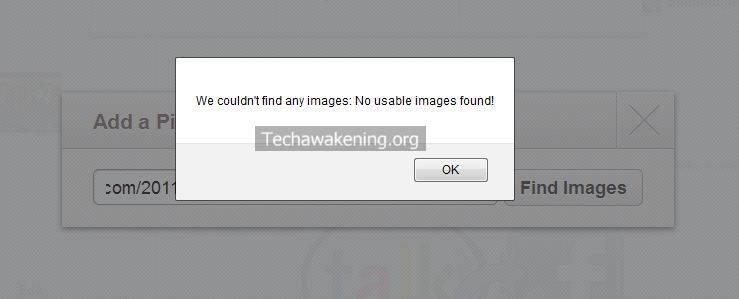
In this article we are going to see a solution to one of the annoying errors of Pinterest. In order to pin an article you need toenter the URL and then click Find Images. Pinterest grabs hold of some images available on the page from which you can select the one you like and then add a description and post it on your boards. But sometimes you end up getting this error “We Couldn’t Find Any Images:No Usable Images Found“. It really does frustrate you because even though the page has many to be shown the Pinterest does not seem to pick up any of the image but instead shows this irritating error message, preventing you from pining! I am not sure if this is some sort of a bug but lets see how to overcome this.
How to Fix Pinterest We Couldn’t Find Any Images:No Usable Images Found Error?
1. Whenever you come across this error the simplest alternative to overcome this is to use “Pin It” bookmarklet.
← Drag and Drop this bookmarklet on to your Bookmarks Toolbar.Pin It Button
If you are not sure on how to install the Bookmarklet follow the below video demo.
Now visit the page for which you got the error message and click on the Bookmarklet. Voila! You get all the images in the page and you can select the one you want and pin it as usual.
2. If even the above method does not work you can always manually upload the pin. Download any pic you want from the page. Click Upload a Pin and select the pic you downloaded then add description and pin it.
Note: Most of the time I got the problem resolved with first method.
So, were you able to fix this annoying error of Pinterest? Which method worked for you? Know any other alternate solution to this problem?







I’m sorry, but this article was a bit misleading. I assumed that since this is a Tech blog, this would be an article about something to do on your website side of things to fix this issue. I think people understand there are various ways to “pin” things, but from a developer’s perspective, it would be nice to know how to fix this on a problematic site where this is occurring. The question I have is “Why do I get that message?” What is pinterest looking for on my site that I don’t have that makes it think there are no images? Is this a pinterest bug or a problem with my site? I expected these sort of answers to be addressed in those post and I felt the need to comment as such.
Thanks a lot Brian DiChiara for your comment and the question you put up. Though it is a Tech blog I sometimes do have to address problems faced by common novice users in their day to day life. This is one such article. Many of my friends weren’t aware that using Pinterest Bookmarlet could put an end to this error. So could be the case of many. Hence I thought of writing about it. Sorry about the fact it wasn’t answering from developer perspective. To answer your query I did a small trail and error experiment here are some insights.
1. The size of the images play a key role for Pinterest to recognize it.
2. The validation of client side code (Bookmarklet) seems to be liberal compared to server side validation done when you click Find Images. Hence the reason why you can bypass the error.
3. Client side validation is minimum of 109 x 109 is the size of the image for it to be recognized.
I would also suggest you to use Open Graph standards on your site because many tools seems to be using it as a key factor to identify images.
Server side validation remains to be bit unclear. I guess it might be checking if the images are hosted on the same domain might be to avoid hot-linking problem. I believe it could probably be a bug too.
I have also raised a support ticket addressing this error. Will get back to you once I get a response.
Cheers!
Shunmugha
Thanks a lot for the tip Shunmugha about “1. The size of the images play a key role for Pinterest to recognize it.”.
That was my issue as to why Pinterest wasn’t able to use my 120×60 images and we’ll look at creating some larger ones now, probably just by putting the 120×60 images on a larger background.
@Nick
You are most welcome. Do spread the word and share this article 😉
Hi there,
I agree with Brian, I am definetely looking for a technical solution to force Pinterest to consider an image (that is not present in the page itself, not in hi-res anyway) and can’t find one.
I have tried og meta tags and it is not supported (yet?) by Pinterest.
They don’t seem to have a solution to this issue yet, but it will hopefully come soon. I keep searching though 😉
Thanks for your comment Simon. I hope the information I shared for Brian query was useful. The ticket I raised at Pinterest is yet to be resolved! 🙁
I have run into the same issue and, sure enough, the bookmarklet does work in my case too.
Thanks for your comment Duane! Welcome here 🙂
Plz send me an inv :P!!!
For days and days all I get is a white square with a red X in the corner on all of pinterest, how do I fix this?
laurie capes,
Are you using Bookmarklet to pin the images? Please do share a sample URL so that I can investigate what the problem could be.
I am having the same problem…but since I am computer illiterate…I do not know how to fix this problem. Can you help me??Thank you so much.
Lori,
Would be great if you could give more inputs with respect to the question I asked above. Sample URL? What browser are you using?
Plz send me an inv XOXOXOXO
Kristin,
Sent you 🙂
I have been using http://pinterest. This doesn’t seem to make any difference. This problem just started about 4 or 5 days ago.
Have you tried pinning the image using Bookmarklet mentioned in the article? Drag and drop the bookmarklet into bookmark menu and then go to the concerned URL and try pinning the images. And by the way what browser are you using?
I have been having the same issues. Unable to see pins on https://pinterest.com/
I am not uploading anything, just browsing. I have a MacBook laptop and I have tried viewing Pinterest from Safari as well as Firefox, to which I use most! Same errors occur on both browsers.
I have put in a support ticket, but received no real answer to the errors I am getting. I’d LOVE to get back to seeing Pins, otherwise I’m just going to deactivate my Pinterest account.
Thank you,
hope you can help!
Could you please post a screenshot of the screen ? So that I would get a better idea of what the actual problem could be.
There is not an attachment option here. What is my next option
You can upload your screenshot to tinypic.com and share the URL of the same here.
Ok will do.
Thank you
Ok here you go, hope this helps.
[IMG]http://i48.tinypic.com/6z3dbo.jpg[/IMG]
Thanks for the screenshot. It’s kind of weird problem. I need few clarifications though.
1. Are you able to see images properly on other sites?
2. Have you tried pinterest using Google chrome?
3. What antivirus/firewall do you use?
Here are few suggestions to try right away.
1. Clear the cache entirely. In Firefox press CTRL+SHIFT+DEL. Then select Everything from drop down. Uncheck browsing history and finally press clear now.
2. I can see in screenshot that address bar shows pinterest.com. Just manually type in https:// in front of pinterest.com and reload the page so that address bar shows as https://pinterest.com/.
Try these and let me know what happened.
NEED HELP!! No images appear on pinterest. No pins , no boards just profile pics. I can view on Kindle and Android phone but not notebook. I have tried changing browser no help
Please reply to below questions in order to help me narrow down the reason behind this sort of an error.
http://techawakening.org/pinterest-we-couldnt-find-any-images-error/843/#comment-1171
Yes same for me – profile pics board and pic data counts but no boards or images??
What the story – it’s been like this for a week now (though I have regained a few hours in my life as a result 🙂
Ha Ha 😀
I haven’t had much time to give an update. So here is my current status. NOTHING HAS CHANGED, lol!! This isn’t even funny, but I’m trying to keep a smile on my face.
In response to your questions:
1. Are you able to see images properly on other sites?
Yes
2. Have you tried pinterest using Google chrome?
Yes, still the same issue. This has been gong on since mid June.
3. What antivirus/firewall do you use?
ClamAV/My router has a firewall.
My husband has it to be, after logging in, when I look at the source, I see that the images are pointing to pinimg.com and not pinterest.com. Even my profile pic doesn’t come up:
https://s-media-cache-ec5.pinimg.com/avatars/1pokiejo-94.jpg
I’m on a macbook. Not sure if that matters.
What is causing this issue? I can visit every other site in the world except Pinterest. I don’t have any special blocks or firewalls up that would prevent simple images from displaying. It’s not my browser settings. When I go to Bolt (http://www.bo.lt) a similar site like Pinterest, I see all of the images perfectly.
I’m not sure if they are routing macs to a different server or what. But with any browser I use, I have the same problems.
Pinterest support has closed every ticket with “resolved” and never notifying me via email.
This is getting infuriating and I’m pretty close to writing the company. Theu don’t seem to care about customer service.
I want answers…
uughhh
Are you able to see the profile pic by directly hitting the URL in the address bar? If not the domain is not reachable that could be the reason.
– Did you try out the second suggestion I gave using https version typing it manually in address bar?
– Add https://s-media-cache-ec5.pinimg.com and pinterest.com in firewall exception list and try.
Hi,
I use firefox and i’ve been having problems with pinterest page only loading header (can’t see any pins or boards) It’s been like this for a fortnight now. It;s happened before and was fixed by putting https:// in front of address but this fix is not working this time. Tried safari, same problem. I can’t get google chrome cos it’s not supported on my version of Mac. Anyone know how i can fix this?
Could please share the screenshot if possible?
I have a screen shot as a .tiff but i cant figure out how to post it here, sorry.
Please refer my previous comment:
http://techawakening.org/pinterest-we-couldnt-find-any-images-error/843/#comment-1136
Yay! This worked for me, no more annoying message!! Thanks 🙂
Welcome. Hope you won’t mind a share or a pin 😀
Very useful article, thank you for clarification of Pinterest’ behavior. Gonna tweet this article 🙂
Histerius,
Thanks! My pleasure 🙂
Check out this Chrome extension that I built.
https://chrome.google.com/webstore/detail/pin-it-all/fgkahiidpmgafgcfiodnkecmecddgldk
It lets you pin sites regardless of pinterest’s image/video requirements. It lets you pin an image of a cat instead.
I built it because I was trying to use Pinterest for bookmarking sites but not all of them had a sufficient image on the page.
Hi – I have a question about pinning Pinterest images. When I’m at this site http://catalog.winecountryparty.com/online/Ordering_DepartmentNewMenu.aspx?Catalog=yes and I want to pin an image from their catalog (using the bookmarklet), it only comes up with their logo. Why is that?
Hello!
Hopefully you can help me with a similar issue I have been having in the past week. The bookmarklet (the one from Pinterest’s site as well as the one posted above) won’t find anything but the header image on my website (www.forgedphotography.com). It has worked in the past but it stopped working sometime late last week. It is a wordpress blog and I deactivated all of the plugins and switched to a factory theme but the problem still persists.
If I click on an individual image I can pin from there, but I am no longer able to pin from my blog’s homepage which will be frustrating if people want to pin the images that I have posted.
I appreciate your willingness to help!
In gratitude,
Mike
Mike,
I noticed that you are directly embedding the images from Facebook. I believe Pinterest will not recognize pics that directly resides in Facebook. Was it working before?
Try uploading the pictures onto your server and then insert it into the post then try pining it.
Well, I’m not getting it. I used to be able to pin any photo from my website, but now only a couple of photos are pinnable (out of hundreds). I tried making a few pictures larger (though most of them are at least 120×320). I tried different browsers. I readded the pinup button on my toolbar.
Maybe this started when I switched from a personal account to a business account? Is it possible you are not allowed to pin from your own site?
Further, I get ZERO traffic on my Pinterest boards (haven’t had any repins for 6 weeks), nor do I or any of my pins show up in a search.
So, I am about to give up on it. Maybe I’m just not doing something right?
Your site?
My red “Follow” button no longer shows on any of my boards…how do I fix this problem?…please send an answer by e-mail…thanks!!
I’ve been using Pinterest for about 8 months now to feature items that I make. The last couple of weeks, I haven’t been able to upload photos successfully from my computer. Where I used to be able to just click a file to upload it to a board, I now get a message box asking me to either ‘find’ a program to read my photo file; or to save the photo file as an ‘uploadimage’.
I’ve never had this happen before, and as far as I know I haven’t deleted any programs from my computer that might be causing this interference. I don’t have trouble uploading pics to my Facebook page, so I believe this is a unique problem on Pinterest. So far they have NOT responded in a way that actually helps me. Their responses give me links which I’ve already tried…still no resolution.
I use Internet Explorer 8 if that is something you need to know. And again, I’m not having issues anywhere else…just this.
Any advice would be appreciated!
Carrie V,
Can you try it from some other browser like Chrome or Firefox and let me know if you see the same behavior. It might help us narrow down the issue.
If possible please do share the screenshot of the message you get.
I’ve tried to get a screenshot of the message box, but it’s impossible to capture. It’s the same type of box that pops up whenever you are downloading something to your computer. It says File Downloading – Security Warning at the top of a blue and gray box. Then the message says ‘do you want to save this file or find a program online to open it?’ After that it says
Name: upload-image
Type: Unknown file type
From: Pinterest.com
Then it has the usual disclaimer at the bottom about downloading files
This is something I would expect to see if I were DOWNLOADING something, not UPLOADING a file from my own computer.
As far as using another browser source like Chrome or Firefox, I don’t have those on my computer currently. Won’t I mess things up by downloading another browser program?
You mean to say all these happen when you click upload/browse button, am I right?
No, please go ahead install Firefox and try uploading from it. Download here: http://www.mozilla.org/en-US/firefox/new/
It won’t mess up anything in fact you will have a better & secure browsing experience, I would personally recommend it.
I downloaded Chrome and tried again to upload pics on Pinterest and it worked!! Whoo hoo! But I still don’t understand what the issue is with Explorer…oh well. But thanks so much for the help!
You are most welcome! Do share this article if it did help 🙂 Meanwhile happened to see your pin collection they look very pretty! You can follow us here: https://pinterest.com/techawakening/
Hi, I have several photos on my blog, but every time I try and pin from the site, it tells me I have no available pins! It’s driving my nuts. I tried pinning directly from the site through pinterest, and I also tried installing the bookmark and neither found and pinnable images. Any ideas?? Thanks!
Hi Sarah,
Just tried to replicate the problem but I wasn’t able to. Tried pinning your latest post was able to see all images. Screenshot: http://oi43.tinypic.com/25u2qeu.jpg
Clicked on Plus->Add from website and entered full URL of the post and clicked next. Please tell me wjat OS and browser do you use? I tried on OSX and Firefox.
By the way all your recipes look delicious 🙂
Hi! Thanks for responding. I still can’t get it to work! I’m using Windows and have tried just about every browser: chrome, explorer, firefox, mozilla. All say the same thing. I’ve tried adding the pin button and it says “sorry couldn’t find any pinnable things on this page”. When I pin directly from pinterest using the URL it says “Nuts! The stuff on this page isn’t Pinnable.” I’ve even tried from my iphone and still getting the same message.
Do you think it’s working for you because you are using OSX? That is Apple right? But still, you would think it would work on my iphone then…what do you think?
Sarah,
Strange! I tried from my Windows PC via Internet Explorer. I was able to pin without any problem. Made a quick recording of it here it is: http://www.gifti.me/i/UwmcW6.gif
Again please make sure you are pining from the actual post. Refer the address bar in above GIF. If it still does not work I won’t mind to assist you remotely over the internet to help you sort this out.
ahhhhhhhh I know what is happening. When I try to pin from the .com address it doesn’t work, but if I pin from the direct blog site it then works. My dad set me up this way but I have no clue what it entails. You probably do though? I emailed him to see if he knows what’s happening along the way. Somehow he has linked www.sarahhealthmuse.com to my blog address of www.sarahhealthmuse.weebly.com
Ya as I said you should be able to pin from actual blog post that’s what I meant. That matters the most to share your new articles across. Actually if you see though you are in .com site all links, articles point to weebly.com. Just hover over the links you should be able to see it on status bar at the bottom.
I see how he has done that. I has embedded your blog on the domain www.sarahhealthmuse.com via iframe. Iframe allows you to embed one site in another.
I suggest you to refer him this video which explain a better/clean way to transfer your site from weebly.com: Export your Free Weebly Website and transfer into different host
For the last week now, I cannot view any photos/pins in my pinterest account. I have no idea what is going on. I have changed nothing in my profile or preferences. Can anyone help me.
Thanks,
Texy,
Your pinterest profile link please?
texy lady
The full URL please?