
Gmail is one of the most widely used web mail by people across the world. It certainly does provide amazing set of features that makes our digital life much easier. But if you had noticed it does lag some basic and useful features that most of its competitors seem to provide. For example you cannot sort your messages by date, sender, etc.
You can see number of people requesting features like these on various official Google forums. Out of the many requested features in Gmail, forwarding multiple messages at the same time is one of the most demanded. Possible solutions that are currently available for this are creating filter and setting up auto forwarding in Gmail. Another option is to use desktop email clients. Some problem with these solutions are that not always you can create such a complex filter criteria to select required emails as your needs might change dynamically. Your desktop client might not be available across different devices.
So, here is an alternate solution I came up which does not involve any third party apps. In this post we are going to see how to use Google Docs to help you forward multiple emails at once to many recipients. It works with text as well as HTML mails, even your attachments will be sent along with email body.
Below are step by step instructions on how to set it up. It will just take few seconds before things are up and running.
Forward Multiple Emails at Once in Gmail with Google Docs
1. Log-in to Google Docs.
2. Click here to make a copy of the Google Spreadsheet. Then click Yes, make a copy.
3. Once the doc has been loaded, wait for few seconds for the menu Forward to appear just next to help menu.
4. Authorize the script by selecting Forward->Authorize. Click OK and then Accept button.
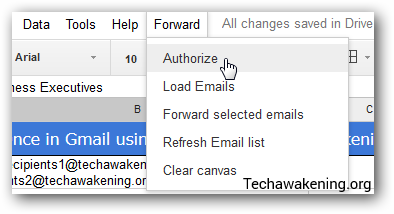
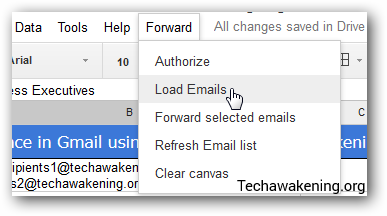
5. Now select Load Emails from the menu and wait for a while for your emails to load.
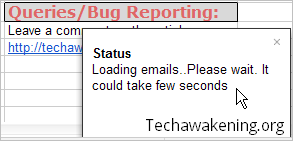
Note:
– Only your 50 most recent messages will be loaded. If you want to know how to increase the limit or require some customization then let me know through the comment section below or request support.
– When a function is still running, by default it is indicated by Google on top via running message, always wait till it disappears. Also do watch out for more descriptive status alert messages at right bottom corner.
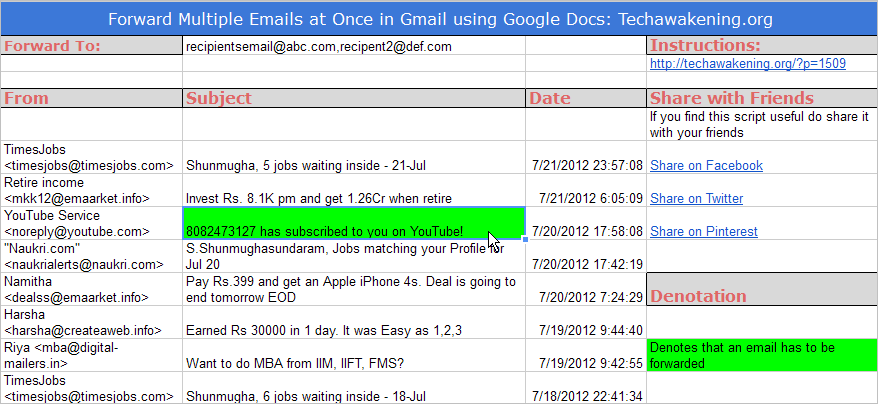
6. Now you have to select which emails you want to be forwarded. Selection here is made by changing the cell (Subject Column) text background color to Green.
– Select the cell in subject column then change background color to green. Access the background color option by clicking paint bucket icon on top. You can mark multiple cells which indicates those emails are to be sent.
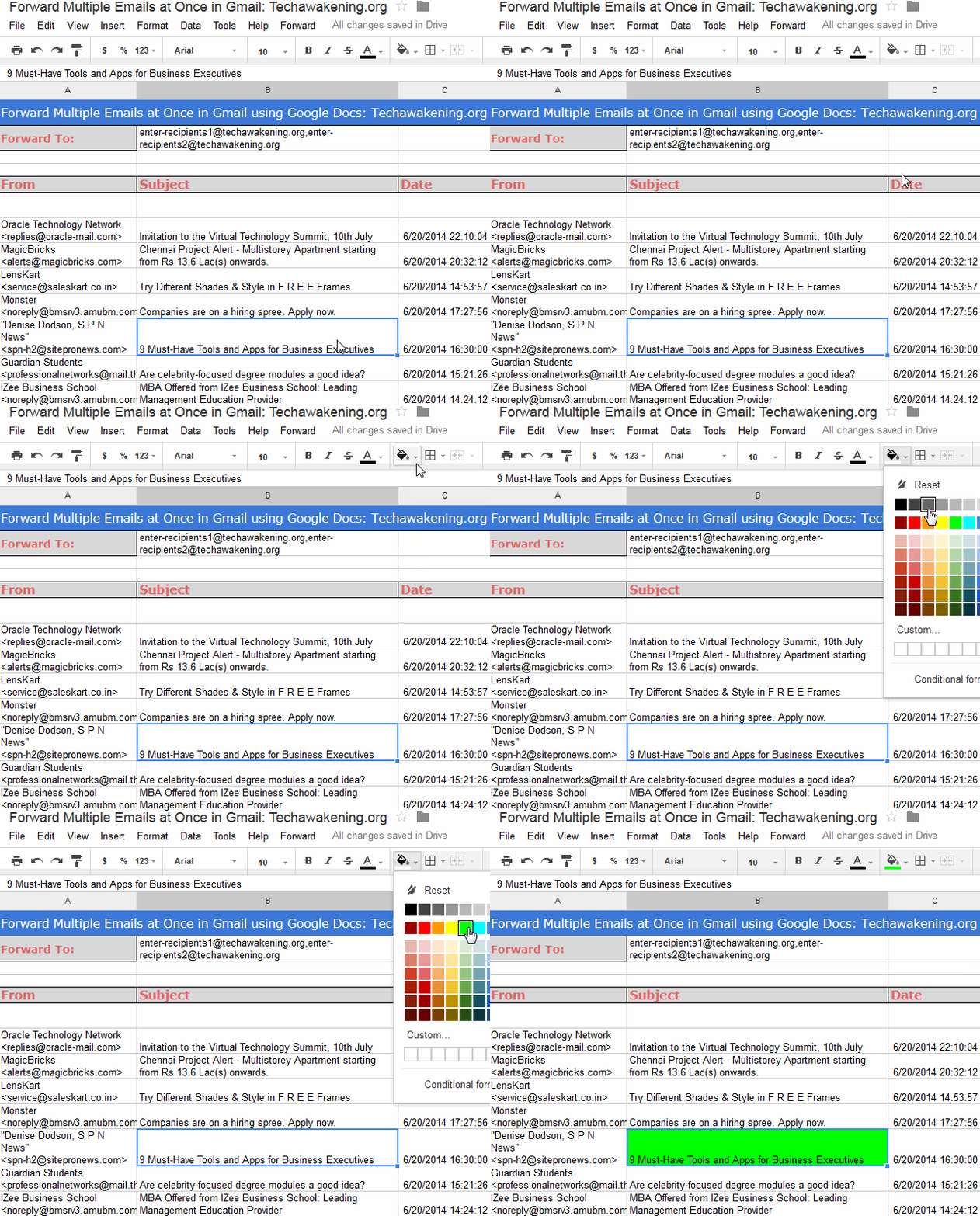
7. Once you have made the selection enter the email id of receiver in cell B3. You can enter multiple recipients’ email ids separated by comma.
8. Finally click Forward select emails from the menu. It might take some time for all the messages to be sent.
Note: You can use Refresh email list option from the menu to refresh the list in case new emails have arrived. Use Clear canvas option to empty the sheet.
Other useful Google Apps scripts you might like:
– Get Free SMS Alerts for New and Important Emails on Gmail with Google Docs
– Use Google Docs to Get Free SMS and Email Alerts when your Website is Down
Video Demo of Google Docs in action:
So, did it work for you? Have any suggestions, queries, clarifications or found any bug feel free to drop in your comments. Hope you found it useful. Do share it with your friends. No more worry of forwarding emails one by one on Gmail!
How I can load specifics mails?
That feature is not yet available in the current version. You can only load recent emails in a batch.
I need to forward about 700 emails for a work related project. How can I accomplish this?
Steve
Steve,
You can do it in batches of 200. For customization needs write to admin@techawakening.org. Cheers!
I am in this similar situation. I would like to have this customization. Thanks.
I also need to forward about 350 emails Can I have this customization. Thanks
Please write to admin@techawakening.org. Thanks!
pls send me the dowloaded material if anyone has scribd account
http://www.scribd.com/doc/53194495/61/Second-derivatives
Never heard of that although i really enjoy reading stuff about Emails to forward. Thanks anyways. Bye, Frank.
You are most welcome 😀
Glad for the spreadsheet to forward multiple emails.
Definetly need the feature to load selected emails.
Please advise once you get that set up. Thanks so much !!
Sure 😉
Hi , I would like to forward more than 50mails no only from recent but from two months back also. Can you please help me.
In that case you would need to tweak the code a bit.
Hi! Shun, this is a great script. What if i wanted to start adding all the emails to the 0ldest email first?
Hi Shun! This thing is awesome! I just wanted to know how to forward more emails though? I have no idea how the code should be tweaked… tbh I dont know where this code is… haha thanks. this is great.
Laura,
Sorry for the late response. That would require some bit of customization, I can do that for you. You can request for support via: https://gumroad.com/techawakening#eGYf
Hi. Thanks for the post. Really useful. Is there any way I can load emails from certain labels, instead of all emails? What changes I need to make in the code? Many thanks.
I changed it to: var threads = GmailApp.search(‘search string’);
it seems to work! I am trying to forward now, but seems like its not forwarding. Any ideas? I changed the background color to green before that.
Can you share the code you have used? I will try looking into it. Upload it online and please share the URL here.
Hey! I shared the document with you. I prefer not to make it public. If you want, you can edit and release it publicly. Not it can forward, but its getting errors after forwarding some emails.
Sure. Will look into it.
Just checked it. Code seems OK to me. What is the exact error message you are getting?
I get this error “Script getEmails experienced an error”.
May I recommend this page from Google:
https://developers.google.com/apps-script/class_gmaillabel#getThreads
I set a Label var and then got the threads of that var using this technique to forward a bunch of emails to my publisher.
I had to make the change in the document twice (line 22 & line 80) and it worked perfectly. I didn’t make any changes to line 59 because I found it after the fact. Shunmugha, can you shed any light on what that line is for how not changing it would affect my results?
It’s to ensure that no new email has received since you load the emails. In case there is mismatch it means new email has received.
All,
Michael Canejo has already shared the project Forward Multiple Gmail Emails by Label which you can make use of.
Hi, Thanks for the script , it is amazing how you can get those emails forwarded easily. I did forward aroung 50 mails to another email ID and
I also wanted to send all the remaining ones too.
I have around 1024 emails to be forwarded as I am using google apps for my website as email UI and I am shifting my domain to another one, so the account will get disabled in few days.
So please help me to get all the 1000 mails to be forwarded
Thanks in advance
Loading & forwarding that many at a go would literally hang the script. Instead send them in 50 batches. Once forwarded first 50, deleted them or move to different folder. Again run the script it will fetch the next fifty. Similarly repeat.
But if you want to tweak the code to load 1000 messages at once you are most welcome. Give it a try.
could you please let me know how to forward more than 50 emails? Thanks.
Hi, great work done!
i want to get all my mails in one spreadsheet. Please share the respective code/script.
Thanks!
Hey, i crack the code.
var threads = GmailApp.getInboxThreads(0, 50);
I will change the limit here (50 to 5000).
🙂
Great! 😉
As I had a user that wanted to forward about 80 emails which may have already been filed out of the Inbox I wondered about the best approach. I originally though of increasing the number of emails loaded. Then I thought there is a better way. Why not load the emails under a label instead of from the Inbox.
If you make the following 3 code changes in the scrip:
// LFS change to get emails from label Forward not Inbox
// var threads = GmailApp.getInboxThreads(0, 100);
var label = GmailApp.getUserLabelByName(“Forward”);
var threads = label.getThreads();
// LFS change to get emails from label Forward not Inbox
// var threads = GmailApp.getInboxThreads(0, 1);
var label = GmailApp.getUserLabelByName(“Forward”);
var threads = label.getThreads(0, 1);
// LFS change to get emails from label Forward not Inbox
// var threads = GmailApp.getInboxThreads(0, 50);
var label = GmailApp.getUserLabelByName(“Forward”);
var threads = label.getThreads();
Then all you need to do is create a label called ‘Forward’, select the emails that you want to forward and label them. Then everything works exactly as before but instead of loading the last 50 conversations you get the ones that you have labeled.
This also answers the requests for a selective email facility.
Les
Les Smart,
Awesome! Thanks for your valuable suggestion. 🙂
Where do you go to change this thread? Please tell me the route to take, Thanks
Do it from Tools->Script Editor.
This ‘Forward’ label is exactly what I need but I’m not exactly sure where to stick these changes. Any chance you could share your changes as a google sheet or text doc.
I can try it, I just get nervous i’ll break it!
Thanks
David
Hi Shunmugha and Les,
Thanks for a great solution, I have another suggestion:
If you replace the following three lines from Les’ suggestion:
var label = GmailApp.getUserLabelByName(“Forward”);
with this one :
var label = GmailApp.getUserLabelByName(sheet.getRange(4,2).getValue());
Then you can load different label as per value in B4 cell.
Also, if you put there a “Inbox” label (without quotes), the original functionality (loading last emails) will return.
Den
Dennis,
Thanks for taking your time to write in! Appreciate that. Actually Michael Canejo happened to share this sometime back.
Really great to see users stepping in and contributing their part. Love it 😀
I used Les Smart’s text as detailed below, but keep receiving a syntax error on line 98 what am I doing wrong?
Mark,
Please paste the line of code available at line 98 instead pasting the entire snippet. Apologizes!
Contents of line 98, any help greatly received
catch(err)
As an added bonus I have just done a test and it seems that you can enter more than one recipient address. I just tried with 2 addresses separating them with a comma (,) and they went to both. Both addresses appear in the To: field on the recipient email.
Sorry for confusion about code snippet. Was showing that the call appeared in 3 places and you had to change all 3 not just the first one otherwise the emails that are forwarded are not the emails in the spread sheet.
regards
Les
Sounds great! Ya the code is capable of forwarding emails to multiple recipients. You must use comma as separator. I have highlighted this point in bold in 3rd paragraph and also in screenshot 😉
Hope you are finding it useful. Do share the article then.
I need the code to get access to 50 or more emails, and also to get older emails so I can forward them also. Thanks
I need the code to get access to 50 or more emails, and also to get older emails so I can forward them also. I can’t understand script part. Run me through the process.
Hi….Thnks for the article.
I want to send multiple drafts to one e mail id…How can i do it?
Great article! Thanx a lot. I was successfully able to forward the first 50 e-mails, like you mentioned. I have another 50 I’d like to move. Please help. I appreciate your assistance in advance.
Welcome! Do share the article in that case 😉 You can temporarily delete or move those completed emails on to another folder so that next 50 mails become the recent ones and now you can again use the script as you did previously.
Similarly repeat as and when needed.
how to forrward selected 50 items from the original email id?
When you forward, emails are sent from your email Id only. That is the Google Account which you used to login.
I want to select 50 items in between from my mail and then i have to forward it to another mail. is it possible?
Yes that’s the purpose of this tool 😉 Please read the article fully.
Please also tell me how to forward mails under a label?
Sorry! Current version of the script does not support this. But it’s very much possible and easy to implement.
Refer: http://techawakening.org/forward-multiple-emails-on-gmail-with-google-docs/1509/#comment-4484
Though I tried to copy the script at line 98 when I go to save it is giving the error illegal thread. Why donot you give the entire script re-written so that I will not be making any error.
thanks in advance
I revised the code to forward all emails by Label Name.
So lets say you have 200 emails in a Label (folder) called Taxes2012, it capture all emails in Taxes2012 label and forward them to an email.
https://docs.google.com/spreadsheet/ccc?key=0AsXkWixR5xw5dFA3RDNJaTZ0LWdfbEUxeWxwZHBQdGc#gid=0
That’s really cool! Thanks for sharing it here 😉 Requesting you to change access permissions of the project, it shows Access Denied error.
And do share this article if you like it!
Sorry if anyone could not access the link due to permissions on Google Drive..
This link should work!
Forward MultiEmails by Label
———————————–
https://docs.google.com/spreadsheet/ccc?key=0AsXkWixR5xw5dFA3RDNJaTZ0LWdfbEUxeWxwZHBQdGc&usp=sharing
This, and other gmail scripts are helpful – thanks! Can we add other features / enhancements and post here (is this an open license?)
Will definitely keep reading techawakening.org and your google+ page!
You are most Welcome! Feel free to tweak it as you wish but please do leave the credits(comments) at top of the scripts intact 😉
Do share these articles on social networks if you found it useful.
I would suggest that the The script also be designed so that all emails with a Particular Label be loaded for forwarding,
This way all the emails we need to forward can be assigned a label & this script run to forward them all
Hi TOS,
A reader has updated the original script and demonstrated it.
For more info please refer my comment here: http://techawakening.org/forward-multiple-emails-on-gmail-with-google-docs/1509/#comment-5155
Hope it helps you 🙂
I have 85 emails in a folder in GMAIl and I want to forward them. Is there anyway to forward a FOLDER/LABEL rather than just the most recent 50? thank you. Will you respond directly Or do I need to check back here.
I am a Univ. prof and not a code person. thanks so much. this is almost helpful 🙂
Hi Madam,
It’s very much possible. Michael Canejo has already shared a demo of it. It helps you forward emails by label. I should say that am very much thankful to him for sharing it here.
First assign all the emails to a label. Then use the spreadsheet available @ Forward Multiple Email by Label SpreadSheet. Mention the label name at cell C3(Parkers) and start using it by following the instruction from step4. Hope it helps!
By the way will appreciate it if you could share this article on social networks 😉
Is the source code available for this script? I would like to pull in the message body into the spreadsheet.
Jared,
Please feel free to explore the source code from Tools-> Script editor.
I need to forward a large amount of e-mails from g-mail to Google
Docs for fowarding. How do I instruct GD to increase the amount from 50 to the maximum possible to upload? Need answer fast, please. Thanks!
Hi Kirland,
Instead of tweaking the size you can assign all emails to a label and then use the project mentioned in my comment here: http://techawakening.org/forward-multiple-emails-on-gmail-with-google-docs/1509/#comment-5155
I am having a problem with this. The emails are forwarded, but they appear as if they’re an original email from my account to the account to which I am forwarding them. When they arrive, there is no record of who the original sender was.
Thanks for writing this! I ran into a problem with the forward by label version when I try to load emails, I get “TypeError: Cannot call method “getThreads” of null.”
Any ideas?
Did you mention the label name?
Project to be used: https://docs.google.com/spreadsheet/ccc?key=0AsXkWixR5xw5dFA3RDNJaTZ0LWdfbEUxeWxwZHBQdGc&newcopy=true
The label name is Forward. I thought that the script was set up for that name. Is there somewhere in the spreadsheet that I need to specify the label name?
Please refer my comment here: http://techawakening.org/forward-multiple-emails-on-gmail-with-google-docs/1509/#comment-5155
Thanks!
Welcome! Do share this article on social networks 🙂
Shunmugha Sundaram! Amazing job! Just exported 67 mails in a jiffy. Thanks!
Pelton,
My pleasure 😉 Do share this article on social networks if you found it useful.
Does this still work?
I opened the doc in Google drive, and i dont see a ‘forward’ option.
Yes it works. Wait for sometime for the menu to appear. Or manually invoke the menu by going to Tool->Script Editor then Run->onOpen. Now you should be able to see the menu.
It took a while but yup, the forward options showed up, and it worked! Although, it wasnt clear where I could enter the label name, i figured it out. Perhaps update the help notes.
Thanks again!
You are most welcome! Do share the article 🙂
Hey..
I tried doing the labels one’s.. It did work for say abt 400 mails in some slots. now am not able to fwd more mails. It just says it will take some time but is not responding anymore nor fwding d mails.
plz help !!
thz
Try creating new copy of the sheet and do again.
How many mails can we transfer in one go ?? I have abt 1000.. It send’s abt 100 mails and again d same prob occurs. It stops responding !!
bt am so thankful for the post
Aakriti,
You can send only in batches of 50 per run. Not all together. First forward 50 mails then move those mails to another folder from inbox again run the script. Repeatedly do like this. OR assign all email to a label and forward by label.
Refer here: http://techawakening.org/forward-multiple-emails-on-gmail-with-google-docs/1509/#comment-5155
Thanks a tonnnnn…..
it Meant a lot.. really gr8 work..
keep it going..
thanks again !! 🙂 🙂
Cheers
Aakriti,
Welcome. Please do share the article on the web. Hope you won’t mind it 🙂
This is very interesting… Do you think this code base can be adapted to a Reply To Multiple Emails at Once kind of script?
I guess it should be possible. We need to parse selected emails and get sender’s address from the emails.
Hi, I kindof got ahead of myself and accidentally hit forward before changing out the “Forward To” email. (Don’t judge, I have a baby that doesn’t sleep at night and my brain is mush). What was the default email that was in that space? I’m a little worried about all my emails having been forwarded to some random email…I don’t think there was anything too sensitive, but would still like to protect myself somehow.
any help on this front?
You absolutely need not worry. It’s a sample, non-existing email account given just for the sake of reference. Well now you can take care of your baby without worrying 😉
I did the exact same thing 🙁
And I really hope Email@address.com is not a valid email address!
Can you please confirm that this is the case?
Bala,
You need not worry. For safer side I have changed the email id to a non existing account(enter-recipients-email-here@techawakening.org) in my own domain. Use the latest sheet from now on.
how can I add more than 50 emails?
Hi Dale,
I can customize the script for you as per your need. Feel free to request for support here: https://gumroad.com/techawakening#eGYf
I modified the script. you can now filter on labels and skip the newest e-mails and set the total number of e-mails:
https://docs.google.com/spreadsheet/ccc?key=0Ai8p-jhLBDB2dGtyWVc5cm9MTFZQVks0U2x0QloyN0E&newcopy=true
Ruut,
Thanks for the share. Good one!
I tried to use this but it no longer seems to work – whenever I try and goto the script editor I get “We’re sorry, a server error occurred. Please wait a bit and try again.” Does anyone else experience this?
MikeP,
Might be a serve issue because code hasn’t be modified for a while.
Thanks Shunmugha Sundaram – it worked the next day, nothing changed, guess it was a Google issue.
i want to load 1500 email so what is the solution or coding
Shunmugha, that script/app is great! Reminds me of the kind of stuff I used to do in Excel (and Word) years ago. I like that it strips the email header and just gives the body of the messages, too. In this particular case, I was just trying to forward 4 emails in 1 (i.e., one new email containing all 4 that I wanted to forward) to my Evernote acct. It was so fun using your script, though, that I don’t even care that they were kept separate! LOL
Thanks, and take care.
Mark N,
Thanks for those words! Happy that I helped you relive your past 🙂 Do share this app if you liked it.
I used this to forward 2 emails. I changed both backgrounds for each email in green and then I forwarded them to myself to test it out. But I only got 1 email and not the other. What do I do?
Thanks
Samantha,
That’s strange. Can you try again and see if you could replicate the same behavior ?
Sorry if anyone could not access the link due to permissions on Google Drive..
This link should work!
Forward MultiEmails by Label
———————————–
https://docs.google.com/spreadsheet/ccc?key=0AsXkWixR5xw5dFA3RDNJaTZ0LWdfbEUxeWxwZHBQdGc&usp=sharing
Hi,
I am Manjunath from Bangalore, i am working on one project call Material management, here i have created a spreadsheet where the ground security staff will update all the fields as per the spreadsheet and there will be two mail IDs where one for receiver and other one for his HOD and finance team.
For materials receiver the mail message body content will be different and for HOD and finance the mail message body content will be different.
As soon as the ground security folks type the individuals mail id in the cell the auto mail should go to these mail ids.
Can you help be on this or if you haven’t understand my requirement pls share your number i can call you and explain.
Regards,
Manjunath
9980304950
Manjunath,
Thanks for dropping in. I believe it’s very much implementable. You can request for support here: https://gumroad.com/techawakening#vpmBe
Write to admin@techawakening.org for further discussions.
Has anyone attempted to Deploy As Webapp?
Hi, Nice job. I can’t make it work with google apps for business. Do you know why?
Welcome. I haven’t got a chance to try it on a business account. What error are you getting? And do share this article if you liked it 🙂
When I click Load emails and i answer for permission, I click on my business account, i shows the loading message and nothing happen. When I click again to load, it ask for permission again…
hi and thanks for the great script, but when i highlighted all the emails and tried to forward them, all email remained green and i waited at least for an hour but nothing happened. I followed all the steps you mentioned, is there any settings that i need to change?
Justin,
Is there any error you got?
Thanks for your great script, but every thing done correctly but I dont recive any email 🙁
I highlight subjects and filled by green color and in column D in green cell enter receipt email address , script alert sending Done correctly but not received any mail 🙁
Yusef,
That’s strange. Did you check spam folder?
yes I check every where, I try it again by select only one mail and another receiver email, but not worked again 🙁
love this! Has completely solved an issue for me! Genius!
Gavyn,
Thanks a lot for those words! If you won’t mind, please do share this article and spread the love:)
I have not yet heard from the precipitant if it worked yet, but if so, YOU GUYS ARE THE COOLEST! I am vastly unfamiliar with coding and every time I see coders and internet geniuses working together to solve problems, it’s so damn encouraging. Very work, everyone! Thank you so much for developing these features.
Many, many, thanks!
Bridget Flynn,
I can guarantee you that it does work. Seriously your words are motivating and did bring a big smile on my face 🙂 Words like these are the ones which help people like us push forward! By the way coding is fun actually, may be you should give it a try (http://www.codecademy.com/) 😉
Please do share/like the article so that it will help in reaching more people.
Cheers!
Worked exactly as described. Unfortunately, it doesn’t give you a way to attach a message to the emails. It just sends them. I was forwarding error messages to a tech support group and needed to tell them why I was forwarding the messages.
Cheryl,
Ya you can only forward emails which are already there you cannot add new contents on to it. Sorry about that! Do share this article if it helped you out. Hope you will 😉
Dude, if you were here in person, I’d give you a “good job, teammate, you made life so much better” kiss on the cheek! Thank you so much!
Jennifer,
Ha ha. Good to know. No problem consider that I got it virtually 🙂 And please do share this article and spread the word.
This solution looks like it will work but I wanted to add the reason I needed it to see if there was an easier method that someone was aware of.
I had a user that we’ll call Bob. Bob was in the Business dept and was a member of the BDC email group. Bob turned in his 2 weeks notice for resignation and so we hired a guy we’ll call Tom. Tom started work a few days before Bob left and everything was going along fine until one day about a month later we realized that Tom was not getting emails sent to the BDC email group and discovered that he had never been added to that group. So we wanted to forward all emails that had been sent to that group to Tom so that he would have a copy of them as well. Unfortunately, there appears to be no recursive way of adding a user to a group so we figured that at least a simple “forward all emails sent to this group between these two dates” would work fine but it turns out that Gmail doesn’t natively support that.
Anyways, I’ll give this method of yours a try and hopefully it solves this one time issue we ran into. Thanks!
Joe,
Thanks for writing in! Hope it helps you solve that issue 🙂
Hey I love this article! I have 6k emails and I would like to foward all my older ones to my other gmail account. I see this script only allows you to add the most recent 50. Well I would like to foward all of my old emails.
Thahanks in advance
Tery Wilson,
It’s very much possible to implement it. But requires code customization. You can opt for Starter plan available at https://gumroad.com/techawakening. If you are OK with it we can take this discussion offline 🙂 Write to me at admin@techawakening.org
Hi Shunmugha. I also need some customization of this code in order to forward all mails from the last two months with a label. Should I also opt for a Starter Plan?
Please write me to my mail.
Hi Jose,
Sent out an email with all details. Please look into it. Thanks!
Love it! But what about sent mail…that’s what I would like to forward, a few sent mails.
Woot! Just move the sent mail to inbox! easy peasy
thank you!
Anne,
You are most welcome! Please do share/like this article if it helped you 😉
It would be cool if there was a way to forward the emails within one email AND be able to insert a descriptive comment.
Anne,
That would require some code customization.
Check all our project @ http://techawakening.org/projects/
Hello!
this is great, but I want to forward all emails with a certain tag to someone else and not the 50 most recent. Is there a solution to that?
christian
Christian,
By tag you mean label?
yes labels,
I’ve labeled all conversations which contain links to videos and now I would like to forward them all in one go (its about 200)
can this be done?
christian
Christian,
Yes very much possible. Please refer this comment: http://techawakening.org/forward-multiple-emails-on-gmail-with-google-docs/1509/#comment-5302
If in-case it does not work, write to me at admin@techawakening.org. I can customize it to meet your requirement. Cheers!
Thank you, Shunmugha! Very helpful script. I also used the “label” technique mentioned in this thread (I label the appropriate emails “Forward”, run the modified script that queries on “Forward” label, and then remove the label after everything is done).
Amit,
Pleasure is mine. Please like/share this post 🙂 And if possible share the updated version of the script so that I can share it with the rest.
Hello!
I seem to be the only programming illiterate here 🙁
I’ve followed the link
and entered the label name (film-video-audio) in the cell below “labelname”
but I got this error message…
TypeError: Cannot call method “getThreads” of null.
Does this make any sense to you?
Thanks a lot for your help!
Christian
Christian,
Don’t worry! Am a noob myself 🙂 Fixed it for you.
Please use this updated sheet and follow the same steps: https://docs.google.com/spreadsheet/ccc?key=0Aqy7rBwoHlSvdEdrdG5HdGhzcnBDQVZJOHNsNUVneXc&newcopy=true
Make sure you enter label name in C3 cell.
Hello!
IT WORKED great!!
The problem was that I put the email and labelname in the wrong cell!
One last thing: The skript did only load up 100 emails, which did not take me very far, any chance this can be expanded to 2 or 300?
Cheers
Christian
Welcome! May be you should request for customization 😉 Write to admin@techawakening.org, will help you out.
And do give a like/tweet if this article helped you out. Would highly appreciate it.
Thanks!
How much would that cost me?
Christian
Pretty less 🙂 Will mail you the info soon. Cheers!
Hello again!
I’ve manged to do it with a trick – was in a hurry. I’ve unlabbeld the ones I had already sent and did it in 3 runs. Less convenient but it worked.
Thanks for all your hard work! Already liked your page and will recommend you.
Christian
Hello again,
unfortunately the trick did not work and I will need your help after all. The skript did read in all the relevant emails, but it did only forward 2 of them … Even though it then gave me the message that everything was ok.
Please let me know how much you charge for making this work.
Christian
Weird! Sent you an email. Please check.
Hey Shun,
I looked through about half of the comments and couldn’t find what I was looking for. I’m getting an error: ReferenceError: “label” is not defined.
Can you help me with that? Only 1 email of 150 are forwarding.
Thanks Shun,
Seth
Oops! Nevermind, I figured it out. I just attached a label to all the emails and they forwarded seamlessly. Thanks again!
Seth,
Good to know. Do share this article on the web 🙂
Hello!
I also receive the error
ReferenceError: “label” is not defined.
Could you tell me what I can do to resolve this? Thanks!
Adam,
Please make sure you are entering the name in correct cell.
what cell? Which column. Can you expand your answer?
Shunmugha,
What cell do I put the label in? Sorry I’m not seeing one defined as label.
Thanks!
Please refer this comment: http://techawakening.org/forward-multiple-emails-on-gmail-with-google-docs/1509/#comment-15980
IT’S NOT WORKING. Any help/suggestions?
ReferenceError: “label” is not defined.
THE CELL IN QUESTION IS C3. PUT A NAME THERE
Jonathan,
Thanks for the error reference. I fixed it. Please make new copy and give a try. Cheers! Sorry for delayed response.
not sure what the problem is but am trying this solution and keep getting an error that label is undefined or something and it wont run.
it finds emails, I color code them green but it fails when I try to forward them saying something about label being undefined.
ss,
Make sure you are entering label name in cell c3 only.
thank you for the reply. based on your note I revisited the site to find the spreadsheet to download and, when I did, noticed it was a newer version than the one I had originally tried. it had places for the label and number of mails to capture for resend.
I moved that spreadsheet to my google drive and opened it from there. it identified the 5 emails I wanted to reforward. I color coded them. then…., when I told it to send them to the new email address it indicated the script started and finished but the emails never showed up in the Hotmail account I had forwarded them to.
others have said the process worked. but I haven’t gotten it to. have I missed something?
have tested forwarding to various emails with different browsers. forwarding does not work. message says script starts and ends but messages never get forwarded.
this does not work.
SS,
May be you are doing it wrong. Because for every others it has worked.
I;ve tried to show exactly what I’ve done to get it to forward:
selected emails
color coded them
hit forward selected
watch messages say script started and completed
emails never show up at the forwarding email address I put in (and I’ve tried a couple of different ones in case it was specific to Hotmail). None get forwarded. Do they have to be unread to get forwarded?
I do not know what i am not doing. Any suggestions would be appreciated as I’d like to get this to work.
SS,
Sorry for the trouble! I fixed a bug now that might be the reason it didn’t work for you. Start over again, it should work for you.
Shunmugha,
The POP mail forwarding wasn’t working for me, and that led me to find your post. Thanks for making my life easier. I used it (the forward by label version) and was fine, but after a few mails it seems to be stuck. It says will take a few seconds to forward my mails, but it’s been more than half an hour and it’s become stagnant. I initially was moving only four mails, then when nothing happened, I refreshed/ and moving only one email now. With that one email taking this long, I know I finally need to ask for your help.
Abigail,
Fixed a bug, make a new copy and try again now.
Addendum: I’m using Chrome on Windows 8.
Hello shunmugha
Dude, there is no forwarding tab in my spreadsheed… what to do now???plz suggest something
It should be there. Just refresh the sheet and wait for few second it will be available next to help menu.
Naaa, i tried alot and waiting for minutes instead of seconds,but nothing is there 🙁
And of course it doesn’t work. This is such a basic feature and demonstrates why you should NEVER trust Google with anything important. They’re brilliant idiots. Really, really dumb brilliant idiots that think you’re even dumber than they are so they will never listen to you when you say, “Uh, hey, dummy. WTF?”
Thanks for sharing your feedback. Happened to fix a bug. Try now it should work!
I want to search for emails sent to one recipient with a certain word in subject line. Then send all emails meeting that search criteria to another recepient. Pleae tell me how. Ben
Ben,
It’s easy. Create a filter condition using has word condition and then assign it to a label and use forward by label project mentioned in the article. Cheers!
How do I load my whole email history and then forward 500 emails at a time?
Sorry you cannot load 500 email in one go due to system restrictions.
the script doesn’t seem to work for me anymore, it did work until last night somehow. I tried to fix it myself but without success. This is what I did: I revoke permission of the script and deleted the script, and downloaded a new copy of the script and granted permission again. Everything seems to work fine except that it doesn’t forward my emails.
It loads the emails but when I mark the emails green I want to forward it just keeps saying please wait while we forward your emails. what could be the problem? I followed your instruction extremely carefully step-by-step.
Is there any error message that’s being displayed on the top when you select forward selected email option?
I need to do to add the mail message in the event Discription and be sent to sms
How can I do?
you use this feature, but is not it time equals 60000.
cal.createEvent(threads[i].getFirstMessageSubject()+”: “+threads[i].getMessages()[0].getFrom(),new Date(now+60000),
new Date(now+60000)).removeAllReminders().addSmsReminder(0);
60 minutes? 6 minutes? 6 seconds?
How many characters can be sent by SMS?
Is there any function to create an event like this:
create event (title, description, start time, end time) and sent to my sms.
As UTF-8 ñ, á, etc use. within the message or sms.
Sorry for my English, my language is Spanish, but use the google translator.
Thanks for this post so good and for your help.
Perez,
It’s 60 seconds. Allowed characters is <160. Already that's the function which is being used.
Absolutely great script. Thanks so much. Get Google on board with this.
cheers!
Thanks a lot. Will be the happiest person if that happens:) Hope your words come true. You made my day. Cheers!
When I originally commented I clicked the “Notify me when new comments are added” checkbox and now
each time a comment is added I get four e-mails with the same comment.
Is there any way you can remove me from that service?
Thanks!
Sorry about. Trying to work out a solution to get you unsubscribed.
I relish, result in I found exactly what I used to be having a look for.
You’ve ended my 4 day long hunt! God Bless you man. Have a nice day.
Bye
That’s awesome, nice to know. And do share this article on the web if you liked it 🙂
Hi, thanks a lot for this great script ! It works perfectly well for me.
I’m just wondering if there is a way we can also have the information of the sender and date added to the forwarded messenger ?
Thanks.
You are welcome. Please do share/like this article 🙂
Ya it’s possible but does not come in free version you can request for customization @ admin@techawakening.org. Will cost you 20$. Do let me know if you are interested.
TypeError: Cannot call method “getThreads” of null.
I loaded as per instructions by making a copy authorizing, and then specifying a label name in the label field. When I selected the menu to go fetch the emails, I got TypeError: Cannot call method “getThreads” of null.
Is this because the emails I want to forward are not among the most recent 50 in my inbox?
It means that the Script is not able to recognize the label name you have entered. At what cell you are entered the name? Please make sure that there do exists a label by that name in your Gmail account.
Is there a way with your solution (or another) to mass forward emails from a particular gmail folder?
Sherri,
Yes it’s possible. Select them all and assign it to a label and then use forward by label project. If you require support please write to admin@techawakening.org. Cheers!
Hi!, wonderful script. it would be nice if this script could load only certain labeled emails. I had to send the items i required to the trash and modify this:
var threads = GmailApp.getTrashThreads(0, 500);
There is already link to project to load mails by label please use that.
have just used the label revision – thank you very much for the solution and also to Michael Canejo. A very neat work around, very much appreciated.
Mikenz,
Good to know! Would appreciate if you could spread the word on social networks 🙂
Do explore: http://techawakening.org/projects/
This is excellent but I wonder if is possible to do with date selection (email from specific dates)
Thanks! Possible with customization which you can request to admin@techawakening.org
you’re a genius!!!!! thanks a lot!
Thanks for those words! Made my day. Do like/tweet the article if it helped you out 🙂
[…] can even try this script which I created using Google Apps Script. It helps you forward bunch of emails at one go. It allows […]
I need to forward 1000 emails in the period 2010 to 2013 to my new project manager for historical references and work updates. How do i go about this. Both the origin account and destination account are on gmail.
Un post muy esclarecedor e sugestivo, sin duda, voy
a volver a leer tus artículos.
Gracias!
tried forwarding 3 emails, it’s taking minutes now and i haven’t received them